6-56 Qualitek mR Owner’s Guide
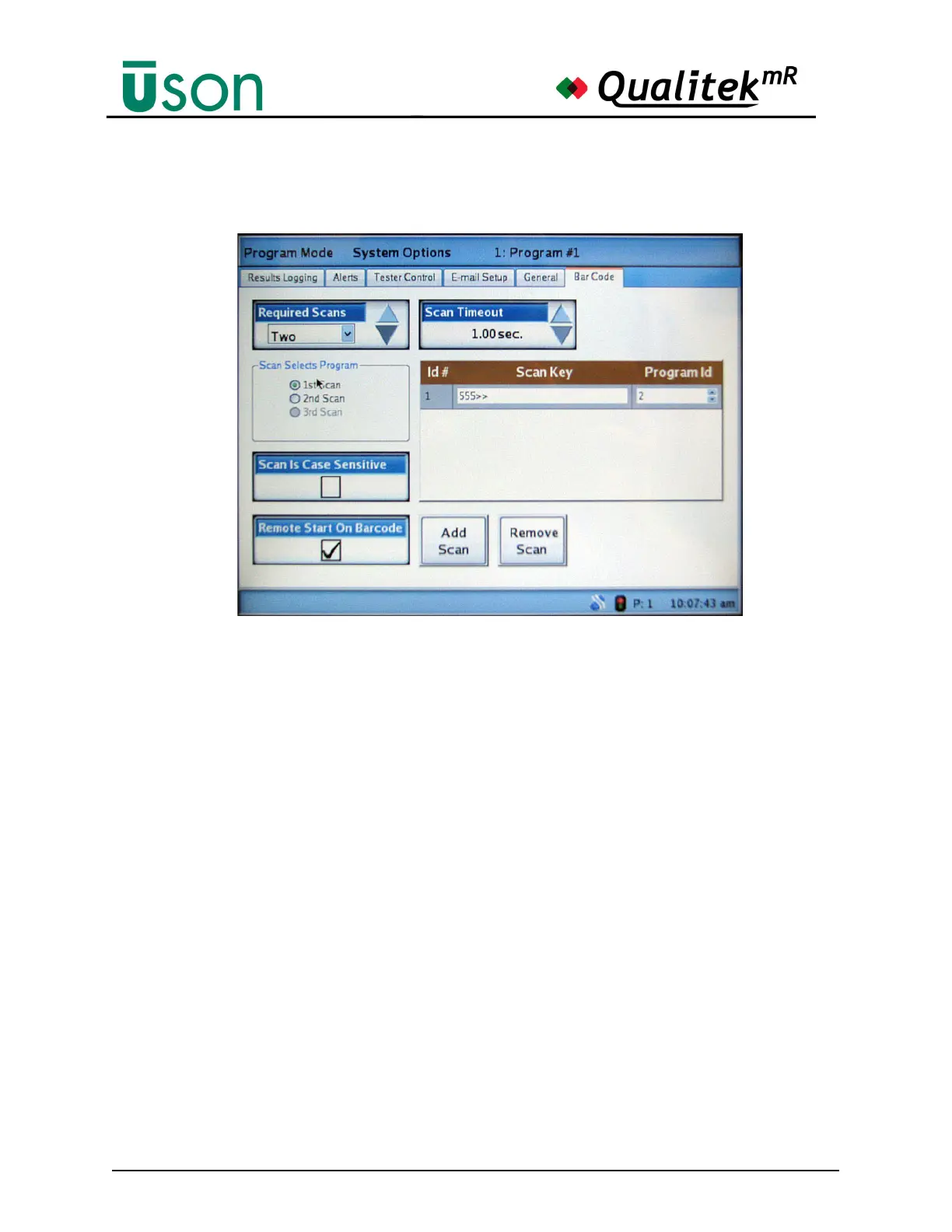
The Bar Code tab is shown below.
• Required Scans: Set to None, One, Two, or Three.
Note: Always set this to None when finished using the barcode scanner or
the operator may experience difficulty starting a test.
• Scan Selects Program: Select which scan will actually select the program.
Note that the settings available here depend on the setting of the Required
Scans box.
• Scan is Case Sensitive: Selecting this checkbox forces the tester to
consider the case of the scanned input.
• Remote Start on Barcode: The box repeats the selection for Remote Start
that was made at the Tester Control tab. This selection cannot be made here.
If Remote Start on Barcode is desired, but is not shown as checked here, go
to the Tester Control tab and select it.
• Scan Timeout: Select the time for the scan to be retained.
• Scan Key box: If Program Selection by barcode is enabled in Tester
Control, this box shows the string to match in the barcode scan and the
program Id it will start. The asterisk * character is a wildcard (matches any
character). The maximum length for a barcode scan is 32 characters.
• Add Scan: Press this button to activate the keyboard to enter the desired
Scan Key.
• Remove Scan: Tap the Id# of the Scan Key to highlight it and then press
Remove Scan to delete that scan from the list.



 To Next Page