Program Mode 6-17
6.2.2.6 Calibration
Calibration values for the currently selected test can be set by navigating to the
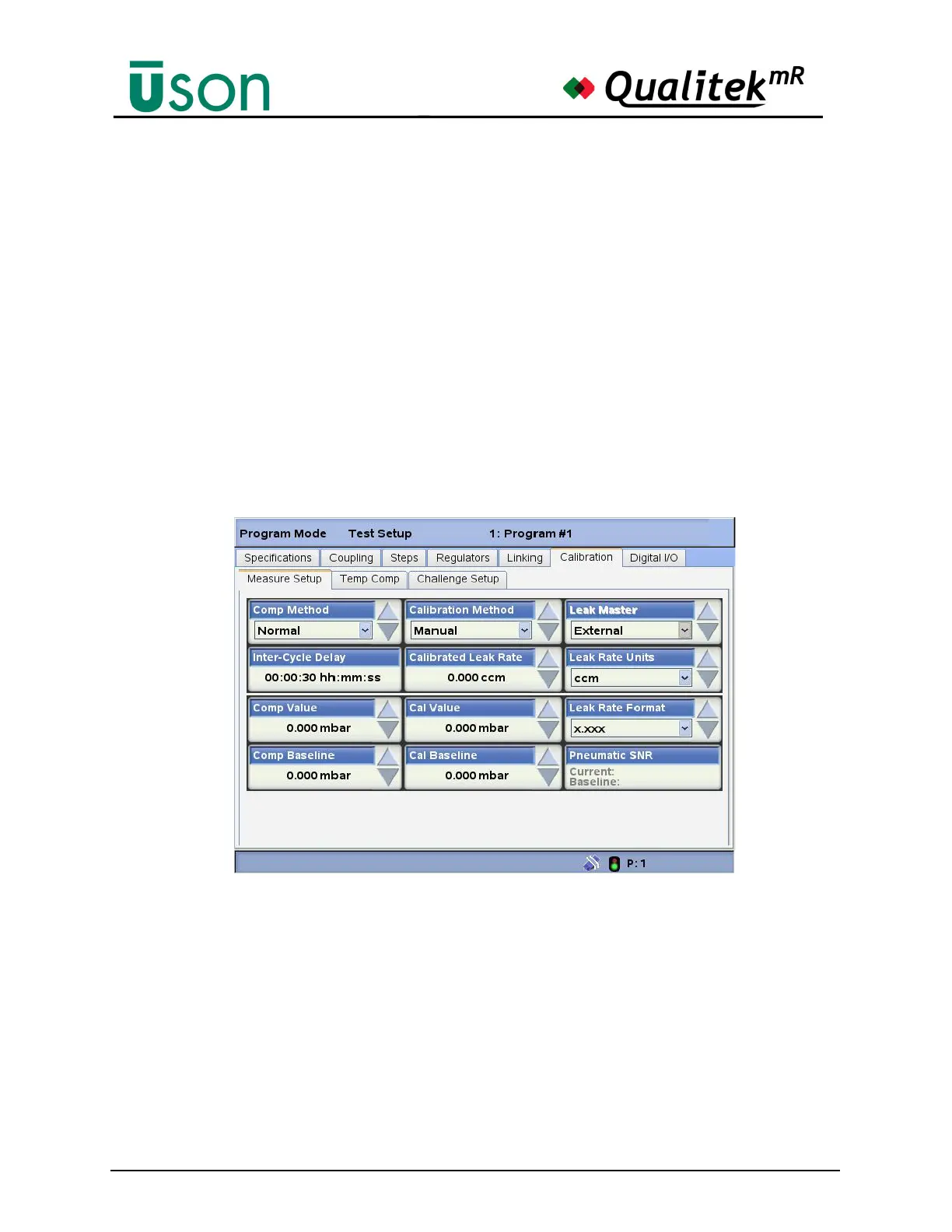
Program Mode, Test Setup, Calibration tab.
Each program needs to be calibrated individually and if any of the test parameters
are changed, including the volume of the test component, a re-calibration should
be performed.
Under certain conditions, when being tested under pressure, some components
exhibit a zero offset, which may drift over a period of time. This is usually due to
adiabatic changes or to changes in temperature due to the manufacturing process,
e.g., component cooling following a welding process. This offset will appear as an
apparent leak even when the component is leak-tight.
If any of a programs parameters are changed, including the type of test component,
a compensation cycle needs to be performed again.
Measure Setup Tab
• Comp Method: Normal
• Inter-Cycle Delay: Enter the delay between test cycles when performing
calibration.
• Comp Value: A Comp value can be entered manually, if desired.
• Cal Value: A Cal value can be entered manually here, if desired.
• Calibration Method: Automatic or Manual. Automatic mode assumes that
the calibration option is fitted and switches the standard leak into the tester
pneumatic circuit when required during calibration. Manual mode relies on
the user exposing the standard leak during the calibration.
• Calibrated Leak Rate: View or enter the calibrated leak rate.



 To Next Page