Run Mode 5-33
Leak calibration is a two-step process. First, the test is run with a non-leaking
master part to establish the characteristic pressure change of the part and the
pneumatic system. This result is referred to as the Comp value. The second test is
run with a traceable Leak Master (e.g., traceable to the NIST in the USA) to
introduce a known leak to the master part. This process establishes pressure loss
caused by a leak, and the resulting value is referred to as Cal
The Update Baseline button allows updating the current baseline with the new
calibration data. Changes to the baseline in the current session may be discarded
by pressing the Revert to Baseline button.
The Dashboard and Profile buttons can be used to temporarily visit those screens.
However, the tester will remain in Calibrate mode (the title bar will reflect this)
until Calibrate is ended from the Calibrate screen with either Done or Cancel.
5.2.11.1 Calibrate Button Availability
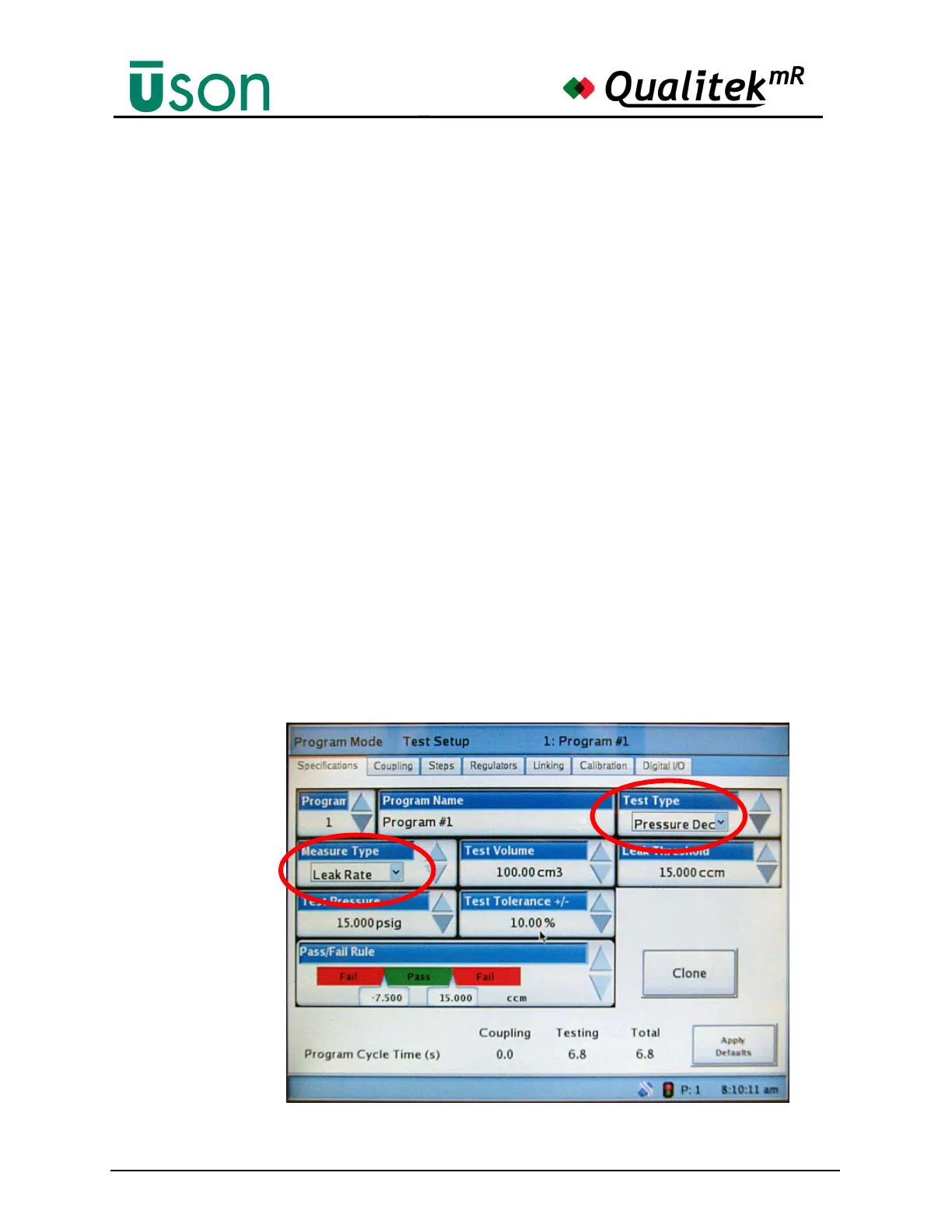
The Calibrate button can be selected only when the Measure Type of the current
program is set to Leak Rate as shown and the Test Type is Pressure Decay. (The
test type and measure type are set in Program Mode on the Specifications tab as
shown.
If a Leak Rate measure type and Pressure
Decay test type are not selected, as shown,
the Calibrate button is dimmed and
unavailable.



 To Next Page