Program Mode 6-7
6.2.2.2 Coupling
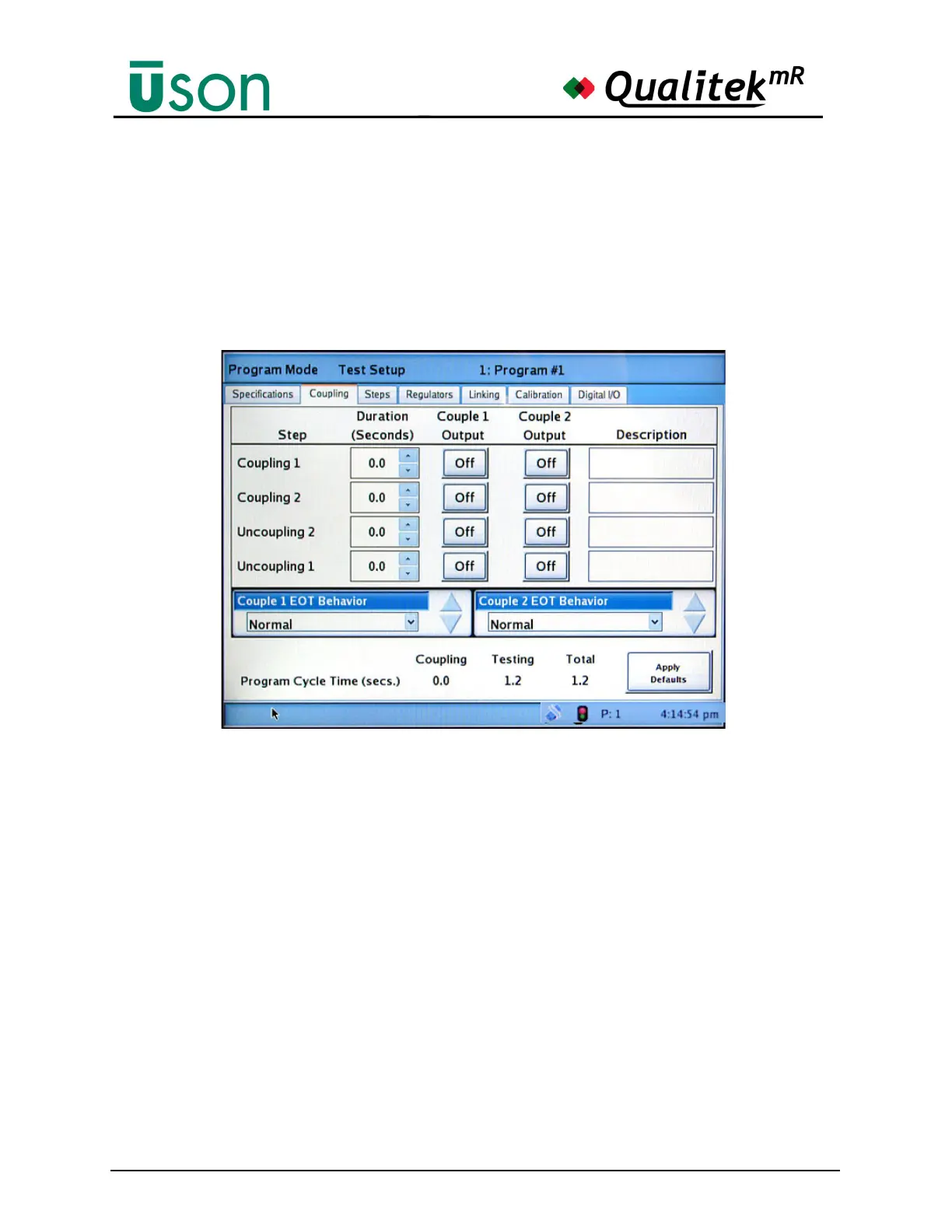
This screen is used to set the coupling parameters for coupling fixtures. Coupling
may be turned off, if it is not required, by setting the couple duration to zero.
When coupling times are set, the coupling steps are automatically included as
implied steps in the current program. In the illustration below, no couple times are
set so no coupling is being used in this program.
How to Set the Coupling Timers
To set Coupling 1, Coupling 2, Uncoupling 2, and Uncoupling 1 it is necessary
to set a duration for the coupling to activate. As the times are adjusted, the affect
on the program time is shown at the bottom of the screen.
Tapping the Description field will open the keyboard, permitting a descriptive
labeling for the coupling to be entered.
Couple 1 and 2 EOT behaviors
Normal, couple valves close at the end of the timer.
Hold on fail, salvage, couple valves stay on when the Measure steps fails or is
salvageable, requires an abort signal to release.
Hold on fail, salvage or abort, the couple valve stays on when any step fails or is
salvageable, requires an abort signal to release.



 To Next Page