6-58 Qualitek mR Owner’s Guide
6.2.5.1 Sensors
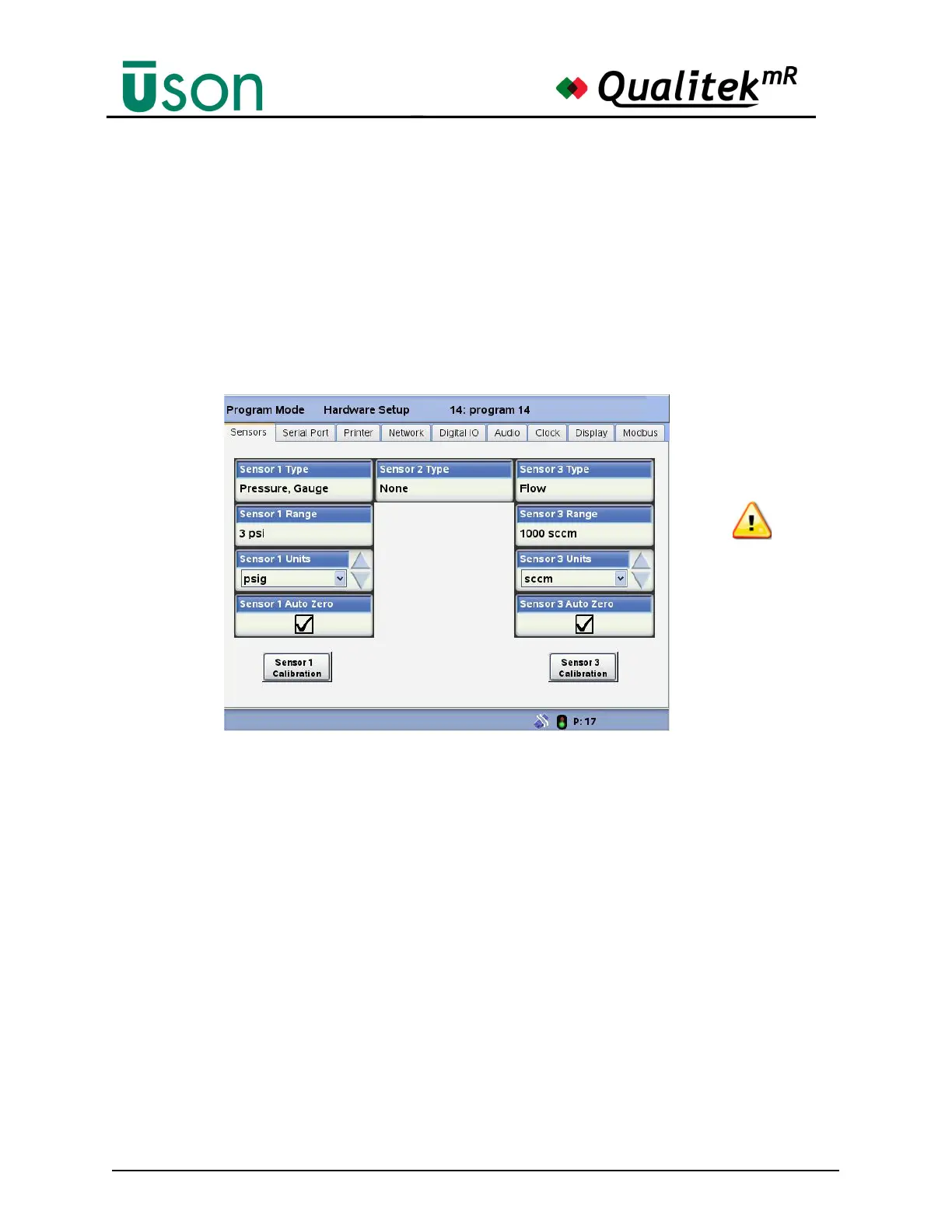
This screen shows the installed sensors and is used to set the sensor(s) parameters
for:
• Pressure Type
• Sensor Range
• Sensor Units
In addition, the sensor screen is used to enable/disable the Auto Zero feature and
initiate the sensors’ calibration processes.
Auto Zero
The Auto Zero function is used to eliminate the long-term zero drift of the internal
sensors by venting the sensors to atmosphere during the Auto Zero step. The
subsequent reading is then used as the new zero value (reference point) for the
current test. To add this feature to an internal sensor, select the corresponding
checkbox. See page 6-58. In addition, in order to activate this feature, you will
need to enter an Auto Zero duration time in the Program Mode, Test Setup, Steps
screen. See page 6-10.
Sensor Calibration
Contact a qualified Uson representative for sensor calibration.
6.2.5.2 Serial Port
The serial port settings are made at this screen. To learn the correct settings to use
you must consult the documentation that was provided with your device.
The settings made at this screen must match the requirements of the connected
output device or communication may be garbled or impossible.
CAUTION: Changing
sensor units DELETES
ALL Audit Log entries
and Test Counters.



 To Next Page