Run Mode 5-1
5
Chapter 5
Run Mode
5.1 Home Screen Features
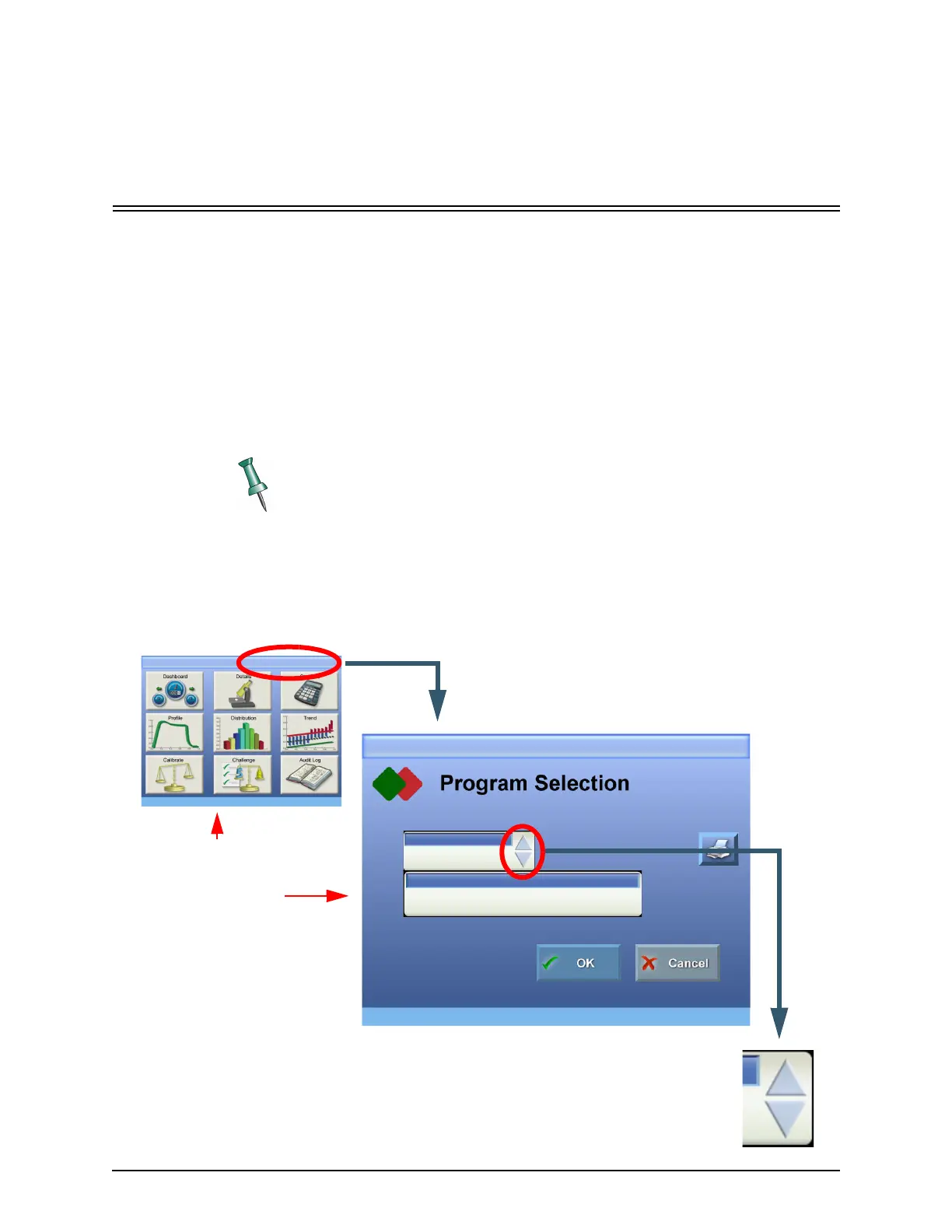
Tapping the program name at the right side of the Title Bar from any screen where
it is visible will call up the Program Selection screen. Select a program by entering
it’s number in the Program data box. The program number can be selected in two
ways. One method is to tap the up/down arrows to scroll through the available
program numbers. This method is the easiest to use if the new program is
reasonably close to the current number. The other method is to use the numeric
keypad, described on the next page.
Once the program number appears in the Program Data Box, its corresponding
name appears in the Program Name box. Use the OK button to accept the change
or the Cancel button to quit without making changes.
Program selection is not available in Run Mode when prohibited by settings
made in Tester Control. The Program Information in the Title Bar is dimmed
whenever Program Selection is not allowed. See "Tester Control" on page 6-45.
Program
Program Name
1
Descriptive Program Name #1
Run Mode Home (Current Program)
Tap the circled region
of the Home Screen to
go to Program
Selection.
Tap the up/down arrows to
change the program number.
Selecting a Program: Method 1
Run Mode Dashboard (Current Program)



 To Next Page