At least two analog input terminals are set to the same function (i.e., at least
two of these parameters has the same setting: H3-02, H3-06, or H3-10).
Change the settings to H3-02, H3-06, and H3-10 so that functions no longer
conflict.
Note: Both 0 (frequency reference bias) and F (not used) can be set to
H3-02, H3-06, and H3-10 at the same time.
The following simultaneous contradictory settings:
• H3-02, H3-06, or H3-10 = B (PID Feedback) while H6-01 (Pulse Train
Input) = 1 (PID Feedback)
• H3-02, H3-06, or H3-10 = C (PID Target Value) while H6-01 = 2 (pulse
train input sets the PID target value)
• H3-02, H3-06, or H3-10 = C (PID Target Value) while b5-18 = 1 (enables
b5-19 as the target PID value)
• H6-01 = 2 (PID target) while b5-18 = 1 (enables b5-19 as the target PID
value)
Disable one of the PID selections.
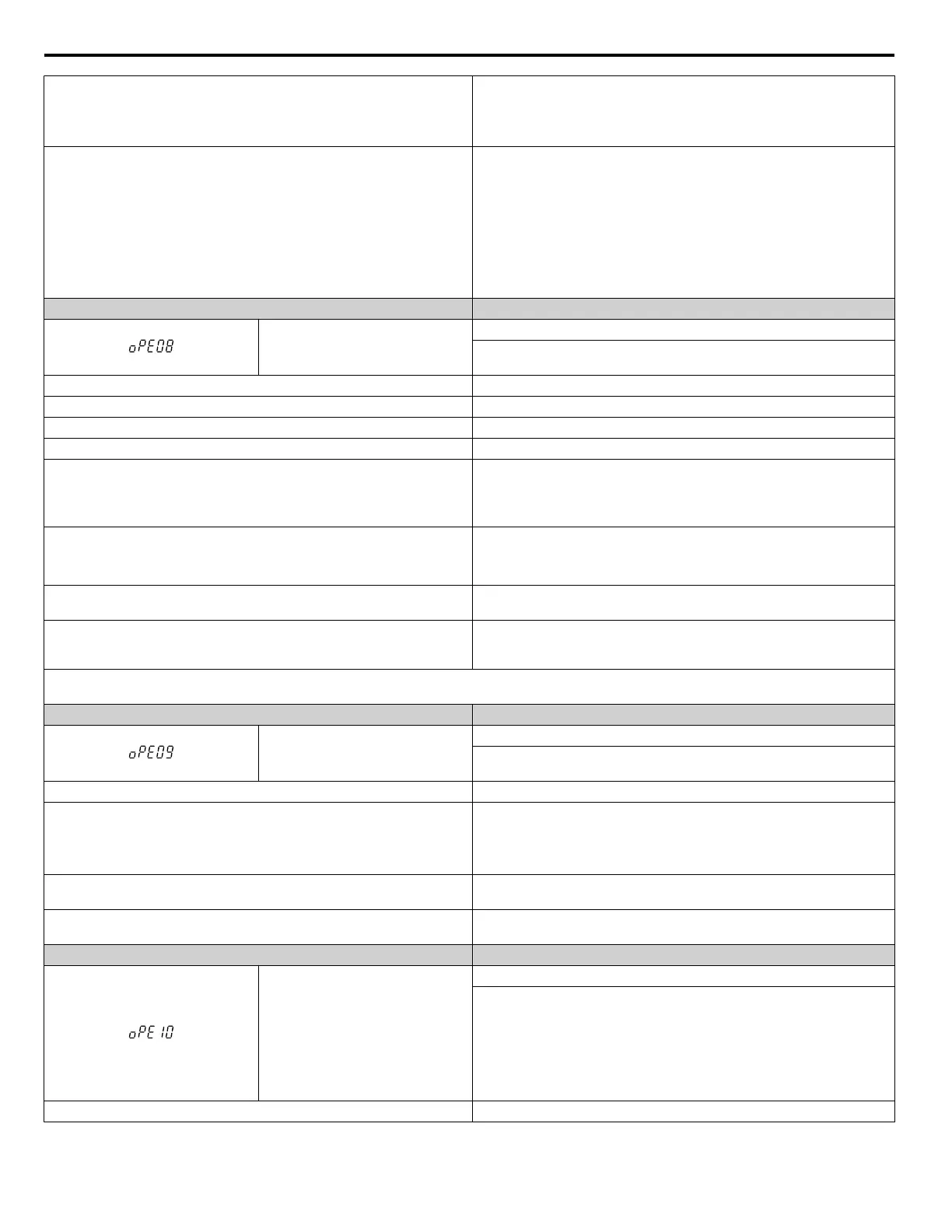
Digital Operator Display Error Name
oPE08
Parameter Selection Error
A function has been set that cannot be used in the motor control method
selected.
Cause Possible Solutions
Attempted to use a function in the V/f Control that is only possible in OLV. Check the motor control method and the functions available.
In Open Loop Vector Control, n2-02 is greater than n2-03 Correct parameter settings so that n2-02 is less than n2-03.
In Open Loop Vector Control, C4-02 is greater than C4-06 Correct parameter settings so that C4-02 is less than C4-06.
In OLV/PM, parameters E5-02 to E5-07 are set to 0.
• Set the correct motor code in accordance with the motor being used
(E5-01).
•
When using a special-purpose motor, set E5-oo in accordance with the
test report provided.
The following settings have occurred in OLV/PM:
• E5-03 does not equal 0
• E5-09 and E5-24 are both equal to 0, or neither equals 0
• Set E5-09 or E5-24 to the correct value, and set the other to “0”.
• Set the motor rated current for PM to “0” (E5-03).
Set b1-14 (Phase Order Selection) to 1 (Switch phase order) when in using
a PG option card.
Correct the parameter settings.
In AOLV/PM High Frequency Injection is disabled (n8-57 = 0) and the
minimum frequency (E1-09) is set lower than 1/20 of the base frequency
setting.
Correct the parameter settings.
Note: Use U1-18 to find parameters that are set outside the specified setting range. Other errors are given precedence over oPE08 when multiple
errors occur simultaneously.
Digital Operator Display Error Name
oPE09
PID Control Selection Fault
PID control function selection is incorrect. Requires that PID control is
enabled (b5-01 = 1 to 4).
Cause Possible Solutions
The following simultaneous contradictory settings have occurred:
• b5-15 not 0.0 (PID Sleep Function Operation Level)
• The stopping method is set to either DC Injection Braking or coast to stop
with a timer (b1-03 = 2 or 3).
• Set b5-15 to another value besides 0.
• Set the stopping method to coast to stop or ramp to stop (b1-03 = 0 or 1).
PID control is set to b5-01 = 1 or 2, but the lower limit for the frequency
reference (d2-02) is not set to 0 while reverse output is enabled (b5-11 = 1).
Correct the parameter settings.
PID control is set to b5-01 = 3 or 4, but the lower limit for the frequency
reference (d2-01) is not 0.
Correct the parameter settings.
Digital Operator Display Error Name
oPE10
V/f Data Setting Error
The following setting errors have occurred where:
• E1-04 is greater than or equal to E1-06, E1-06 is greater than or equal to
E1-07, E1-07 is greater than or equal to E1-09, or E1-09 is greater than
or equal to E1-11.
• E3-04 is greater than or equal to E3-06, E3-06 is greater than or equal to
E3-07, E3-07 is greater than or equal to E3-09, or E3-09 is greater than
or equal to E3-11.
Cause Possible Solutions
6.6 Operator Programming Errors
326
YASKAWA ELECTRIC SIEP C710616 31B YASKAWA AC Drive – A1000 Technical Manual


 To Next Page
 Loading...