Step Display/Result
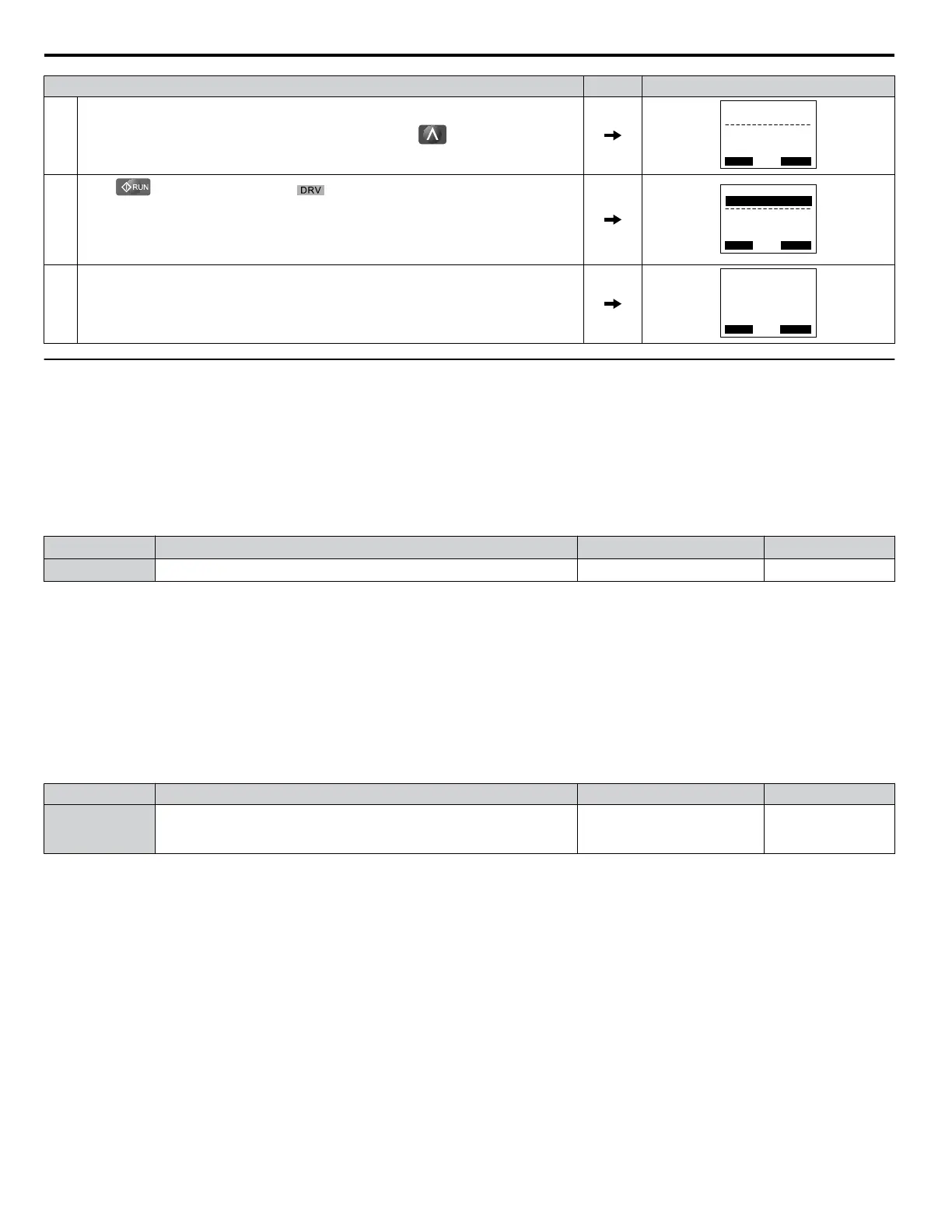
1.
After entering the data listed on the motor nameplate, press to confirm.
- A.TUNE -
0.00 Hz/ 0.00A
Tuning Ready ?
DRV
Auto-Tuning
Rdy
ESC FWD
Press RUN key
2.
Press
to activate Auto-Tuning. flashes. The drive begins by injecting current
into the motor for about 1 min, and then starts to rotate the motor.
Note: The
first digit on the display indicates which motor is undergoing Auto-Tuning
(motor 1 or motor 2). The second digit indicates the type of Auto-Tuning being
performed.
- A.TUNE -
X XX Hz/ X.XXA
DRV
Tune Proceeding
Rdy
FWD
<<<<<< >>> >>>
3. Auto-Tuning finishes in approximately one to two minutes.
- MODE -
End
Tune Successful
DRV
FWD RESET
u
Parameter Settings during Induction Motor Auto-Tuning: T1
The T1-oo parameters set the Auto-Tuning input data for induction motor tuning.
Note: For motors operating in the field weakening range, first perform the Auto-Tuning with the base data. After Auto-Tuning is complete, change
E1-04, Maximum Output Frequency, to the desired value.
n
T1-00: Motor 1/Motor 2 Selection
Selects
the motor to be tuned when motor 1/2 switching is enabled (i.e., a digital input is set for function H1-oo = 16). This
parameter is not displayed if motor 1/2 switching is disabled.
No. Name Setting Range Default
T1-00 Motor 1/Motor 2 Selection 1, 2 1
Setting 1: Motor 1
Auto-Tuning automatically sets parameters E1-oo and E2-oo for motor 1.
Setting 2: Motor 2
Auto-Tuning
automatically sets parameters E3-oo and E4-oo for motor 2. Make sure that motor 2 is connected to the drive
for Auto-Tuning.
n
T1-01: Auto-Tuning Mode Selection
Sets the type of Auto-Tuning to be used. Refer to Auto-Tuning for Induction Motors on page 100 for details on the different
types of Auto-Tuning.
No. Name Setting Range Default
T1-01 Auto-Tuning Mode Selection
2, 3 (V/f, V/f w/PG)
0 to 2, 4 (OLV, CLV)
8, 9 (CLV)
2 (V/f, V/f w/PG)
0 (OLV, CLV)
Setting 0: Rotational Auto-Tuning
Setting 1: Stationary Auto-Tuning 1
Setting 2: Stationary Auto-Tuning for Line-to-Line Resistance
Setting 3: Rotational Auto-Tuning for V/f Control
Setting 4: Stationary Auto-Tuning 2
Setting 8: Inertia Tuning
Setting 9: ASR Gain Auto-Tuning
4.7 Auto-Tuning
106
YASKAWA ELECTRIC SIEP C710616 31B YASKAWA AC Drive – A1000 Technical Manual


 To Next Page
 Loading...