Measuring System Performance: Measuring Signal Levels
114
6
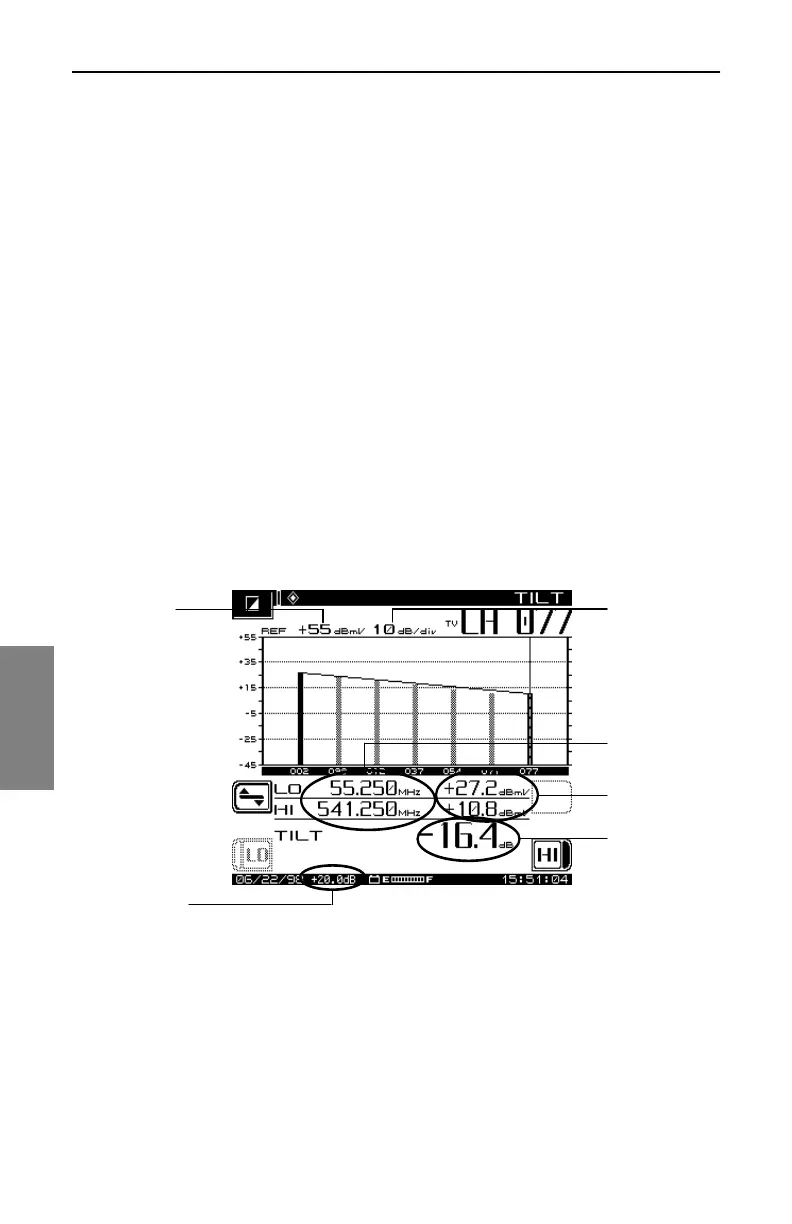
The Tilt adjustment uses amplifier gain to compensate for the attenuation of
signals moving through the cable. Higher frequencies are attenuated more
than lower frequencies. This accounts for the slope of the line in Fig. 6-3. Tilt
mode simplifies the actual balancing by displaying a bar graph with a
representation of up to nine video carrier levels. Tilt adjustment
compensates for unequal attenuation, so that each channel reaches a
customer with about the same level.
The following information is displayed in Tilt measurement mode (numbers
correspond to callouts in Fig. 6-3):
1. Reference scale
2. High and low carrier frequencies
3. High and low carrier levels
4. Tilt measurement
5. Reference level
6. Test point compensation (appears only if a non-zero value is
programmed during setup).
Fig. 6-3 The TILT Measurement Mode Screen
Balancing Amplifiers
A cable system is designed for unity gain, and the output level of each type
of amplifier (trunk, bridger/line extender) should be set or adjusted to be as
close to the same output as possible. The amplifiers are set up with
1
2
3
4
5
6



 To Next Page