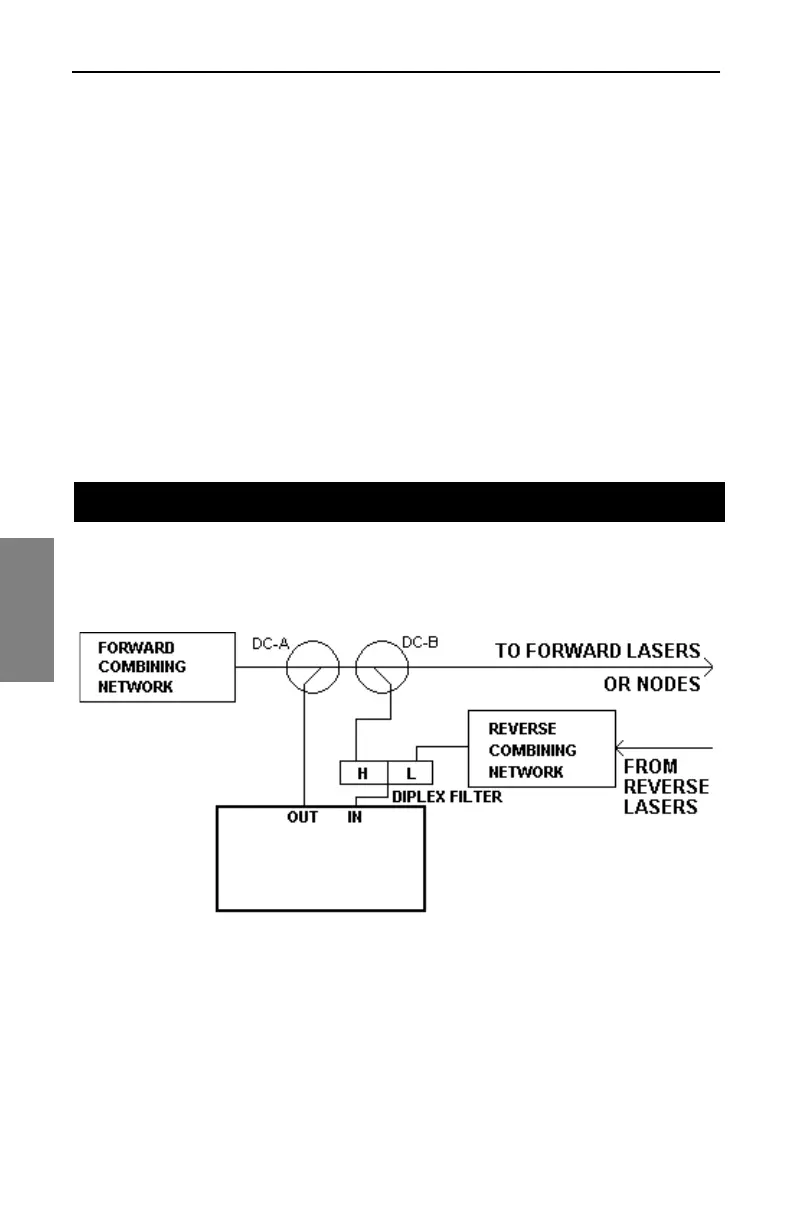
SDA-5500/SDA-5510 Sweep Configuration: Forward and Reverse Sweep (SDA-5500)
296
14
2. Set the reverse telemetry and sweep levels of the SDA-5000 so that,
in the combining network, they will be about 10dB below the reverse
path signal levels. Make sure that test point compensation is set to 0
for this test.
3. Using the TX diagnostics menu in the SDA-5000, generate a CW
signal at the same level and frequency as the telemetry. Verify that the
expected level reaches the SDA-5500 or SDA-5510 used for reverse
sweep. Remove the CW signal and verify that the level drops by at
least 20dB at the SDA-5500.
4. Enter Sweep mode with both the SDA-5500 and the SDA-5000. Verify
that reverse sweep works.
Figures 14-19 and 14-20 show the wiring connection to use if you’re using
the SDA-5500 for both forward and reverse sweep.
Fig. 14-19 Connecting the SDA-5500 for Forward and
Reverse Sweep
FORWARD AND REVERSE SWEEP (SDA-5500)
SDA-5500



 To Next Page