Field Sweeping with the SDA-5000: Test Point Compensation
61
4
Use the top right-hand soft key to toggle between
forward and reverse test point displays.
Use the top left-hand soft key to return to the previous
screen.
Use the bottom right-hand soft key to enter the current
value from the Edit Box into the test point loss table.
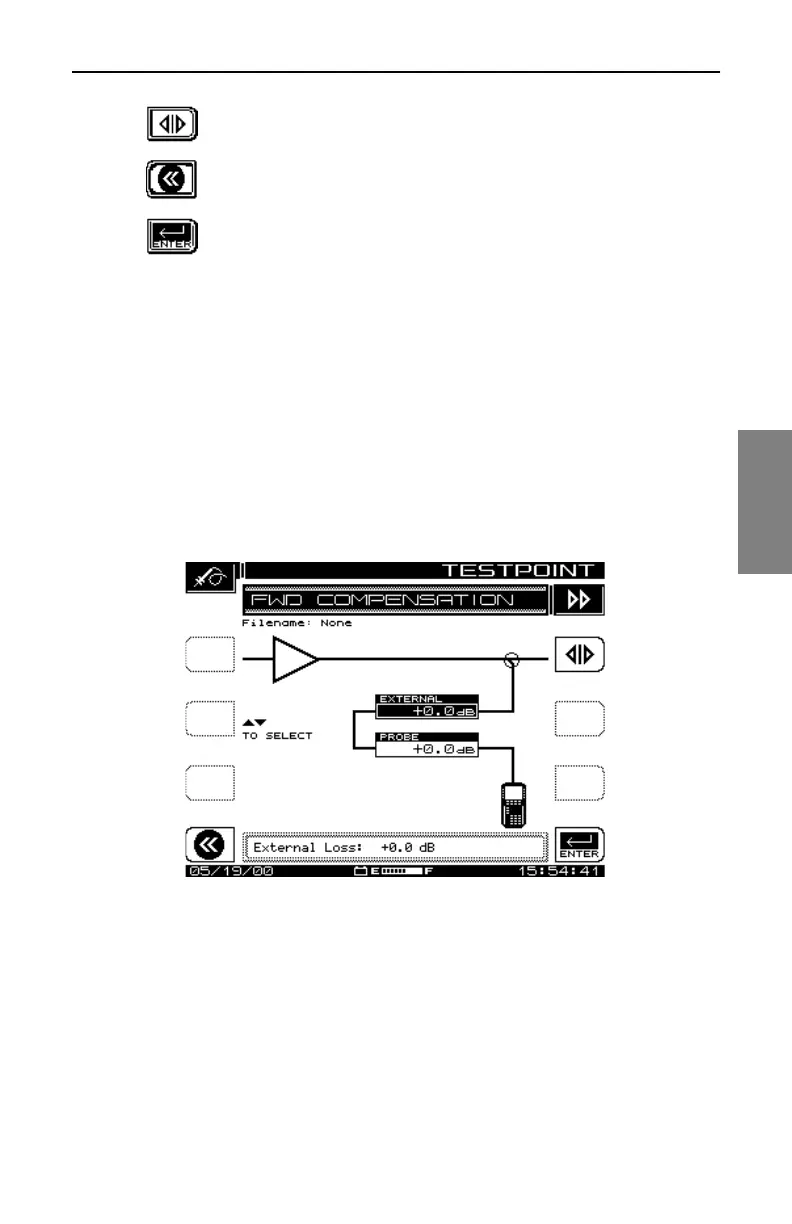
2. The forward test point display has two entries:
• The top item (EXTERNAL) is to allow for external pads, coupling
networks, or any amplifiers you might use. It is important to note that a
pad has a positive value (loss), while an amplifier has a negative value.
• You should enter the amplifier test point loss in the second line
(PROBE). Typically this is 20, 25, or 30dB. Positive values represent
loss, and are the norm. A negative value represents an amplifier.
Fig. 4-3 shows a 20dB test point, and an external splitter provides 3.5dB
additional loss.
Fig. 4-1 The FWD COMPENSATION Screen
3. The reverse test point display contains more adjustments and
information (see Fig. 4-2).
The soft keys for this screen have the same function as those on the
FWD COMPENSATION screen, with the addition of an Information
soft key.



 To Next Page