6. Shapes and Pixel Mapper effects - Page 143
TitanUniversal_Man_v10_QU.doc 15 March 2016
horizontally.
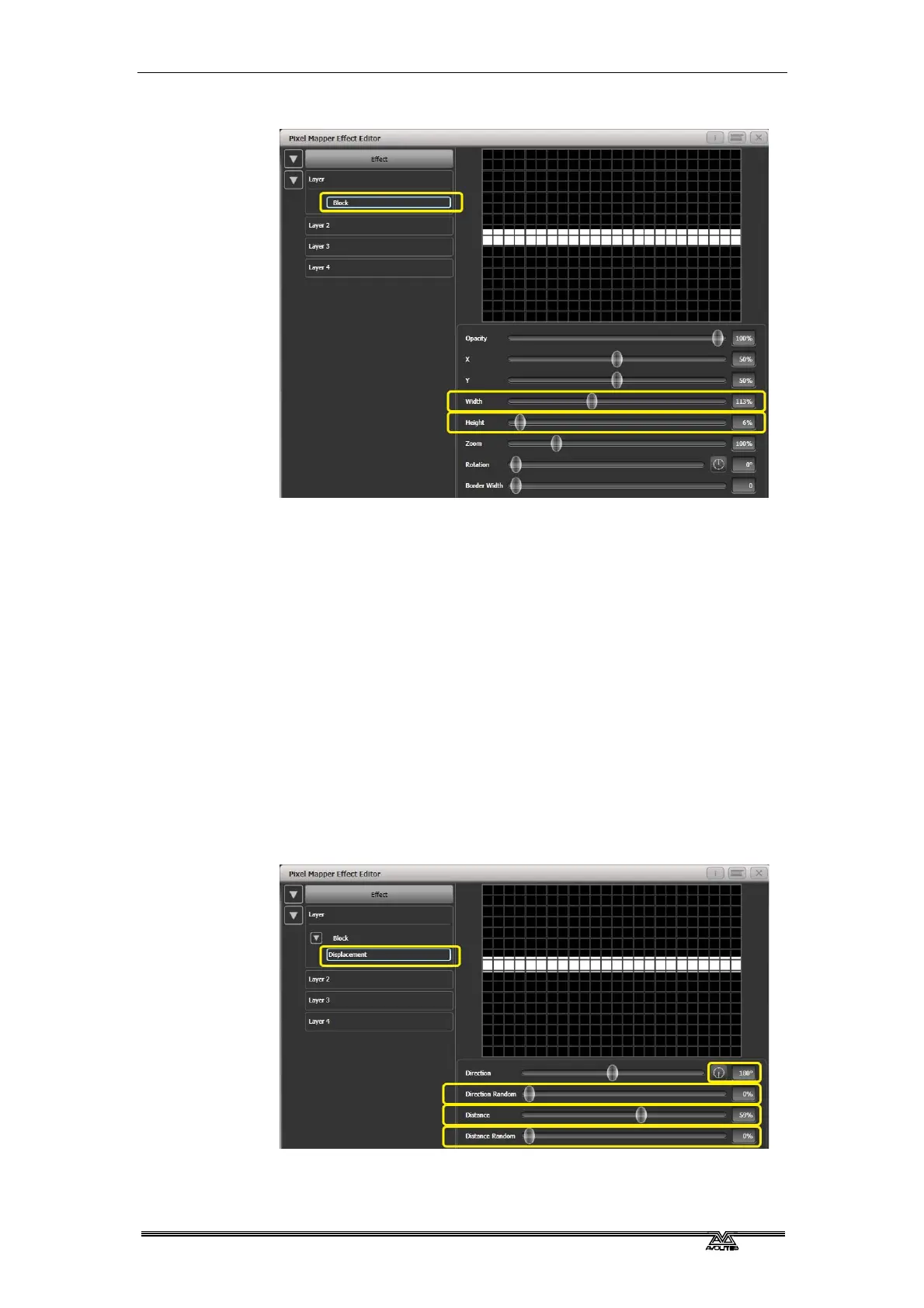
5> Reduce Y until the bar disappears off the top of the grid. (This
is in preparation for adding a displacement animation.)
6> Add a Displacement animation. By default this will offset the
original position by anything up to 30% distance. This is
because the default value for 'Distance' is set to a maximum of
30% and 'Distance Random' is set to 100% meaning it can use
any random value between zero and 30%. Similarly 'Direction
Random' is set to 100% meaning it can offset in any direction.
Temporarily set 'Distance Random' to zero. (This is in order to
see exactly what the displacement is doing.)
Set 'Direction Random' to zero. (In this example we do not
require a random direction.) Now the bar will disappear because
it is being displaced upwards in the default settings.
Set 'Direction' to 180 degrees. Click on the compass button
four times to get there quickly. Now the bar should reappear on
the screen because it has been offset vertically down from the
our off-screen position by the default 30%.
Increase 'Distance' until the bar is approximately in the centre.
7> Add an Opacity animation.



 To Next Page