1. Quick Start - Page 15
TitanUniversal_Man_v10_QU.doc 15 March 2016
1. Quick Start
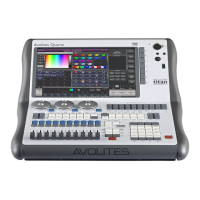
This section is a quick guide on how to do most things on the Quartz .
Each section has a link to take you to the appropriate manual section
for more details.
Softkeys are shown in square brackets like [This].
1.1 Patching fixtures
Press Patch, [Dimmers] or [Fixtures].
For Fixtures, from the softkeys choose fixture manufacturer (type on
keyboard to filter the list) then fixture type, then fixture mode.
Set [DMX Line] and [Address]. Console will automatically set these if
you don’t change them.
Press buttons in the Fixtures window to patch the fixture. (Section
3.1.3, p51).
To patch a number of dimmers or fixtures at once, drag over buttons
to draw a selection box on the screen. Or, set [Quanti
ty] in the patch
menu.
To change DMX address or line, use [Repatch Fixtures]. (Section 3.2,
p56).
View fixture patch
To see an overview screen of how the console is patched, press
Window Open then Patch (Section 3.2.1 , p56).
Setting fixture options
Press Patch, [Edi
t Fixtures], or use the Patch View screen.
1.2 Controlling fixtures
Select fixtures for control by pressing select buttons.
Press Locate to “home” selected fixtures with lamp on. (Section
4.1.2. p72). Hold locate and press attri
bute button to remove that
attribute from the locate (e.g. to locate without changing pan/tilt,
hold Locate and press Pan/Tilt).
Select attribute to control using attribute bank buttons (labelled
Intensity/Dimmer, Colour, Gobo etc), then turn the wheels to set
fixture. Display shows which attribute each wheel is controlling.
(Section 4.1.5, p75).
Open Attribute window onscreen (Window Open, Attribute Options) to
sel
ect attributes from buttons and to control subfixtures of
battens/arrays. (Section 4.1.6, p77).
Use Pal
ettes to store often-used colours, positions etc. for instant
recall, see next page.
Fixture Groups
Fixtures may be grouped for quick selection, press Group, [Record
Group], select fixtures for group, set legend using [Provide a legend],
press a handle to store. If the handle has a fader it becomes a master


 To Next Page