5 • Operation
Doc. 065031-04 1/08 143
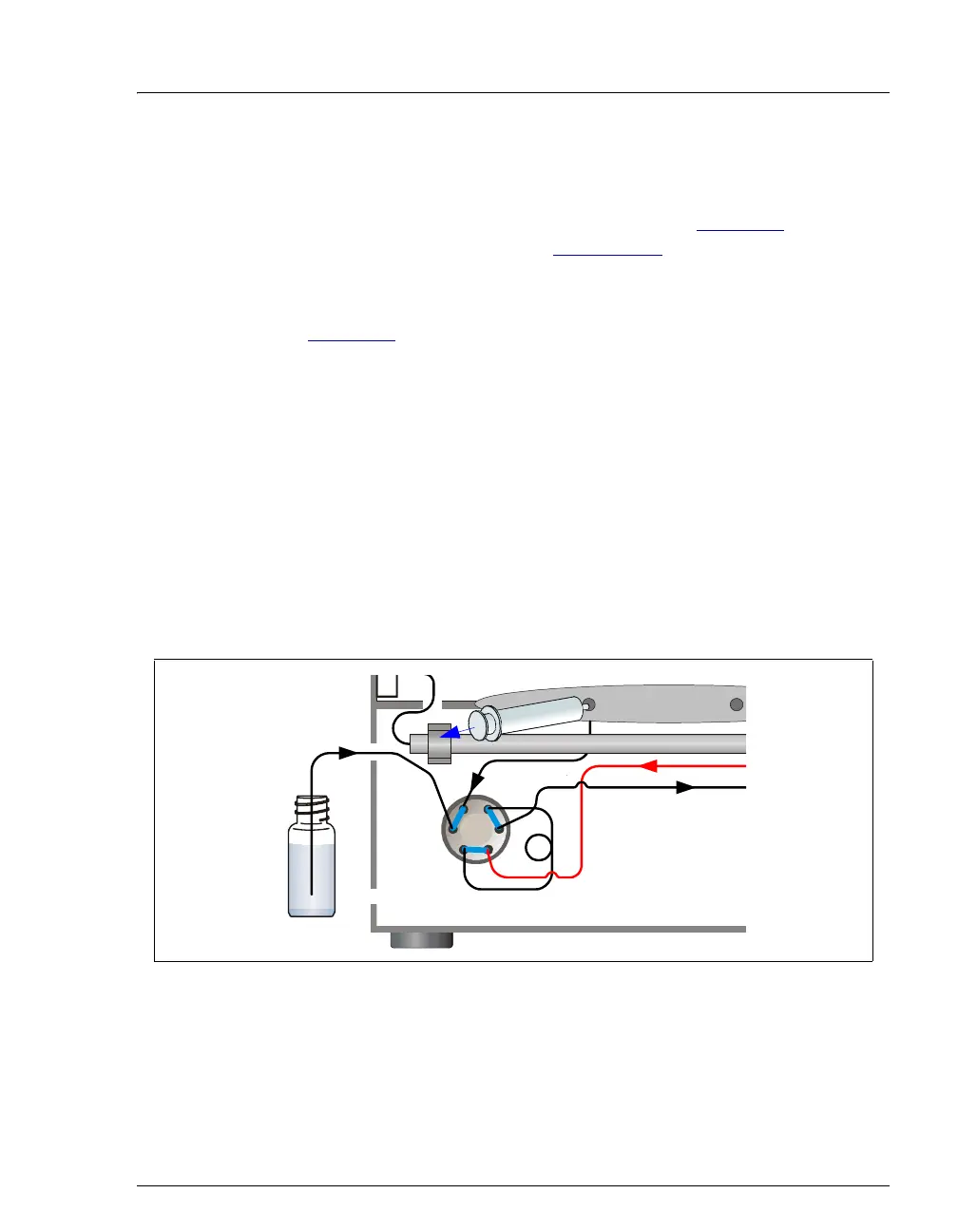
5.3.2 Loading Samples with a Vacuum Syringe (Pull Method)
1. Make sure the sample loading port on the DC front door is connected
to sample port
S (5) on the injection valve (see Figure 5-5). If the port
is not already connected, see Section 5.3.1
for connection
instructions.
2. Disconnect the waste line from port
W (6) on the injection valve (see
Figure 5-5
) and attach a shorter line: 25 to 30 cm (10 to 12 in) of
PEEK or Teflon® tubing.
3. Place the free end of the line into the sample.
4. Verify that the injection valve is in the Load position. If it is not,
switch the valve by clicking the valve control on the Control panel or
pressing the
VALVE button on the front of the DC.
5. Insert a 5 cc syringe into the sample loading port on the DC front door
and pull out the plunger to draw the sample into the injection valve.
6. Switch the injection valve to the Inject position by clicking the valve
control on the Control panel or pressing the
VALVE button on the
front of the DC.
Figure 5-5. Loading Sample with a Vacuum Syringe (Pull Method)
(1)
L
L
S
W
P
C
(2)
(3)
(4)(5)
(6)
Sample
Valve
Sample Port
S
y
r
i
n
g
e



 To Next Page