FOR RESTRICTED USE only Fargo Electronics, Inc.
DTC550 Direct to Card Printer/Encoder User Guide (Rev. 2.8)
6-17
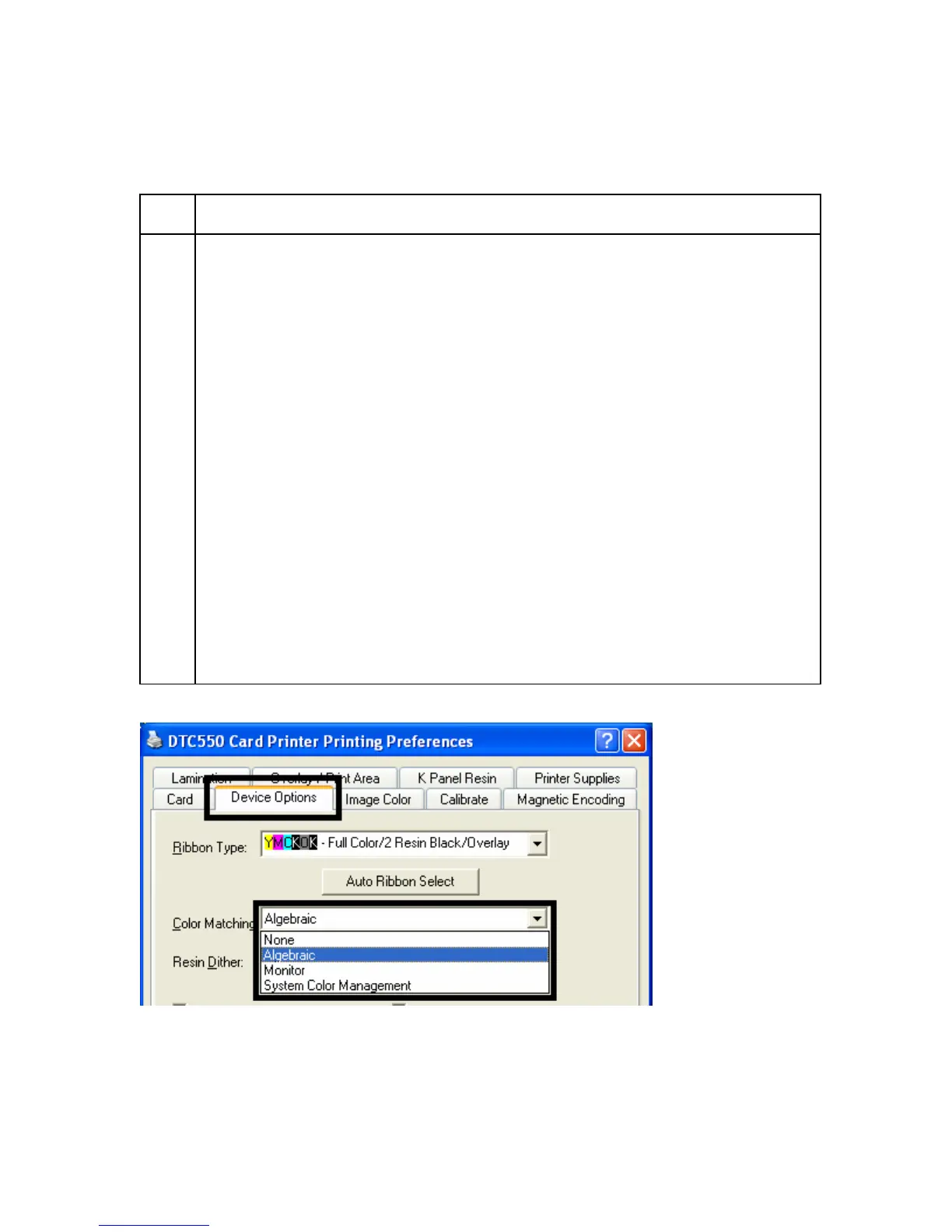
Adjusting for the Color matching
Use the Color Matching option to meet the requirements for the print job.
Step Procedure
1 Select None (a) if interested in print speed rather than print color, (b) if color
correcting the image for printing has already been done or (c) if using third party
Color Matching software.
OR
Select Algebraic to allow the Printer Driver to make very simple, fast, color
balance adjustments. (Note: This option gives a natural-looking image without
slowing down the processing speed of the Printer Driver. It also allows further
customization of the printed color of the cards through the Image Color tab.)
OR
Select Monitor to allow the Printer Driver to make color corrections similar to
the Algebraic option but through an RGB color matching algorithm. (Note: This
option shifts colors more radically so the colors in the image will more closely
match how they appear on screen.)
OR
Select System Color Management to allow the Printer Driver to use an
external color profile, installed with the printer driver, to map color output. The
external color profile maps output to a set of color targets that are RGB
compliant. Printed colors will be closest to what you see on the computer
monitor and are compliant with Windows® Hardware Compatibility Test.



 To Next Page