FOR RESTRICTED USE only Fargo Electronics, Inc.
DTC550 Direct to Card Printer/Encoder User Guide (Rev. 2.8)
6-35
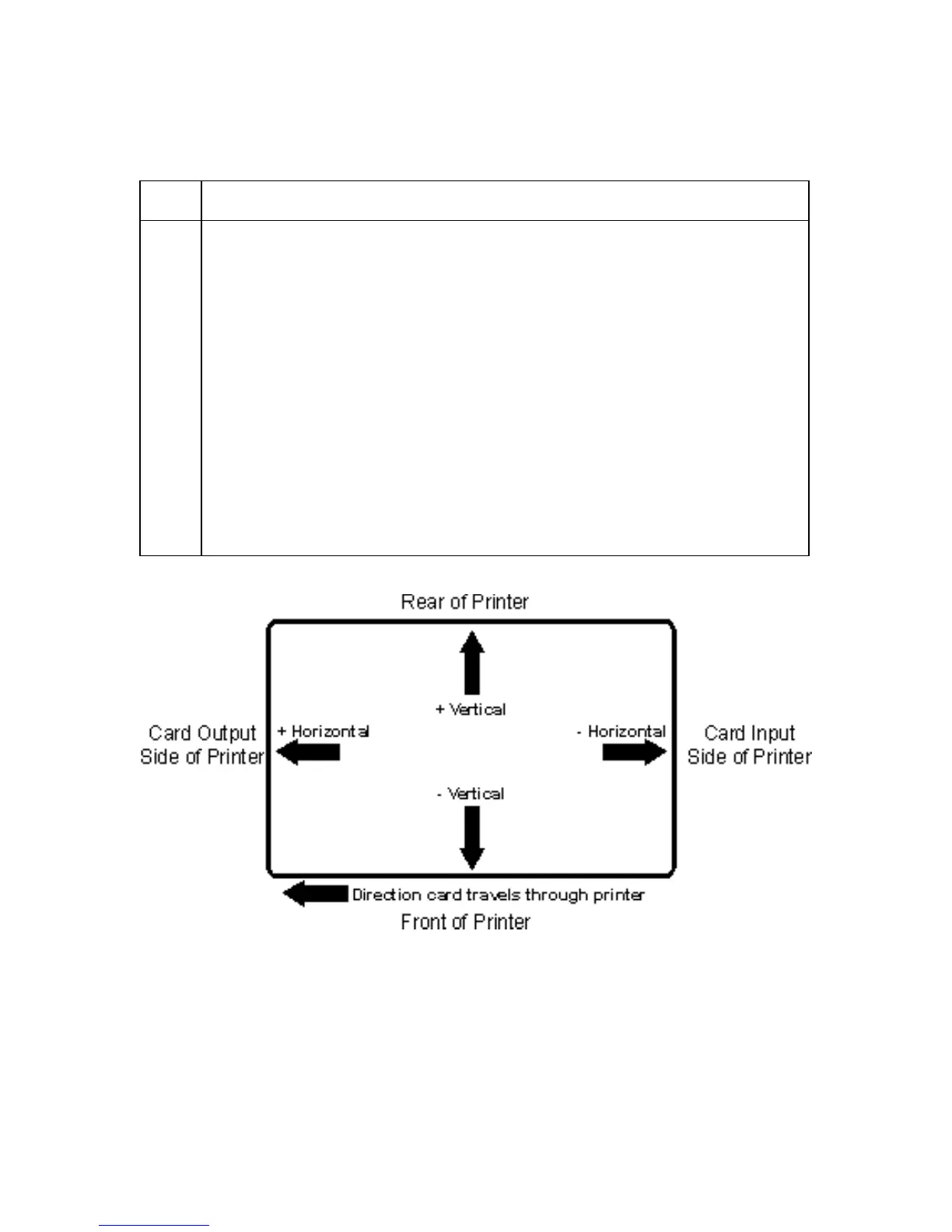
Review the Image Position diagram, which displays how the printed image will move in
relation to the fixed card position as positive and negative image placement values are
entered.
Step Procedure
2 Use the Vertical adjustment to move the image:
• Toward the rear of the Printer if a positive number is entered.
• Toward the front of the Printer if a negative number is entered.
OR
Use the Horizontal adjustment to move the image:
• Toward the card output side of the Printer if a positive number is entered.
• Toward the card input side of the Printer if a negative number is entered.
(Note No.1: The maximum value for the Vertical and Horizontal
adjustments is ±100 pixels (10 pixels = about .03"/. 8mm).)
(Note No.2: The Vertical and Horizontal adjustment arrows point to within
the Image Position window, which represents the direction that the printed
image moves.)



 To Next Page