13. USER CHARTS
13-6
How to use the Undo feature
The Undo feature, available when creating a route and a user chart, can be accessed
from the [UNDO] button on the InstantAccess bar™, use double-click, or the context-
sensitive menu. In user chart creation the feature is used with object and text input as
follows:
Tidal, Circle, Current, Label: Delete last-entered object.
Area, Line: Erase last-entered point. For [Area], the area must have at least four
points. And for a [Line], there must be at least three points.
Text input: Erase last-entered character or character string.
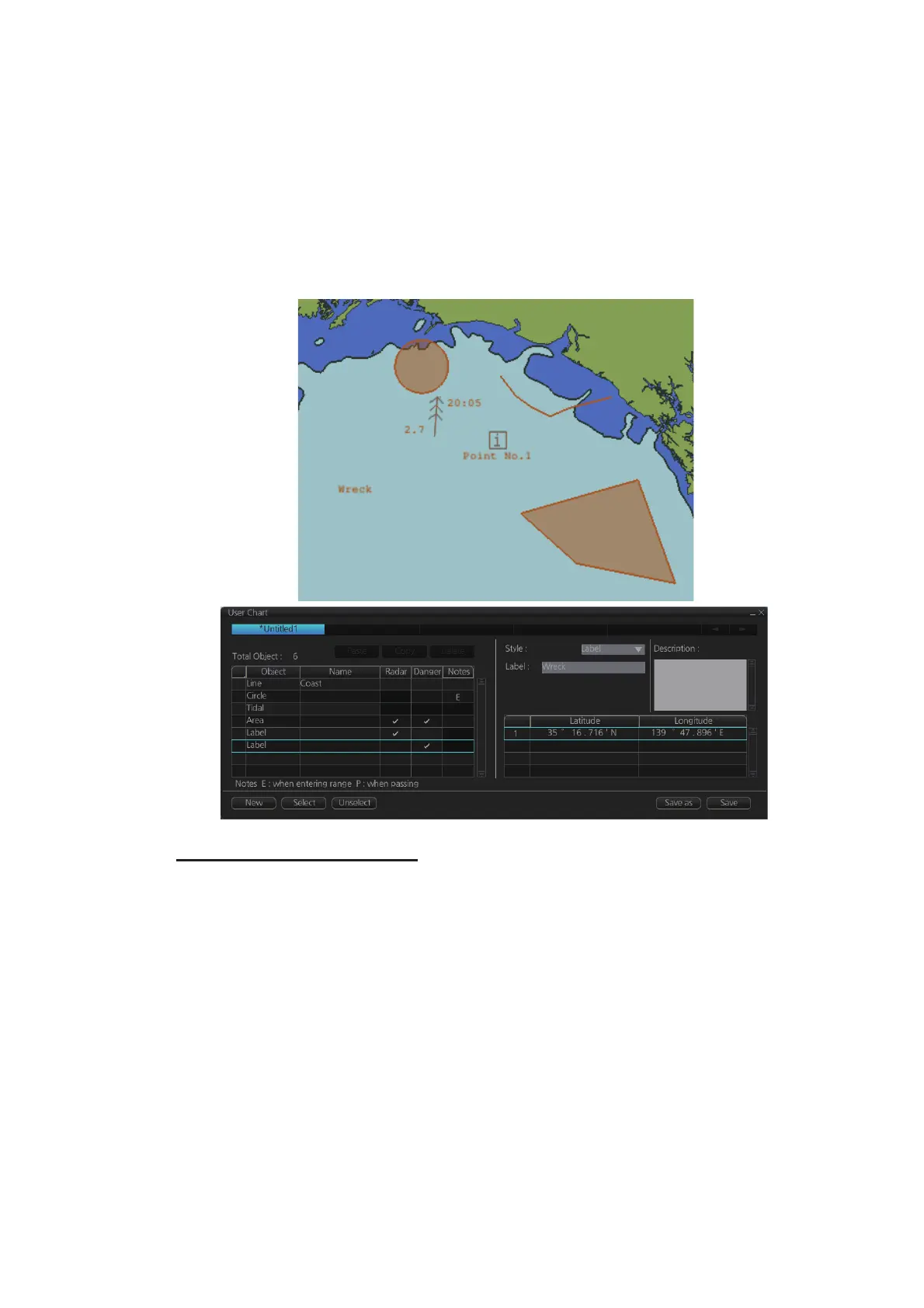
• The Line with the name "Coast" is a coastline.
• The Circle has the Notes "E" which means the message set in the [Description] box
when the own ship enters the circle will be shown.
• The Tidal marks line marks a tidal (current).
• The Area has Radar and Danger checked. This means the area is shown on the radar
display and is used in chart alert calculation.
• The Label with the name "Point No. 1" is a point label and is also shown on the radar
display.
• The Label with the name "Wreck" is a common label and has Danger checked; it is
used in chart alert calculation.
LINE (Coast)
TIDAL
LABEL (Point)
LABEL (Label)
CIRCLE
AREA



 To Next Page