Configuration
User Manual corpuls
3
164 ENG - Version 2.1 – P/N 04130.2
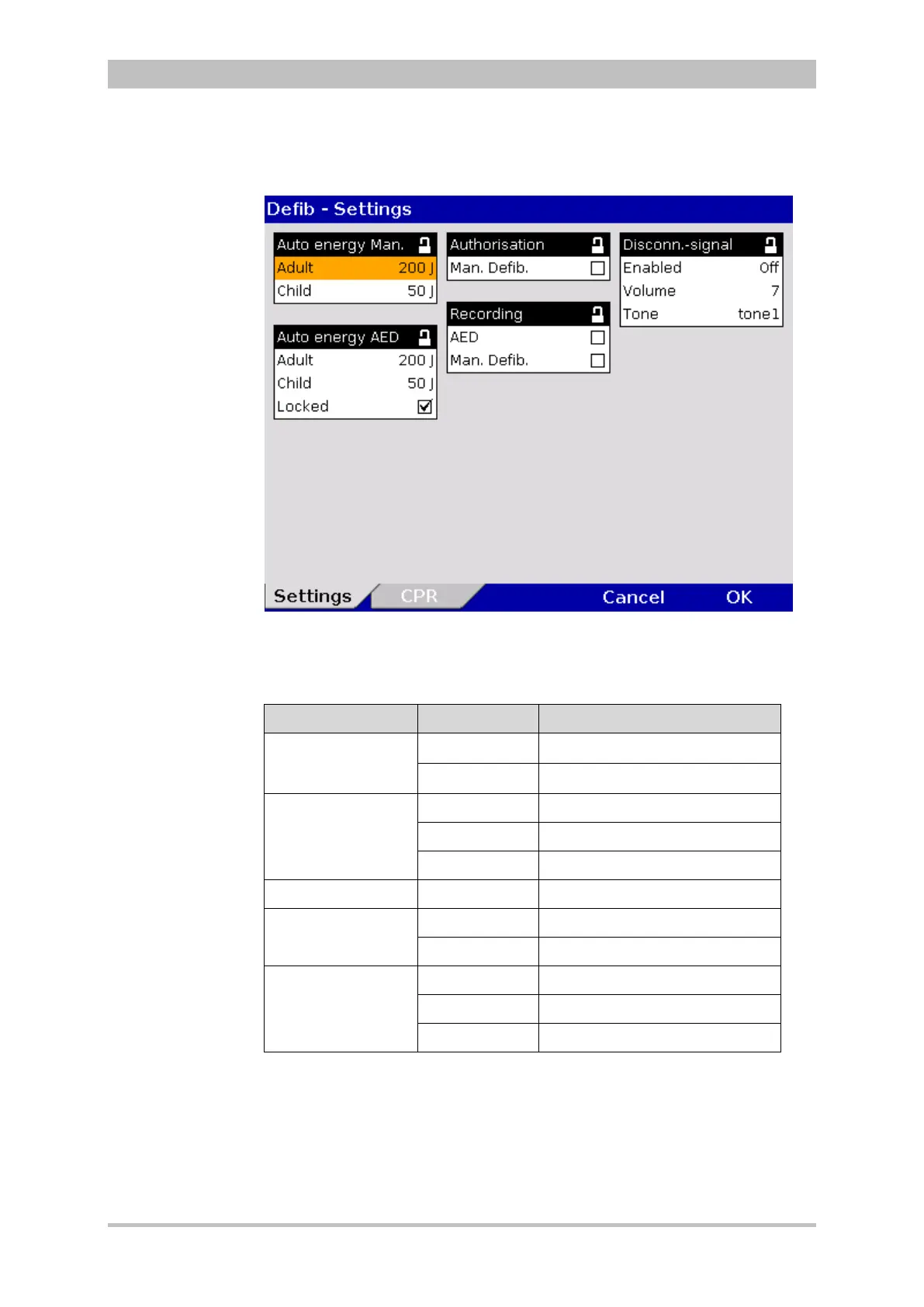
1. In the main menu, select "Defib" ► “Settings”.
The configuration dialogue opens.
Fig. 7-19 Defibrillation function settings (persons responsible for the device)
2. Select the settings.
Table 7-13 shows the possible values.
Group Settings Values
Auto energy Man.
Adult
Off, 2, 3, 4, 5, 10, 15 to 200 J
Child
Off, 2, 3, 4, 5, 10, 15 to 100 J
Auto energy AED
Adult Off, 2, 3, 4, 5, 10, 15 to 200 J
Child Off, 2, 3, 4, 5, 10, 15 to 100 J
Locked Enabled, disabled
Authorisation Man. Defib. Enabled, disabled
Recording
AED Enabled, disabled
Man. Defib. Enabled, disabled
Disconn.-signal
Enabled Off, 5, 10, 30, 60 s
Volume 3 – 10
Tone Tone 1 to Tone 4
Table 7-13 Values for defibrillation function configuration
3. To confirm the settings and close the configuration dialogue, press the
softkey [OK].
To retain the previous settings and close the configuration dialogue, press
the softkey [Cancel].



 To Next Page