ECC800 Data Center Controller
User Manual (for ECC800-Pro)
Copyright © Huawei Technologies Co., Ltd.
8.1.6.6 How to Set and Add a PDU8000 (over Modbus RTU)?
Prerequisites
One end of the straight-through cable has been connected to the COM port on the PDU8000,
and the other end has been connected to the COM port on the ECC800-Pro collector or ETH
converter.
Procedure
Step 1 Set the PDU8000 monitoring parameters.
1. Enter the PDU8000 home screen, tap System Info.
2. Choose System Info > Settings, enter the user name admin and password 000001, and
tap . In the password message dialog box displayed, tap Confirm.
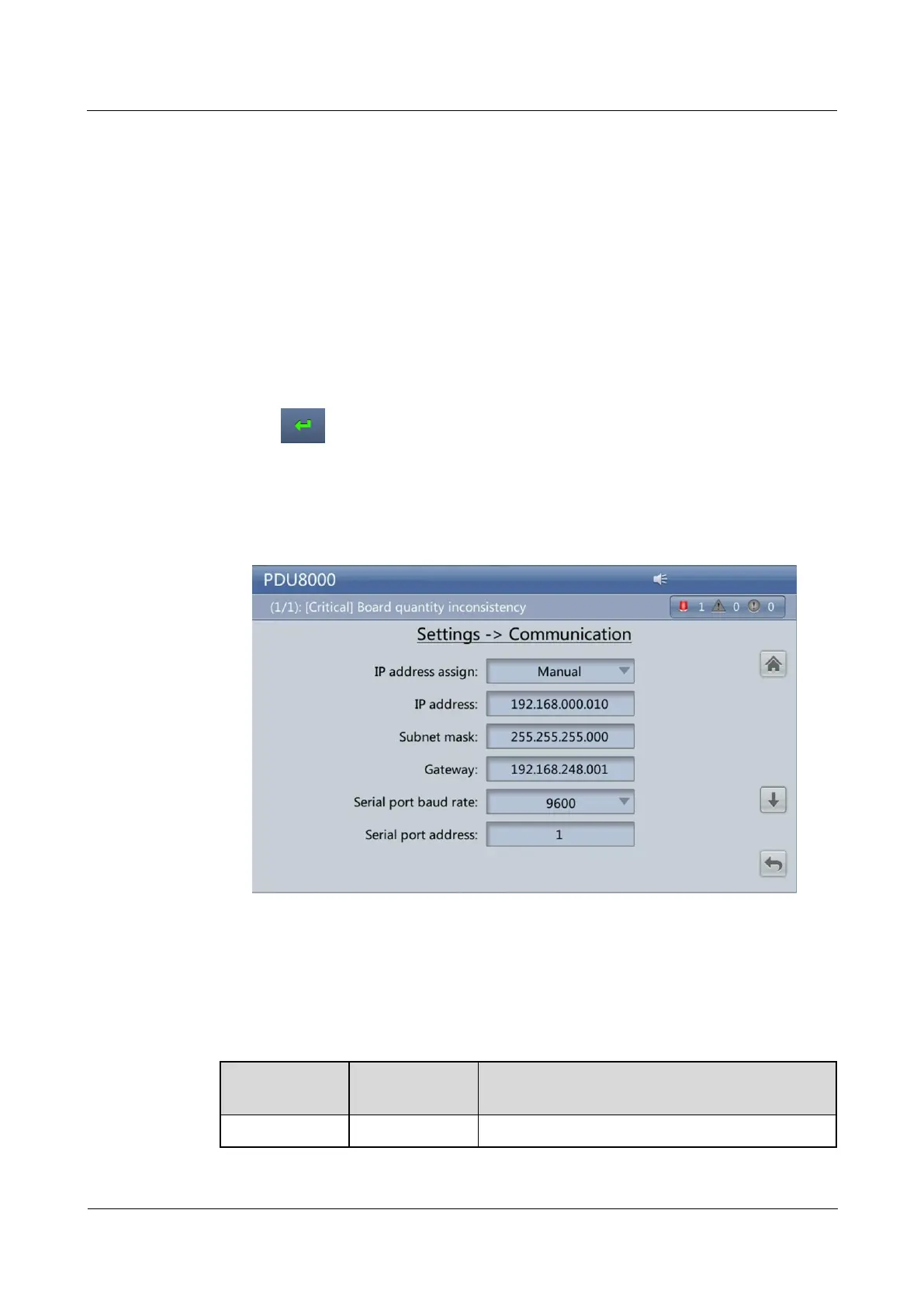
3. Tap Communication and check IP address assign to Manual. And set Serial port
baud rate to 9600, and Serial port address to 1 on the displayed communication
settings screen.
Figure 8-10 PDU8000 communication settings screen
Step 2 Add a PDU8000 (Modbus-RTU).
1. Log in to the ECC800-Pro WebUI as an administrator.
2. Add a PDU8000.
Table 8-5 Adding a PDU8000
Select PDU from the drop-down list box.



 To Next Page