ECC800 Data Center Controller
User Manual (for ECC800-Pro)
Copyright © Huawei Technologies Co., Ltd.
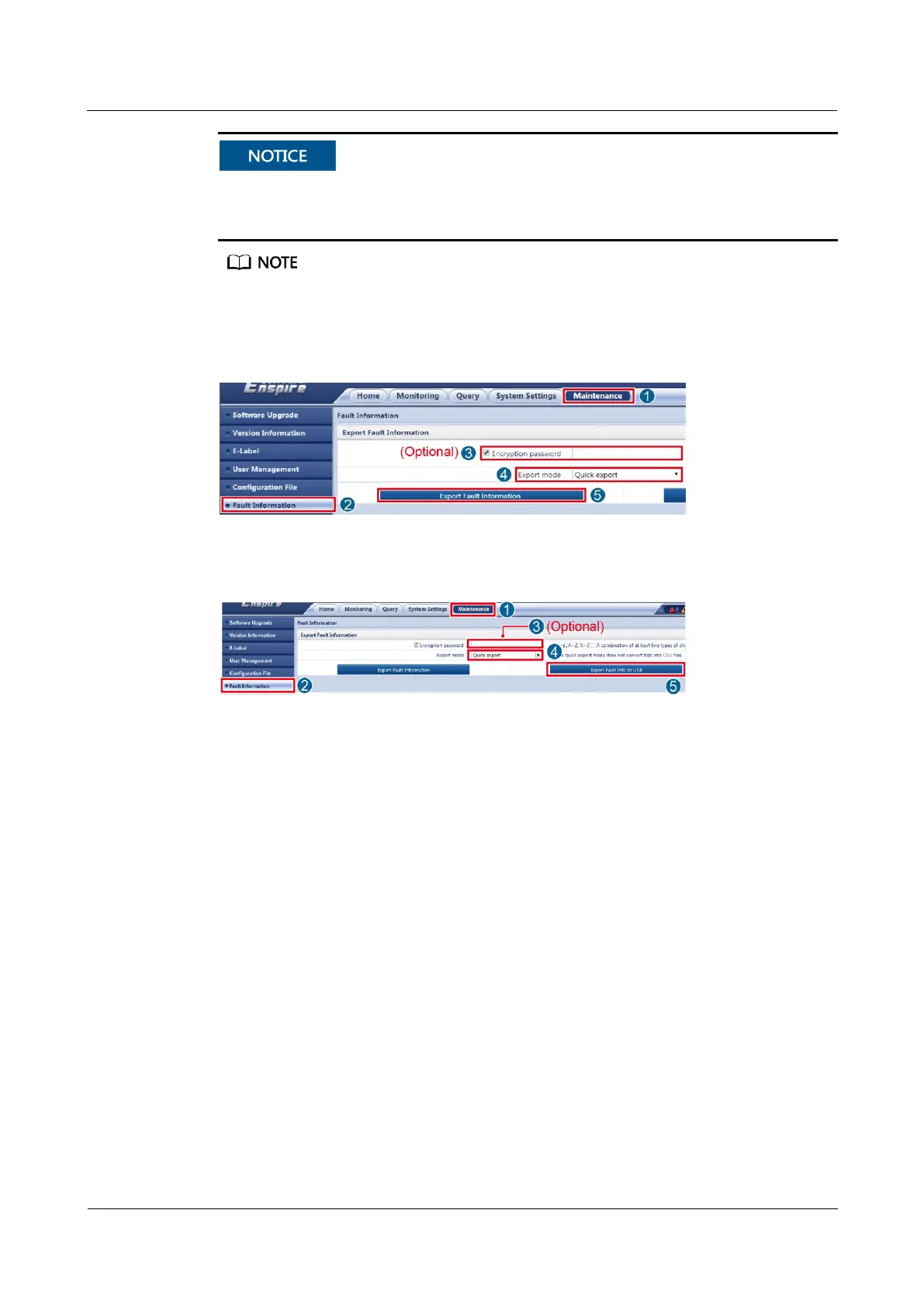
If Encryption password is selected, the exported data package will be encrypted, and you
need to enter the encryption password to decompress the data package. To ensure data security,
you are advised to select Encryption password.
Record the password for decompressing the data package.
Step 4 Export fault information and save the exported data to the PC or USB flash drive.
Figure 8-25 Exporting information to PC
Figure 8-26 Exporting information to USB flash drive
----End
8.1.19 How Can I Synchronize Device Parameters?
Context
Do not delete the source devices before replacing devices.
After replacing devices, you can choose to synchronize configured device parameters to
the target devices.
Source device: device before replacement
Target device: device after replacement
Procedure
Step 1 Log in to the ECC800-Pro WebUI as an administrator.
Step 2 Choose Maintenance > Parameter Sync.
Step 3 Select a value from the Device type drop-down list box.
Step 4 Specify source device and target device, click Submit.



 To Next Page