ECC800 Data Center Controller
User Manual (for ECC800-Pro)
Copyright © Huawei Technologies Co., Ltd.
Blinking at
long
intervals
A network is set up, and no node
access is allowed (the indicator
blinks at 0.5 Hz, on for 1sand then
off for 1s).
Blinking at
super short
intervals
A network is set up, and node
access is allowed (the indicator
blinks at 10 Hz, on for 0.05s and
then off for 0.05s).
Blinking
intermittently
at super short
intervals
The AC actuator is searching for a
network (the indicator blinks at
super short intervals for 0.5s and
then turns off for 0.5s).
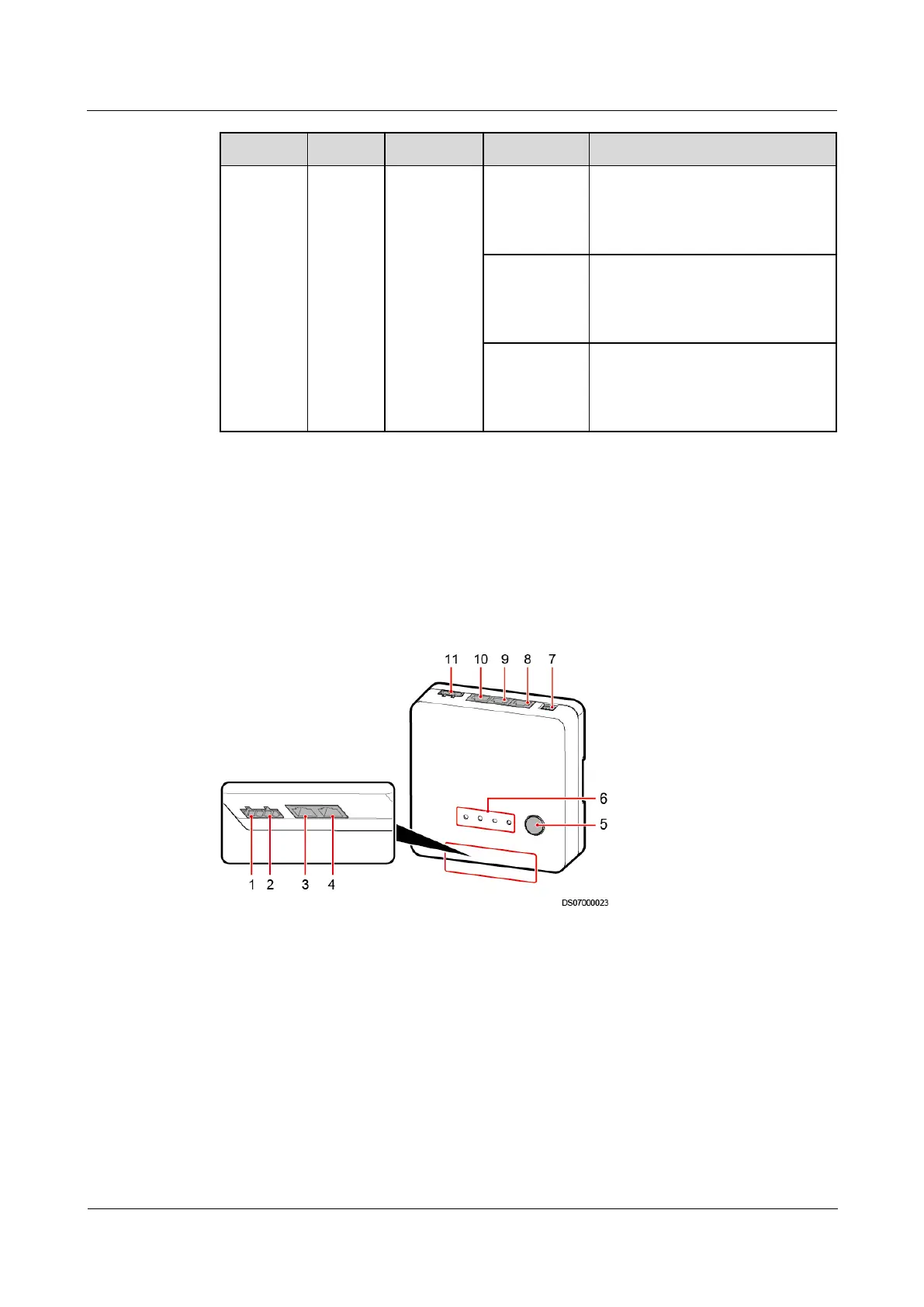
3.2.6 Skylight Actuator
The skylight actuator controls the rotating skylight on the aisle containment of the smart
module through the alarm linkage information from the fire extinguishing system or the
control information from the upper computer. The skylight actuator supports E-labels and
wireless networking (802.15.4).
Figure 3-21 Skylight actuator
(1) LOCK/GND
magnetic lock DO
output port
(2) BUTTON/GND
window open button DI
input port
(3) AI/DI_1 sensor
input port
(4) AI/DI_2 sensor
input port



 To Next Page