ECC800 Data Center Controller
User Manual (for ECC800-Pro)
Copyright © Huawei Technologies Co., Ltd.
One route of dual RS485 ports, not isolated (reserved)
Two AI/DI dry contacts, connecting to two light buttons
Press the button for less than 1 second to start blinking.
Hold down the button for 1–5 seconds to search for a network and start
networking.
Hold down the button for more than 10 seconds to clear network
parameters.
Indicators
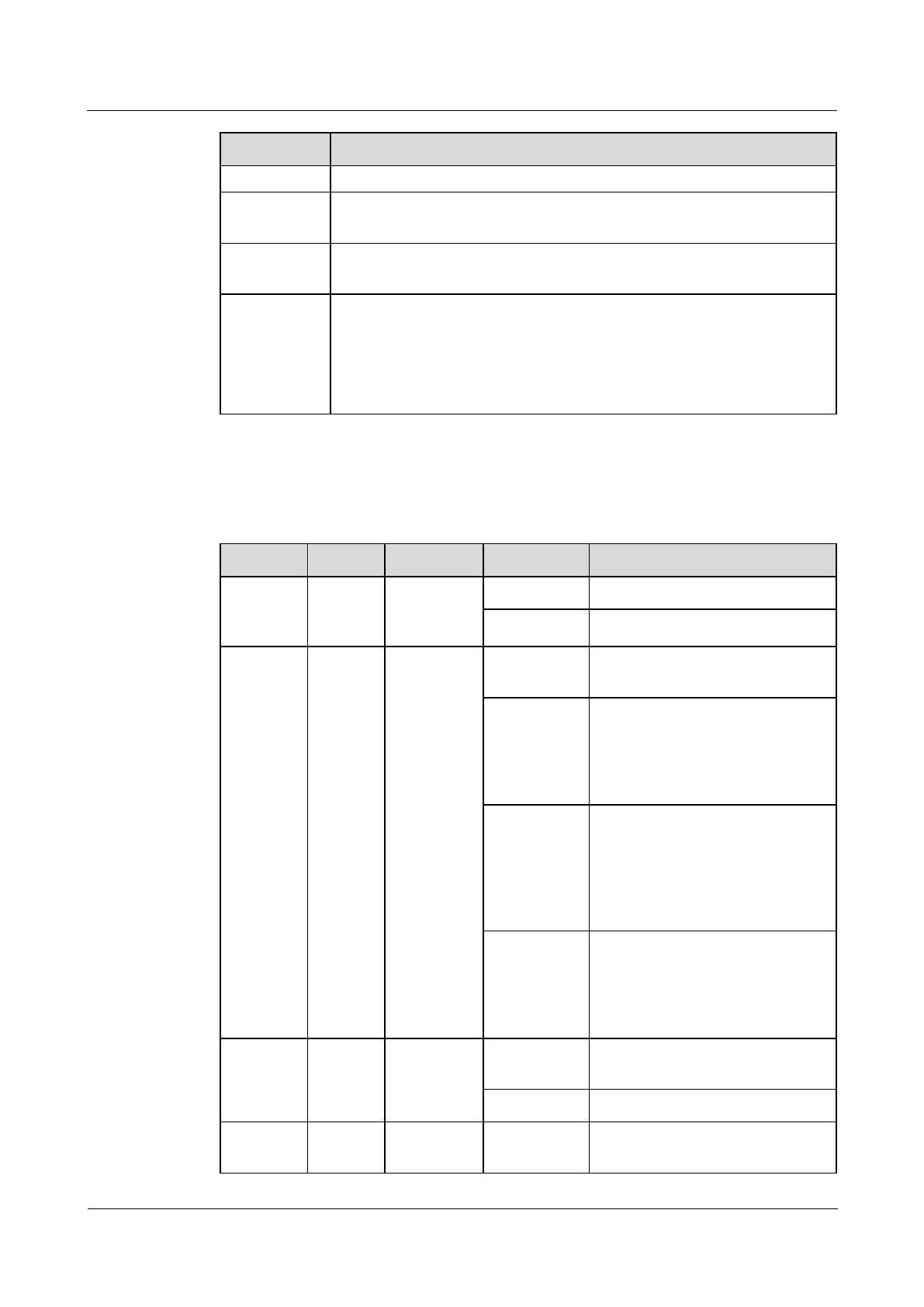
Table 3-40 AC actuator indicators
The power input is normal.
The power is abnormal or the
board program is loading.
Blinking at
long
intervals
The AC actuator successfully
registers with the ECC800-Pro and
the software runs properly (the
indicator blinks at 0.5 Hz, on for
1s and then off for 1s).
Blinking at
short
intervals
The communication is
disconnected or the AC actuator
fails to register with the
ECC800-Pro (the indicator blinks
at 4 Hz, on for 0.125s and then off
for 0.125s).
The indicator blinks at super short
intervals for 0.5s (blinking at 10
Hz, on for 0.05s and then off for
0.05s) and then turns off for 0.5s.
The cycle lasts for 10s.
A system failure alarm is
generated.
No system alarm is generated.
No network parameters exist, or a
network is to be created.



 To Next Page