ECC800 Data Center Controller
User Manual (for ECC800-Pro)
Copyright © Huawei Technologies Co., Ltd.
1. On the Linkage Group tab page, click Add.
2. In the displayed Add Logical Group dialog box, set Group name to Link fire
extinguishing with skylight open.
3. Click OK.
For details about how to add or edit a linkage group name for high temperature linkage control, see Step
4.
Step 5 Add or edit a logic program.
1. Select the edited linkage group name on the Linkage Group tab page.
2. On the Linkage Logical List tab page, click Add or the edit icon .
3. Click Submit.
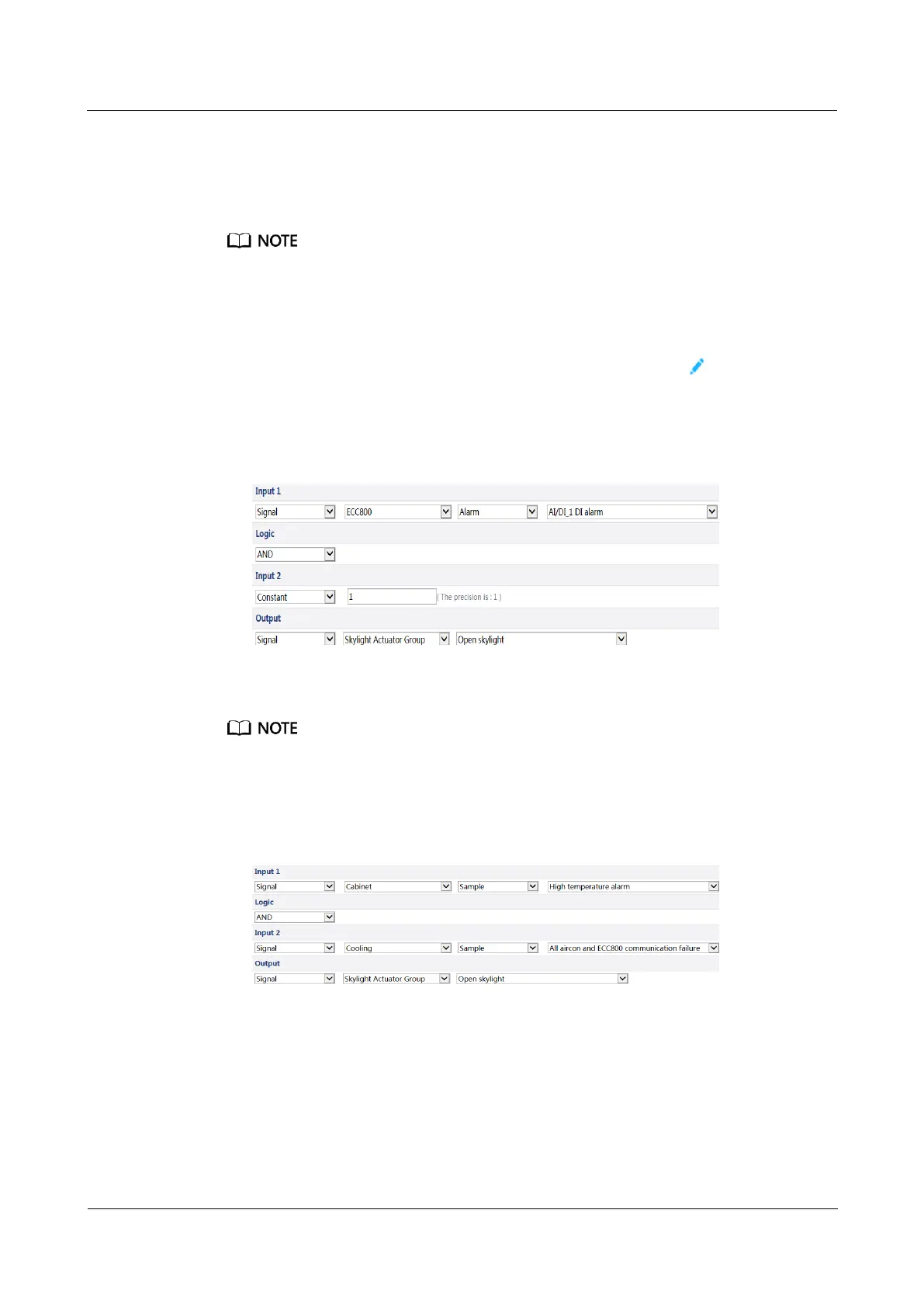
Set Linkage Logic List parameters for Link fire control with skylight open.
Figure 9-1 Setting parameters for Linkage Logic List
Set Linkage Logic List parameters for Link high temperature with skylight open.
When adding high temperature linkage control, ensure that all smart cooling products fail to
communicate with the ECC800-Pro. If smart cooling products communicate properly, cooling can be
automatically implemented when the smart cooling products are at high temperature. Opening the
skylights may cause the cooling effect to fail.
Figure 9-2 Parameters for connecting to the temperature sensor



 To Next Page