ECC800 Data Center Controller
User Manual (for ECC800-Pro)
Copyright © Huawei Technologies Co., Ltd.
Wireless communication:
If the sensor is not connected to the network, after you hold down
the button for 2s to 3s, the sensor connects to the network in RF_Z
mode.
If the sensor is connected to network, after you hold down the button
for 2s to 3s, the RUN indicator blinks.
Hold down the button for more than 6s to clear network parameters.
Test button
(smoke sensor
test button)
Supports the smoke sensor test.
Hold down the button for 3s to trigger a smoke alarm, and release the
button to stop the smoke alarm.
Indicators
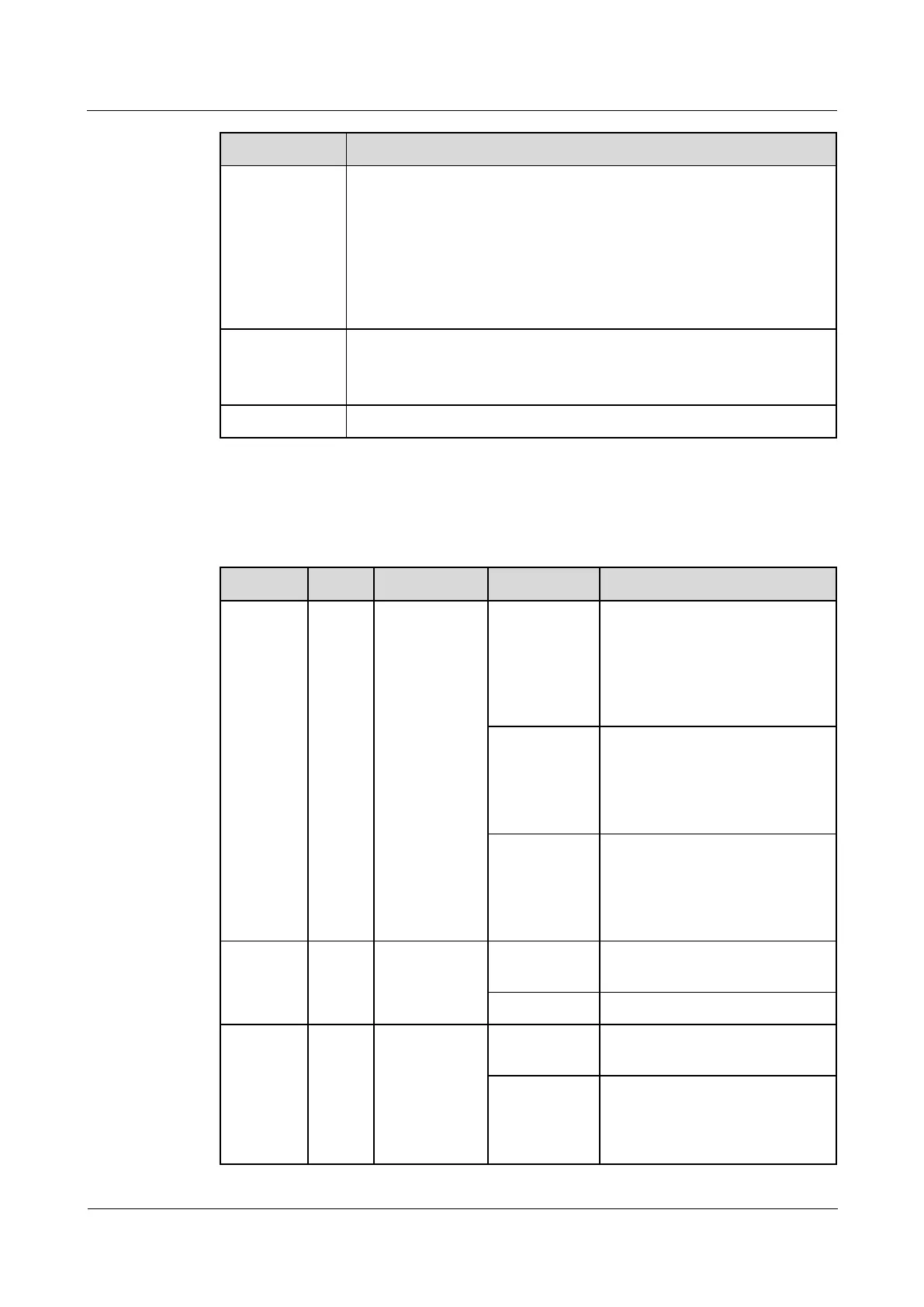
Table 3-45 Description of the indicators on the multi-functional sensor
Module
running status
indicator
Blinking at
long intervals
The multi-functional sensor
successfully registers with the
ECC800-Pro and the software
runs properly (the indicator
blinks at 0.5 Hz, on for 1s and
then off for 1s).
Blinking at
short intervals
The multi-functional sensor fails
to register with the ECC800-Pro
or the communication fails (the
indicator blinks at 4 Hz, on for
0.125s and then off for 0.125s).
The indicator blinks at super
short intervals for 0.5s (blinking
at 10 Hz, on for 0.05s and then
off for 0.05s) and then turns off
for 0.5s. The cycle lasts for 10s.
A system failure alarm is
generated.
No system alarm is generated.
Communicatio
n status
indicator
No network parameters exist, or
a network is to be created.
Blinking at
long intervals
A network is set up, and no node
access is allowed (the indicator
blinks at 0.5 Hz, on for 1s and
then off for 1s).



 To Next Page