v 2.3 — September 2015 Altanium Delta3
100 Alarm States
9.4.2 Alarm States
Alarm states are as follows:
9.4.3 Clearing Alarms
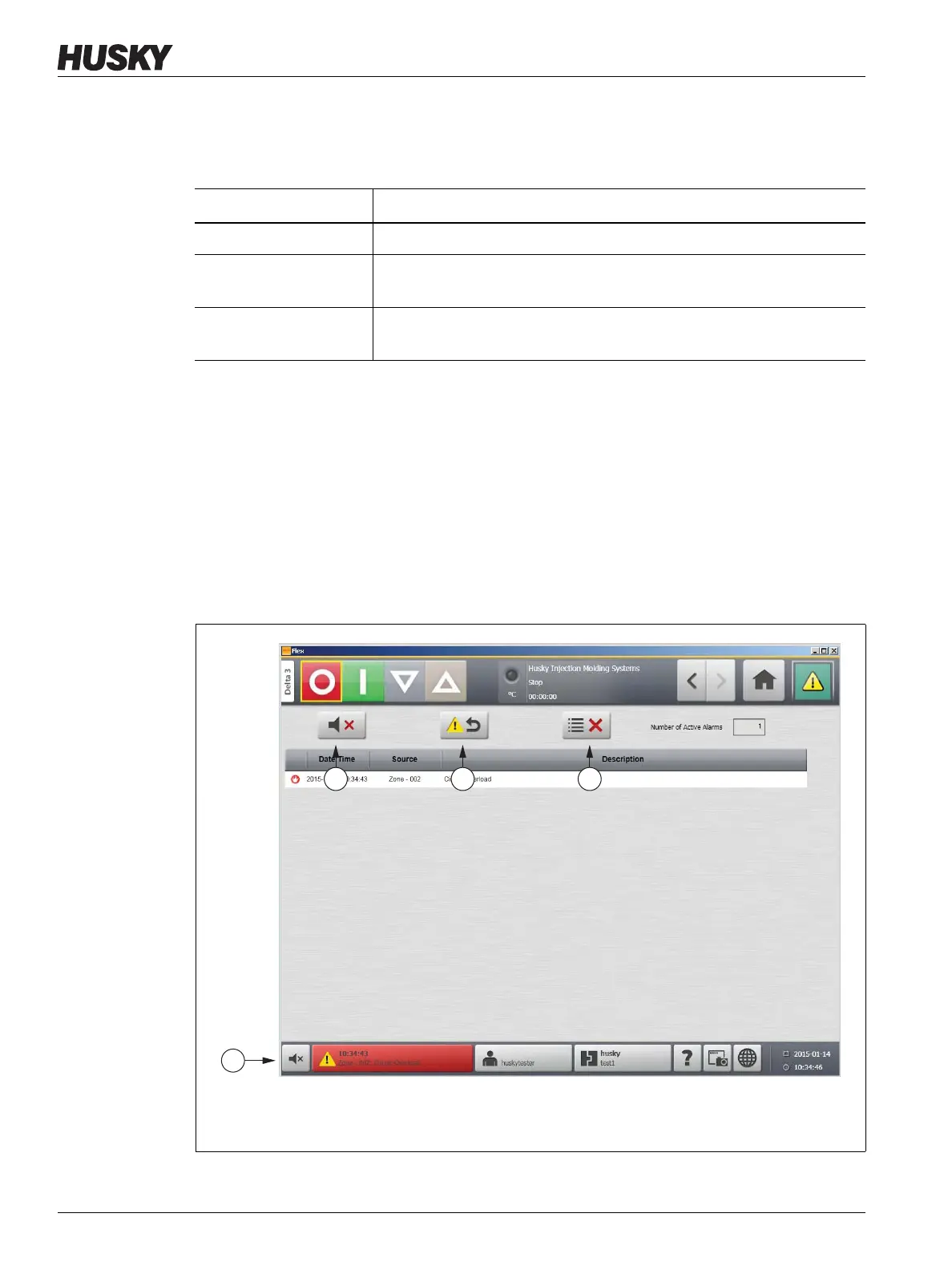
If an error occurs, Altanium will turn on audible and visual alarms and display the alarm
condition on the Alarm screen.
To clear an alarm, do the following:
NOTE:Before resetting an alarm, correct the source of the alarm.
• To silence an audible alarm, touch the Silence Horn button.
• To reset the alarm light and acknowledge the alarm, touch the Reset Alarms button.
Alarm State Description
Active When an alarm first occurs it is assigned the active state.
Inactive Not
Acknowledged
Press the Reset Alarms button and the alarm will be assigned the inactive
not acknowledged state.
Inactive Acknowledged Press the Clear Inactive Alarms button and the alarm will be assigned the
inactive acknowledged state.
Figure 9-2 Silencing an Audible or Visual Alarm
1. Silence Horn Button 2. Reset Alarms Button 3. Clear Inactive Alarms Button



 To Next Page