Deleting a Zone Information Panel 151
User Guide v 2.3 — September 2015 Mold Picture View
11.3.5 Deleting a Zone Information Panel
To delete a Zone Information Panel, do one of the following:
1. Make sure Mold Picture View is in Edit mode.
2. Touch and drag the Zone Information Panel to be deleted onto the Delete button or
off the mold picture view graphic, or:
3. Select the Zone Information Panel and touch the Delete button.
11.3.6 Exiting Edit Mode
To exit Edit mode, do the following:
1. Make sure Mold Picture View is in Edit mode.
2. Touch the Accept button.
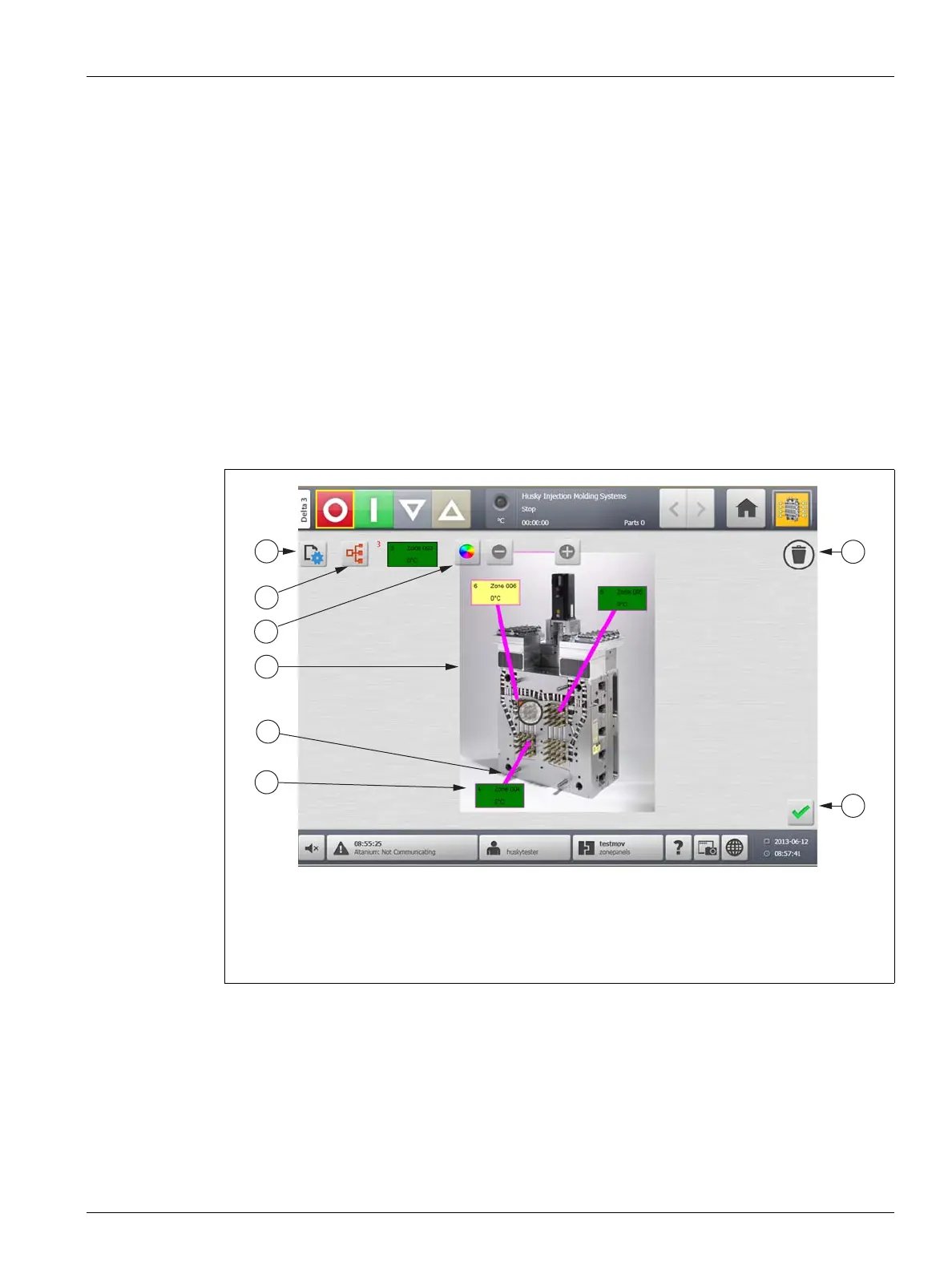
Figure 11-11 Mold Picture View Screen in Edit Mode
1. Change View Settings Button 2. Choose Heat Zone Button 3. Leader Line Color Button
4. Mold Picture View Graphic 5. Leader Line 6. Zone Information Panel 7. Delete Button
8. Accept Button



 To Next Page