v 2.3 — September 2015 Altanium Delta3
148 Editing a Zone Information Panel
11.3.2.3 Editing a Zone Information Panel
In addition to the zone number, a zone information panel also contains two of the following
pieces of information:
• Zone Name
• Current Temperature Setpoint
• Actual Temperature
• Power Output
• Amperage
NOTE:Actual earth leakage is an option when ICC
3
cards are installed and the display
earth leakage parameter is set.
To change the content displayed on a zone information panel, do the following:
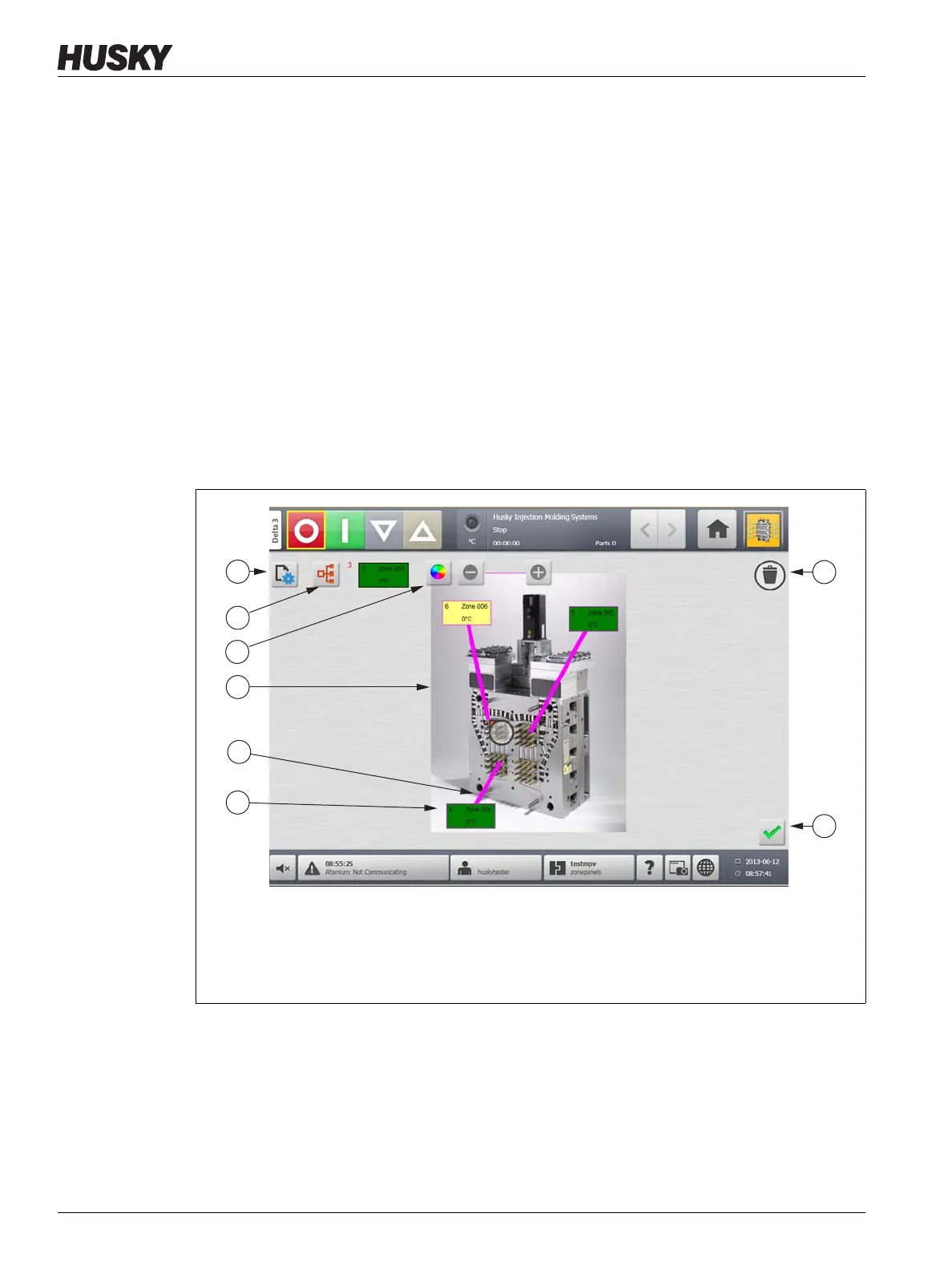
1. Make sure Mold Picture View is in Edit mode.
2. On the Mold Picture View screen, touch the Zone Information Panel to be changed.
3. Touch the Change View Settings button.
Figure 11-8 Mold Picture View Screen in Edit Mode
1. Change View Settings Button 2. Choose Heat Zone Button 3. Leader Line Color Button
4. Mold Picture View Graphic 5. Leader Line 6. Zone Information Panel 7. Delete Button
8. Accept Button



 To Next Page