ART Process Screen 81
User Guide v 2.3 — September 2015 Making Adjustments
7.6.1 ART Process Screen
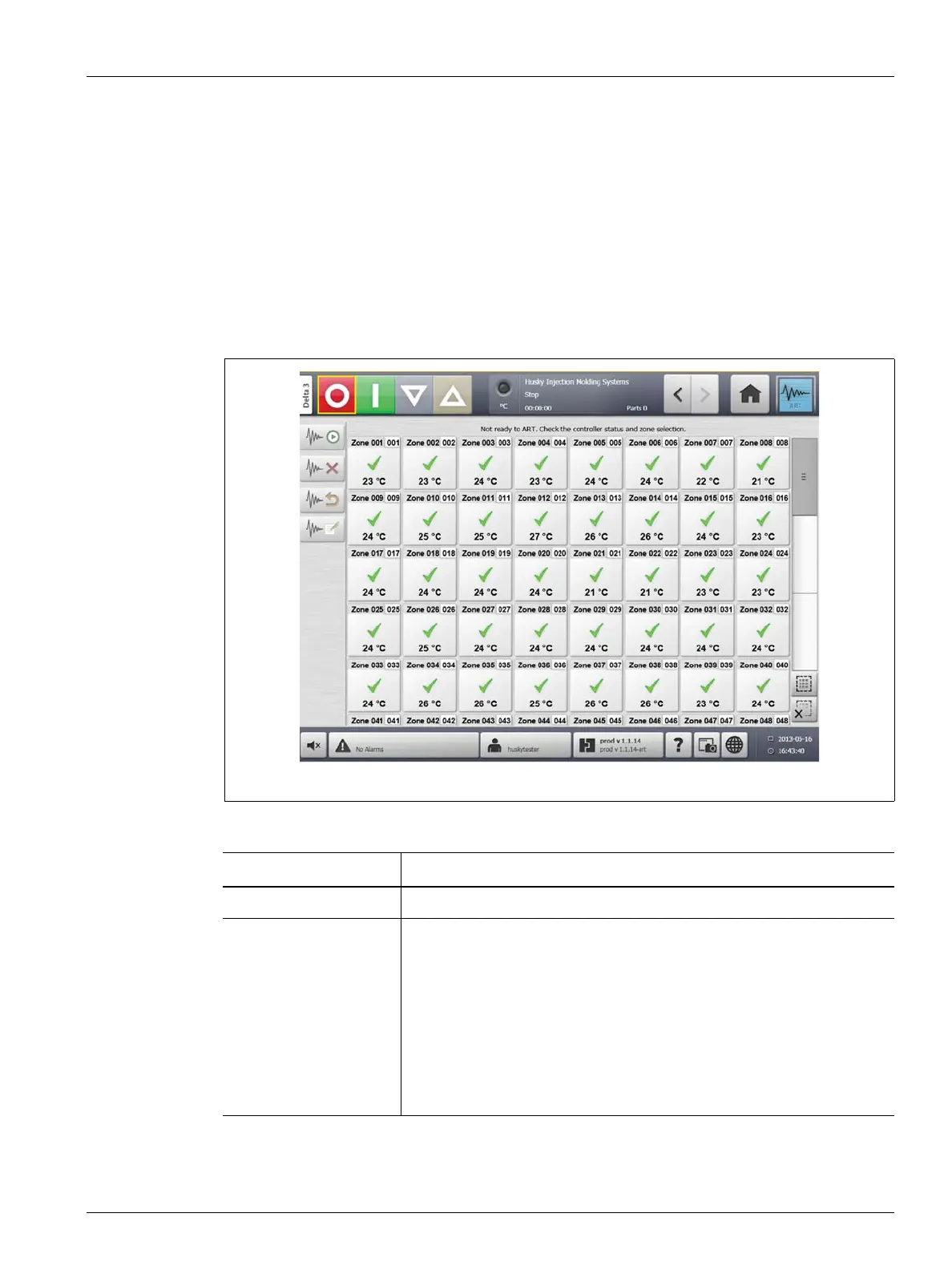
The ART Process screen is used to initiate the Active Reasoning Technology self tuning
process and monitor its progress. This screen will appear automatically after touching START
if any zone in the currently loaded mold setup has not completed the ART process. The
process can be manually initiated for any zones that it is felt are not controlling properly.
When ART is running, the system cannot be modified using the Start, Standby and Boost
buttons. Touch the Cancel Art buttons to return to normal operation or touch the Stop
button to cancel the ART process and stop the controller. Normal navigation is disabled until
ART completes. Pending zones will undergo the ART process the next time the system is
started.
Figure 7-9 ART Process Screen
Table 7-3 ART Process Screen Item Descriptions
Item Description
Status Text The current ART status.
Zone Selection Grid The selection grid indicates the status of each zone.
Yellow represents a zone that is selected.
A yellow caution triangle marks a zone that cannot be ARTed (for
example, a zone set to manual regulation mode or a zone with errors).
An hourglass indicates ART is in progress.
A green check mark represents a zone that has already been ARTed.
A question mark represents a zone that is not ARTed.



 To Next Page