Home
Husky
Temperature Controller
Altanium Delta3
Page 53
Husky Altanium Delta3 - Page 53
230 pages
Manual
Save Page as PDF
To Next Page
To Next Page
To Previous Page
To Previous Page
Loading...
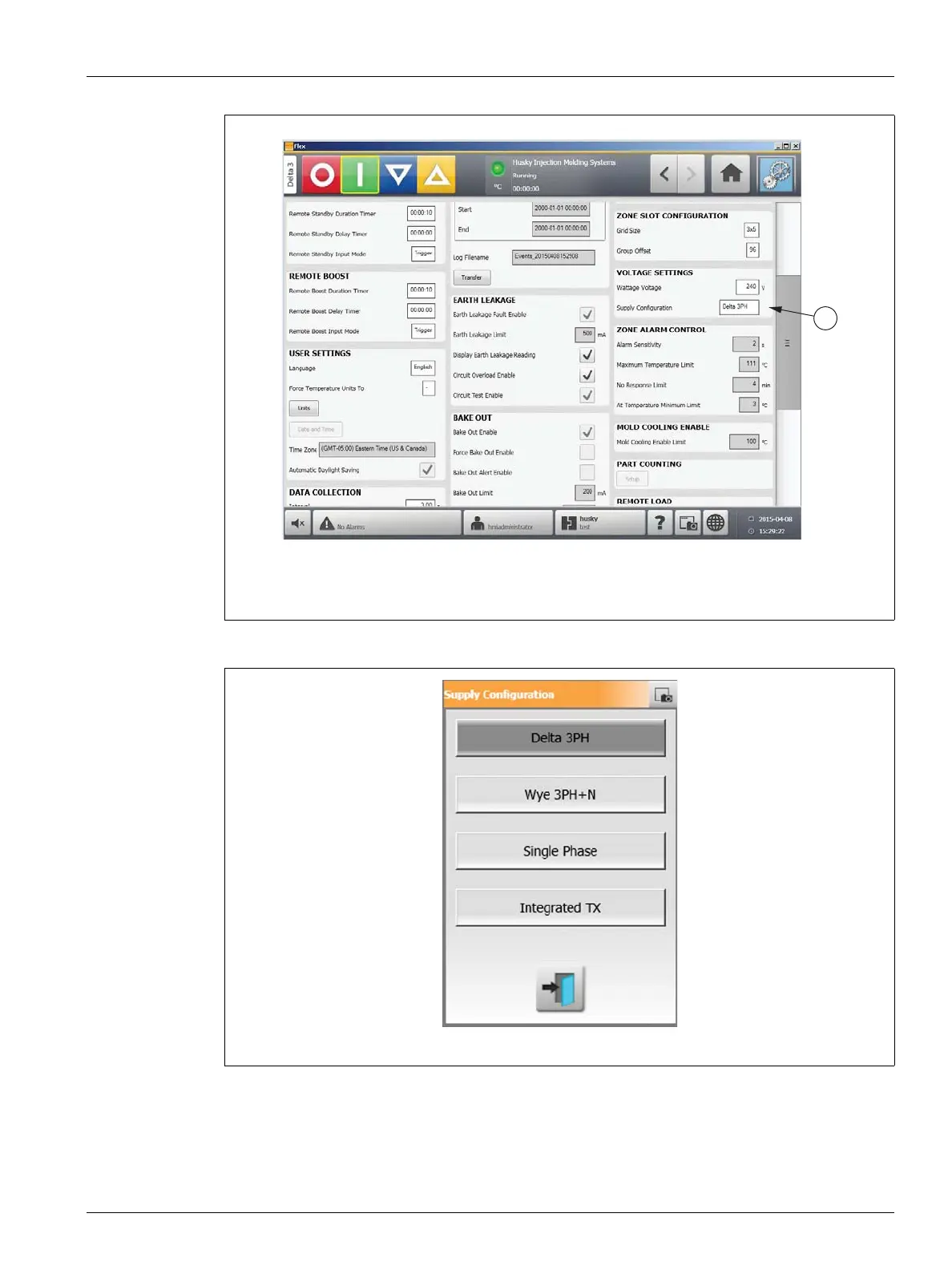
Configuring the Supply Voltage
41
User Guide
v 2.3 — September 2015
Altanium Operator Interface
3.
Select the correct
supply configuration.
Figure
4-13
System Setup Screen
1.
Supply Configuration Field
Figure
4-14
Supply Configuration Dialog Box
1
1
52
54
Table of Contents
Main Page
General Information
3
Telephone Support Numbers
3
Husky Regional Service and Sales Offices
3
Product Upgrades
3
Ordering Spare Parts
3
Ordering Additional Manuals
4
Table of Contents
5
Chapter 1 Introduction
13
General Safety
13
Safety Signs
14
Purpose of the Equipment
15
Restrictions of Use
15
Input Wiring (Conventional)
15
Environmental Operating Specifications
16
Equipment Ratings
16
Technical Specifications
17
Controller Lifting Instructions
17
Chapter 2 Hot Runner Temperature Control
21
Types of Temperature Control
21
Open Loop Control
21
Configuring Zones
21
Configuring a Zone for Zero Cross Control
22
Configuring a Zone for Phase Angle Control
22
Determining the Heater Size
22
Thermocouple Types and Color Codes
23
Chapter 3 Connecting the System to the Mold
25
Prior to Startup
25
Connecting to the Power Source
25
Startup Procedure Checklist
26
Chapter 4 Altanium Operator Interface
27
General Layout
27
Altanium Operator Interface
27
Home Screen
27
Altanium Buttons
28
Controller Function Buttons
29
System Status Field
29
Navigation Buttons
30
Alarm Buttons
31
System and User Management Buttons
31
Dialog Box Buttons
32
System Modes
32
Views Buttons
34
Temperature Control Shortcuts Buttons
35
Creating a Shortcut Button
35
Screen Buttons
36
Multi Group View Screen
39
Changing the Header Color
42
Selecting a Language
44
Printing to a File
45
Print Report Descriptions
47
Network Settings
48
Supply Voltage Screen
49
Viewing the Supply Voltage
49
Configuring the Supply Voltage
52
Using Online Help
54
Chapter 5 Security and Administration
55
User Management and Security Screens
55
Manage Users
60
User Preferences
61
Auto Logout
62
Chapter 6 Mold Setups
63
Mold Setup Screen
63
Creating a New Mold Setup Folder
65
Creating a New Mold Setup File
65
Saving Changes to a Mold Setup File
66
Discarding Changes to a Mold Setup File
66
Saving the Current Mold Setup File as a New File
66
Loading an Existing Mold Setup File
67
Deleting Files
67
Copying Files
67
Renaming Files
67
Transferring Data to the Network
68
Transferring Data Using a USB Storage Device
68
Chapter 7 Making Adjustments
69
Zone Selection
69
Creating a Group
70
Graphical View Screen Overview
71
Text View Screen Overview
75
Zone Selection in the Text View Screen
77
Sorting
77
Quick Set Screen
78
Frequently Used Fields
79
Zone Edit Fields
79
Setpoint Limits
80
Manual Standby Fields
80
Manual Boost Fields
80
Remote Standby Fields
81
Remote Boost Fields
81
Advanced Settings Fields
82
Control Settings Fields
82
Changing a Zone Name
83
Changing Multiple Zones Names
84
Changing a Setpoint
84
Changing the Alarm Window
84
Changing the Abort Window
85
Changing the Output Mode Setting
85
Zone Slave
85
Changing the Regulation Mode
86
Manually Slaving One Zone to Another Zone
86
Using the Automatic Slave Function
86
Setpoint Limits
87
Changing the Normal Setpoint and Limits
87
Changing the Manual Standby and Remote Standby Setpoint Limits
88
Changing the Manual Standby Setpoint Limits
88
Changing the Remote Standby Setpoint Limits
88
Changing the Manual Boost Setpoints and Limits
89
Changing the Remote Boost Setpoints and Limits
89
Changing the Sensor Assignment (Thermocouple)
90
Changing the Priority Control Mode (PCM) Setting
90
Changing the Earth Leakage Check
91
Changing the Automatic Manual Control (AMC) Setting
91
Changing the Output Power Limit Setting
91
Changing the Zone Control from ART to PID
91
Changing P, I or D Parameter Values
92
Active Reasoning Technology (ART)
92
ART Process Screen
93
Using the Manual ART Function
94
PID Control
95
Typical PID Values
95
Possible Causes of Oscillation
95
Chapter 8 Mold Diagnostics
97
Testing the Mold
97
Running a Mold Diagnostics Test
99
Setting the Zone Cooling Time
99
Setting the Maximum Test Time
100
Diagnostics Results
100
Test Results Screen Values
101
Automatic Thermocouple Rewiring
102
Cross-Talk Screen
103
Temperature Graphs Screen
104
Chapter 9 Heating the Mold
107
Heater Circuit Test
107
Startup
107
Earth Leakage/Wet Heater Bake out System
108
Earth Leakage Limit
108
Setting the Earth Leakage Percentage Limit
108
Configuring the Length and Number of Bake out Cycles
108
Soft Start Routine
109
Enabling Soft Start
109
Disabling Soft Start
110
Adjusting the Soft Start Minimum Limit
110
Alarm Screen
110
Opening the Alarm Screen
111
Alarm States
112
Clearing Alarms
112
Event History Screen
113
Filtering Events
114
Alarm and Event Icons
114
Alarm Conditions - Warning Errors
115
Abort Conditions - Shutdown Errors
116
Chapter 10 System Setup Screen
119
System Setup Screen
119
Force Temperature Units to Option
125
Data Collection
125
Changing the Units of Measure
126
Changing the Energy Usage and Units
126
Changing the Grid Size and the Group Offset
127
Changing the Number of Zones in the System
127
Standby Timer Settings
127
Setting the Manual Standby Duration Timer
127
Changing the Remote Standby Input Mode
128
Setting the Remote Standby Delay Timer
128
Setting the Remote Standby Duration Timer
128
Standby Operation Description
129
Boost Timer Settings
130
Setting the Manual Boost Duration Timer
130
Setting the Remote Boost Duration Timer
130
Boost Operation Description
131
Changing the Remote Boost Input Mode
131
Setting the Remote Boost Delay Timer
131
Power Deviation Settings
132
Power Limiting
134
Monitor Zone Settings
135
Options and Licensing
136
Diagnostics Export
138
Part Counting
138
Setting up Part Counting
138
Resetting the Part Counter
140
Sack Full Output Optimization
140
Remote Load
142
Setting up Remote Load
142
Zone Alarm Control
144
Mold Cooling Enable
146
Staged Startup and Shutdown
147
Enabling or Disabling Staged Startup
147
Enabling or Disabling Staged Shutdown
148
Staging Screen
148
Setting the Staged Temperature and Power Setpoints
150
Holding a Stage Setpoint
150
Setting Soak Timers
150
Chapter 11 Mold Picture View
153
Loading a Mold Picture View Graphic
153
Mapping a Network Drive
153
Using the Mold Picture View Toolbar
156
Configuring a Mold Picture View
157
Edit Mode
158
Configuring a Zone Information Panel
158
Creating a Zone Information Panel
158
Moving a Zone Information Panel
159
Editing a Zone Information Panel
160
Creating a Leader Line
161
Changing the Color of a Leader Line
162
Deleting a Leader Line
162
Deleting a Zone Information Panel
163
Exiting Edit Mode
163
Chapter 12 Data Recording
165
Process Trend Screen
165
Viewing the Process Trend
165
Process History Screen
167
Curve Data Point
168
Setting the Timeframe
169
Setting the Date and Time Range
170
Changing the Date and Time Range New
170
Changing the Date and Time Range Old
170
Changing the Zone Displayed on the Process History Screen
171
Process Targets Screen
173
Filtering by Units
174
Chapter 13 System Options
175
Configuring the Digital I/O
175
Turning an I/O Option on or off
177
Cable Connections
177
Input/Output Connector Pin-Out Description
178
Input Base Connector ID
179
Output Base Connector ID
179
Part Count Base Connector ID
180
Remote Load Base Connector ID
181
Chapter 14 SPI Protocol Option
183
SPI Command Summary
183
Echo
183
Process Setpoint
184
Process Value
184
Alarm Active Status
184
Alarm 1 Setpoint
185
Alarm 2 Setpoint
185
Alarm 1 Reset
185
Controller Status
186
Manual Percent Output
187
Open/Closed Loop
187
Chapter 15 Maintenance
189
Altanium System
189
Card Layout Screen
190
Troubleshooting Using the Card Layout Screen
190
Servicing the Altanium System
192
Altanium X/H-Series Card Cage
193
Replacing an Intelligent Control Card (ICC2 or ICC3)
194
Replacing a Blown Fuse on an Intelligent Control Card (ICC2 or ICC3)
195
Replacing an Altanium Delta3 Display Module
196
Disconnecting the Display Module
196
Connecting the Display Module
198
Mounting the Display Module Remotely
200
Replacing the Motherboard Battery
201
Calibrating the Thermocouple Inputs
203
Cleaning the System
203
Cabinet
203
Touch Screen
203
Chapter 16 Ultrasync-E, if Equipped
205
Connecting the Controller
205
Ultrasync-E Screens
206
Ultrasync-E Home Screen Buttons
206
Ultrasync-E Home Screen
207
Control Modes Buttons
208
Manual Control Buttons
209
Ready Conditions
209
Control Bar Status Indicators
210
Datalog Values
210
Ultrasync-E Setup Screen
211
Monitoring
211
Other Settings
212
Setup Buttons
212
Permit Calibration
213
Signals
213
Engaged Mode Commands
214
Permit Disengaging
214
Maintenance
215
Tool
216
Pullback
217
Ultrasync-E Opening Profile and Closing Profile Screens
218
Closing Profile Graph
219
Opening
220
Servo I/O Screen
220
Inputs
221
Outputs
223
Configurable Signals
224
Safety Signals
225
Calibrating the Ultrasync-E
226
Troubleshooting
226
Drive Fault (Error Code #)
226
Alarm: Position Deviation Limit Exceeded
229
Related product manuals
Husky Altanium Neo2
120 pages
Husky Altanium Neo5
182 pages



 To Next Page