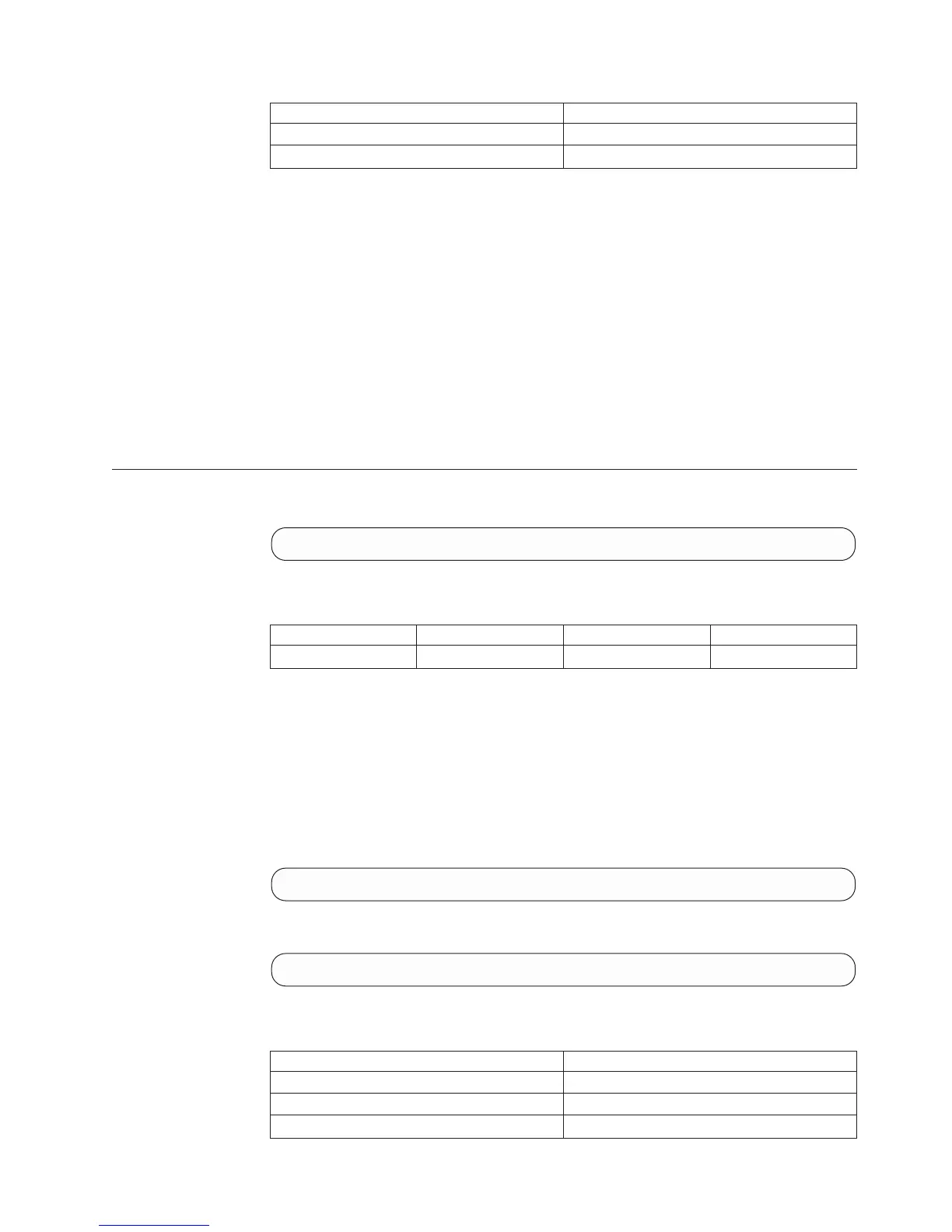
User Category Permission
Read-only users Disallowed
Technicians Disallowed
Completion Codes:
v USER_NAME_ALREADY_EXISTS
User name already exists
v MAX_USERS_REACHED
Maximum number of users already defined
v PASSWORDS_DO_NOT_MATCH
Passwords must be identical
v USER_PHONE_NUMBER_MUST_ACCOMPANY_AREA_CODE
Phone numbers and area code must be defined together
v LDAP_AUTHENTICATION_IS_ACTIVE
Command is not available while LDAP authentication is active
Deleting a User
Deletes a user.
user_delete user=UserName
Parameters:
Name Type Description Mandatory
user Object name User to be deleted. Y
This command deletes a user.
Existing objects created by this user contain an empty reference to the creating user
after it has been deleted.
Two predefined users are set system-wide: Admin and Technician. Predefined
users cannot be deleted or renamed.
Example:
user_delete user=user1
Output:
Command executed successfully.
Access Control:
User Category Permission
Storage administrator Allowed
Storage integration administrator Disallowed
Application administrator Disallowed
Chapter 18. Access Control
379








 To Next Page