Page | 189
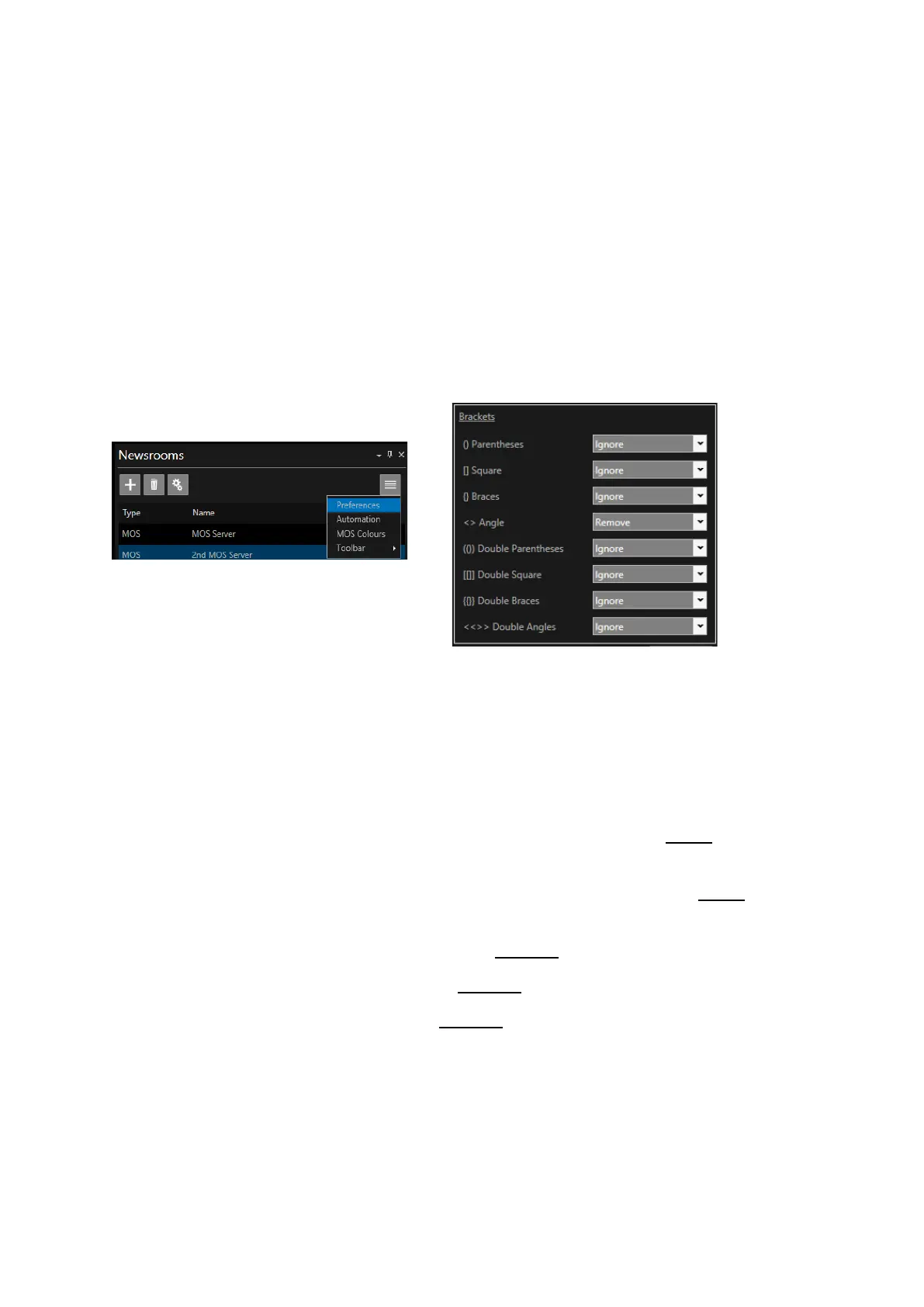
Closed Caption Bracket Settings
Where a script is used which contains text within brackets, how the text within those brackets is
displayed in the CC output can be configured in WP-IP. The configuration of the brackets is
determined in the relative NRCS.
The bracket settings are accessed via the Newsroom pane. Select a Newsroom and then click on the
burger in the pane then Preferences.
There are a number of brackets used in Newsroom production. These brackets are usually imported
in singles or in pairs. WP-IP allows for parameters to be set for any of this combination of brackets.
There are only two types of data sent to the Closed Captioner device:
• Normal story text
• Sound on Tape (SOT) transcripts
Bracket functionality will be handled as follows:
Any bracket type assigned to "Ignore" will be handled as Normal Story Text and will be sent to the
captioner.
Any bracket type assigned to "Sound on Tape" will be handled as sound on tape and will be sent to
the captioner.
Any bracket type assigned to "Presenter Name" will be excluded from the captioner.
Any bracket type assigned to "Instruction" will be excluded from the captioner.
Any bracket type assigned to "Remove" will be excluded from the captioner
Connection Settings
To set the CC serial output parameters click the “Connection” tab.
There are a number of fields to be completed:



 To Next Page