Page | 70
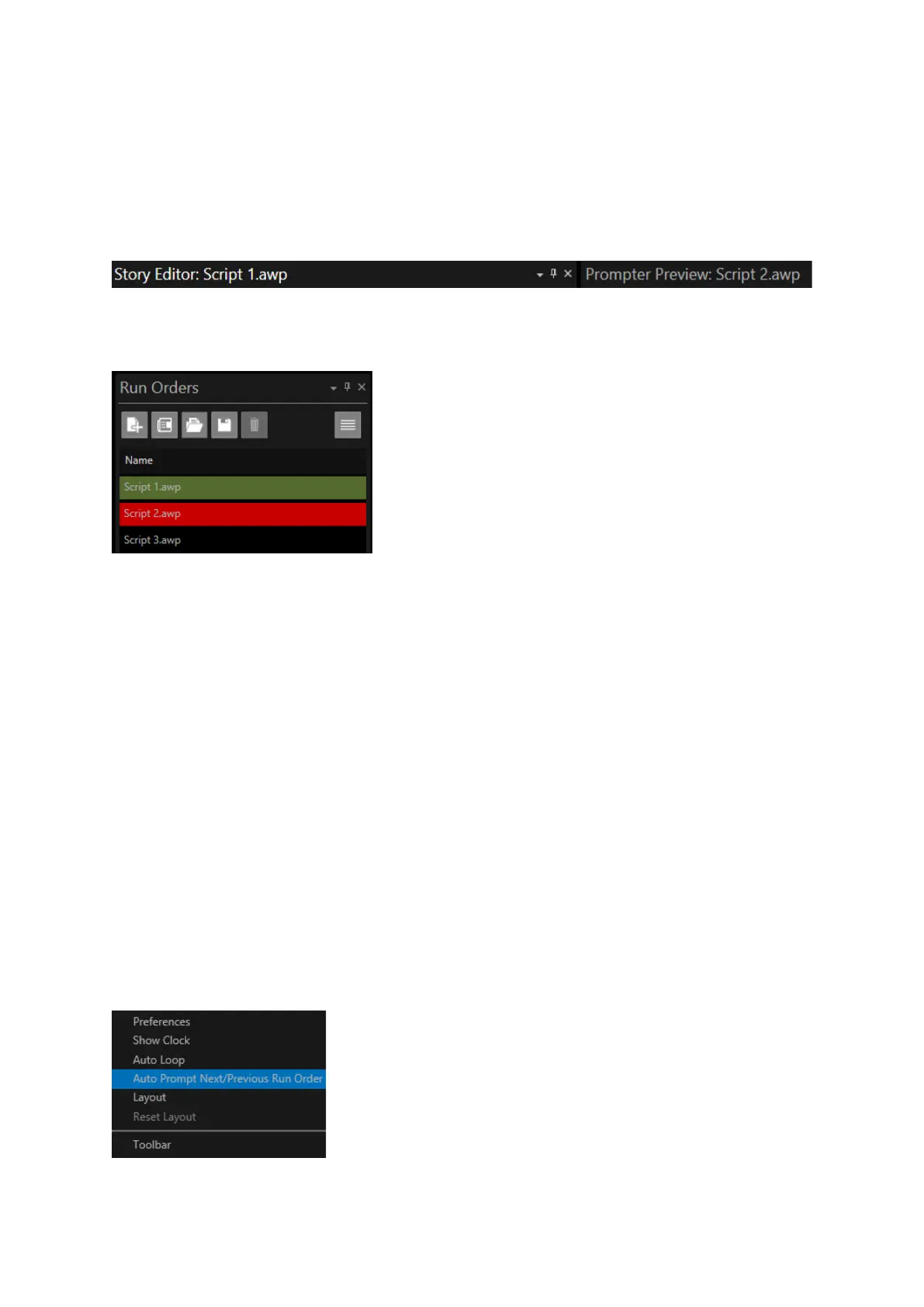
Script 1 is now in the Story Editor pane and Script 2 is still in the Prompter Preview pane (the live
script)
To confirm, the title bar of the Story Editor pane and the Prompt Preview pane show the two
different Run Orders.
Script 2 is in red in the Run Orders window signifying that it is the live Run Order
Script 1 is in green signifying that it is now in the Story Editor
Please Note: Whichever Run Down is selected to be in the Story Editor pane will also be in the Active
Run Order pane
By using these options, the user can preview and edit one script while live prompting another.
Automatically Scroll from One Run Down Into the Next
In many instances multiple run downs are loaded in WP-IP. This is a common mode of operation
with news production, when different news hours have different rundowns, or in conference
presentations where different speakers have different scripts.
The common factor is that the scripts will run consecutively.
When this feature is enabled, the prompter will automatically scroll from the end of one rundown
into the start of the next.
To access this feature, click the burger in the Prompt Preview pane and then Auto Prompt
Next/Previous Run Order



 To Next Page