Home
IP
Software
autoscript WinPlus-IP
Page 235
IP autoscript WinPlus-IP - Page 235
265 pages
Manual
Save Page as PDF
To Next Page
To Next Page
To Previous Page
To Previous Page
Loading...
Page | 234
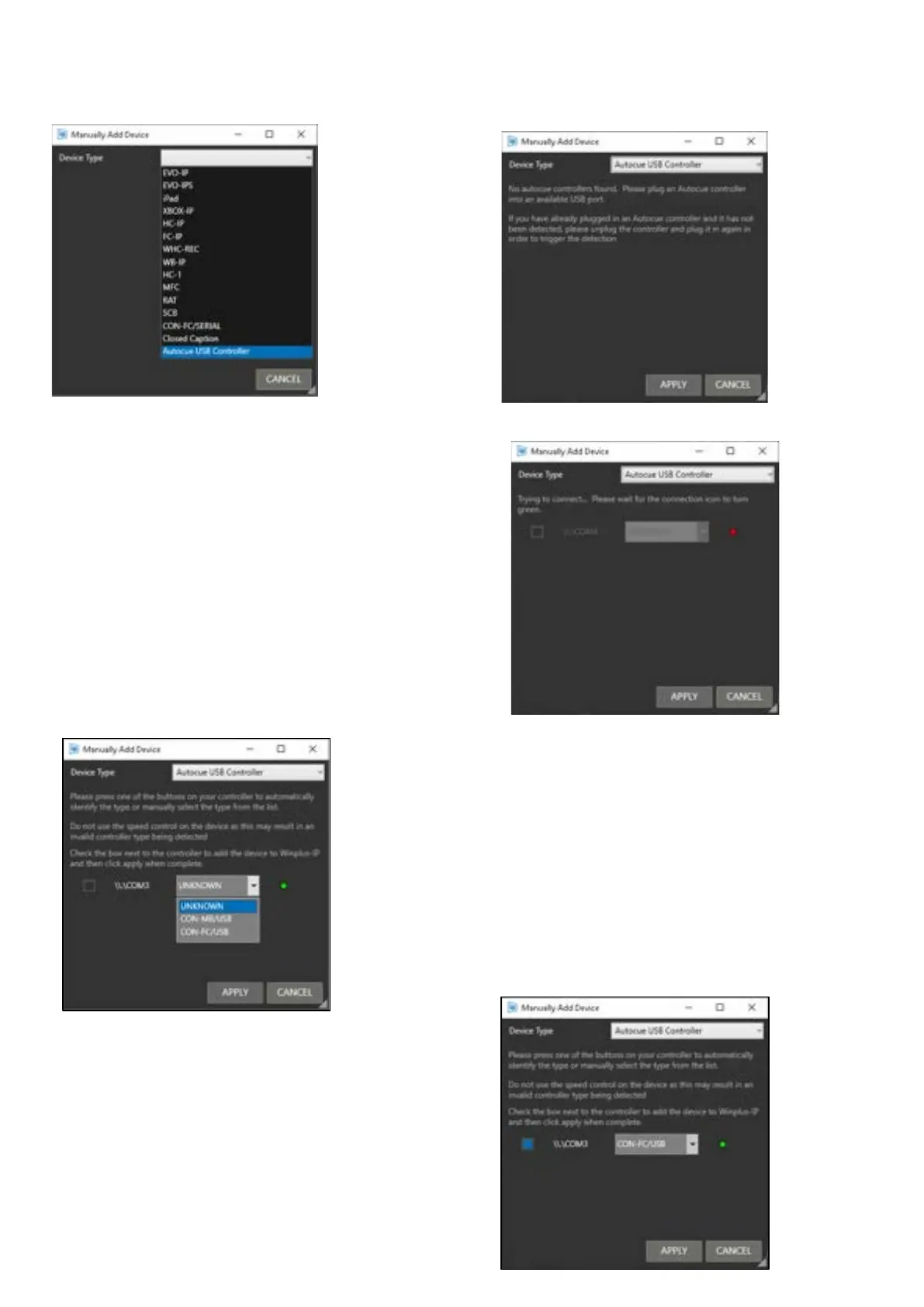
If you have not
connected a
controller, or the
controller is not
detected, you ma
y
see this message
:
When the USB device
is being connected the
icon will be red.
Once connected it
will show green.
The assigned COM port
will be displayed.
Use the pull down t
o manually select the contr
oller type.
Or, press any button
on the controller
to have WP-IP aut
omatically detect the
controller type.
In this example, a CON-
FC
/USB Foot Contr
ol is added.
Click the check bo
x to add the devi
ce to the Devices
pane in WP-IP and
then click APPLY.
234
236
Table of Contents
Main Page
Table of Contents
2
Copyright and Trademarks
10
Winplus-IP Installation
11
To Access Winplus-IP
11
To Install Winplus-IP
11
To Activate Your Winplus-IP Licence
14
How to Videos
15
Licence Types
16
Licence Warnings
17
Invalid Licence Warning
18
Dongle Licence
19
Overview
19
Requirements
19
Requesting a Migration Code
19
Applying a Migration Code
21
Moving the Licence Dongle
22
Firmware Upgrade
24
Adding Devices
26
Adding an Auto Discovered Device
27
Manually Adding a Device
30
Adding Additional Display Devices
33
Adding an NDI Prompter
33
Adding a Local Prompter
35
Displaying Device IP Address
39
Displaying Device Ownership
39
To Take Control of the Device
39
Device Status Light
41
Re-Ordering Devices
41
Connecting IP Devices Across Different Networks
42
Using a VPN IP Tunnel
42
Overview of Winplus-IP Default Layout
44
Icon Size
44
Common Icons
45
Window Layout
45
Moving Panes
45
Tabbing Panes
46
Story Editor Toolbar
47
Story Editor Position Indicators
50
Story Editor Slider Function
51
Active Run Order Toolbar
52
Active Run Order Slider Function
55
Language Selection
55
Status Bar
56
Adding Machine Status Information
58
Activating Prompting
59
To Activate Live Prompting
59
To De-Activate Live Prompting
59
Run Orders
61
How to Create a Simple Run Order
61
Compatible Text Formats
62
Saving a Run Order
63
Exporting a Run Order
64
Recalling a Run Order
65
Reordering Run Orders
66
Renumbering Run Orders
66
Run Order Status
67
Dual Rundown Mode
68
Automatically Scroll from One Run down into the Next
71
Merging Runorders
72
Grouping Runorders
73
Moving Stories
76
Move after Live Story
76
Move after Story
79
Floating/Cloaking Text or Stories
80
Floating from the Story Editor Window
80
Floating/Cloaking from the Run Order Window
83
Adding Notes to a Story
84
Run Order Options When Importing Scripts
85
Limit Maximum Number of Blank Lines Imported
86
New Line after ".", "?" or
86
Tab Handling
88
TIPS Import Handling
90
Selecting Format on Import
92
Shortcut Keys
93
Text Colours
94
Default Colours
94
Edit the Custom Colours
94
Using Shortcut Keys to Apply Colours
96
Prompter Preview Preferences
97
Blanking
97
Cue Marker
100
Cue Marker Style
100
Cue Marker Colour
100
Cue Marker Vertical Offset
101
Controls Prompt Position
102
Clock
104
Operating with Prompter Preview Closed
106
Timer
107
Setting the Timer
108
To Add/Remove Time
108
Setting the Timers Appearance
109
Timer Display
109
Time to Show Alert
110
Timer Format
110
Timer Colours
111
Timer Position on Screen
111
Timer Preferences
111
Prompter Messages
113
Adding a Message
114
Deleting a Message
115
Showing/Hiding Messages
115
Configure Message Preferences
116
Sluglines
121
Slugline Configuration
121
Removing Sluglines from the Prompt Output
122
Prompter Preview Layout Formatting
123
Adjusting the Output Margin
124
Adjusting the Cue Marker
125
Adjusting the Interline Spacing
126
Resetting the Prompter Preview Output Formatting
126
Presenter Settings
127
Overview
127
Add a Presenter
129
Display the Presenters Name
130
Configure Presenter Settings
132
Apply Presenter Settings
134
Remove a Presenter
135
Script Macros
136
Adding Script Macros
136
Editing Macro Preferences
137
Bookmarks & Snapshots
141
Configuring Bookmarks
142
Selecting Bookmarks
143
Configuring Snapshots
144
Selecting Snapshots
144
Find and Replace
145
To Find Text
145
To Replace Text
145
Spell Check
147
Font Management
148
To Add a Font
149
Adding Fonts from a File
151
Removing Fonts
151
Printing Options & Configuration
153
Common Settings
154
Colour Closeness
154
Editing Run Order & Selected Story Settings
155
Additional Functionality from Winplus-IP V1.12 Onwards
157
Newsroom Connection & Configuration
158
Connecting to a MOS Newsroom
158
Adding a Rundown in MOS
160
Additional MOS Configuration Options
162
Use Backup/Buddy Server
162
Connection Timeout (Ms)
163
Heartbeat Timeout (Ms)
163
Break Identifier
163
Initialise Run Order List
163
Auto Load MOS-Active Run Orders
164
Preserve Current Run Order if Made Inactive on Server
164
Pausing Runorder Updates
165
Connecting to Avid Inews Via FTP
167
Adding a Rundown in Inews
168
Additional Inews Configuration Options
171
Connection Timeout (MS)
171
Encoding
172
Use Encryption
172
Passive Mode
172
Limit Connections
173
Max Connections
173
Backup Servers
173
Connecting to a Shared Directory Newsroom
174
Adding a Rundown in Shared Directory Newsroom
175
Newsroom Preferences
177
Live Updates
178
Disable Editor for Newsroom Updates
178
Auto Story Numbering
179
Save Run Order Selection
179
Float/Cloak Stories with no Presenter Assigned
179
Exclusion Options
180
Bracket Options
180
MOS Colour
182
Display Run Order Date/Time
184
Display Story Update/Replacement Count
185
Display/Hide Story Breaks
187
Closed Captioner Configuration
188
General Settings
189
Closed Caption Bracket Settings
190
Connection Settings
190
Advance Settings
191
EEG and Link CC Encoders
191
Legacy Winplus Settings
192
Other CC Encoders
192
Redundancy
193
Overview
193
Configuring Redundancy
193
Swapping Redundant Machines
196
Manual Pairing
196
Additional Redundancy Tools
197
Newsroom Redundancy
199
Supported Devices
199
Automation Options
200
Automation Interface
200
Automation
201
Overview
201
Configuration
201
Configuration
202
Overview
202
Configuration Toolbar
203
Add a Configuration
204
Add Parent or Child Configurations
206
Modify Configurations
208
Load Configurations
209
Reset to Default
211
Move & Duplicate Configurations
211
Delete a Configuration
212
Export/Import of Settings
213
Overview
213
Exporting Settings
213
Importing Settings
216
Advanced Display Configuration
218
Power
220
Main Settings
221
Colour Temperature
221
Image Orientation
221
Image Scaling
222
Input Source
222
Display
222
Talent Monitor
223
Noise Reduction
223
Dynamic Noise Reduction
223
MPEG Noise Reduction
223
Picture-In-Picture (Pip)
224
Display
224
Talent Monitor
225
Integration of Legacy Autoscript Controllers with WP-IP
226
Hardware Configuration
227
Software Configuration
228
Integration of Legacy Autocue Controllers with WP-IP
232
Adding the Autocue Shuttlexpress (CON-SE)
233
Adding Autocue Multi Button USB Desktop Control (CON-MB/USB) & USB Foot Control (CON-FC/USB/001)
234
Idevice Integration and Operation
238
Overview
238
Licence & Software Requirements
238
Autoscript Licence Required
238
Autoscript Supported Software
238
Supported Apple Devices
238
Supported Apple os
238
Purchasing a WP-I Licence
239
To Activate Your WP-I Licence
239
Downloading the Ievo Application
240
Connection Requirements
241
Ievo Network Connection Examples
242
Local Network Ipad/Iphone Connection
242
Remote Network Ipad/Iphone Connection
243
Adding an Idevice to the WP-IP Application
244
Adding an Auto Discovered Device
245
Manually Adding a Device
246
Configuring an Idevice
249
General
250
Time Zone
251
Display
253
Prompting Control
253
Configuring the CLOCKPLUS-IP Device
254
Controller Devices
256
HC-IP Controller (A9009-0002)
256
FC-IP Controller (A9009-0003)
257
WC-IP Wireless Controller (A9009-0007)
258
WB-IP: Base Station for Wireless Scroll Control (A9009-0008)
258
Configuring the WC-PKG Wireless Controller
259
Adding the WB-IP
259
Adding the WC-IP
260
Pairing the WC-IP to the WB-IP
261
Troubleshooting
262
Export Logs
262
Technical Support & Sales Contact
263
Service Agreements
264
Notes
265



 To Next Page