Operation
4
Operation
5
6
7
8
e3861552
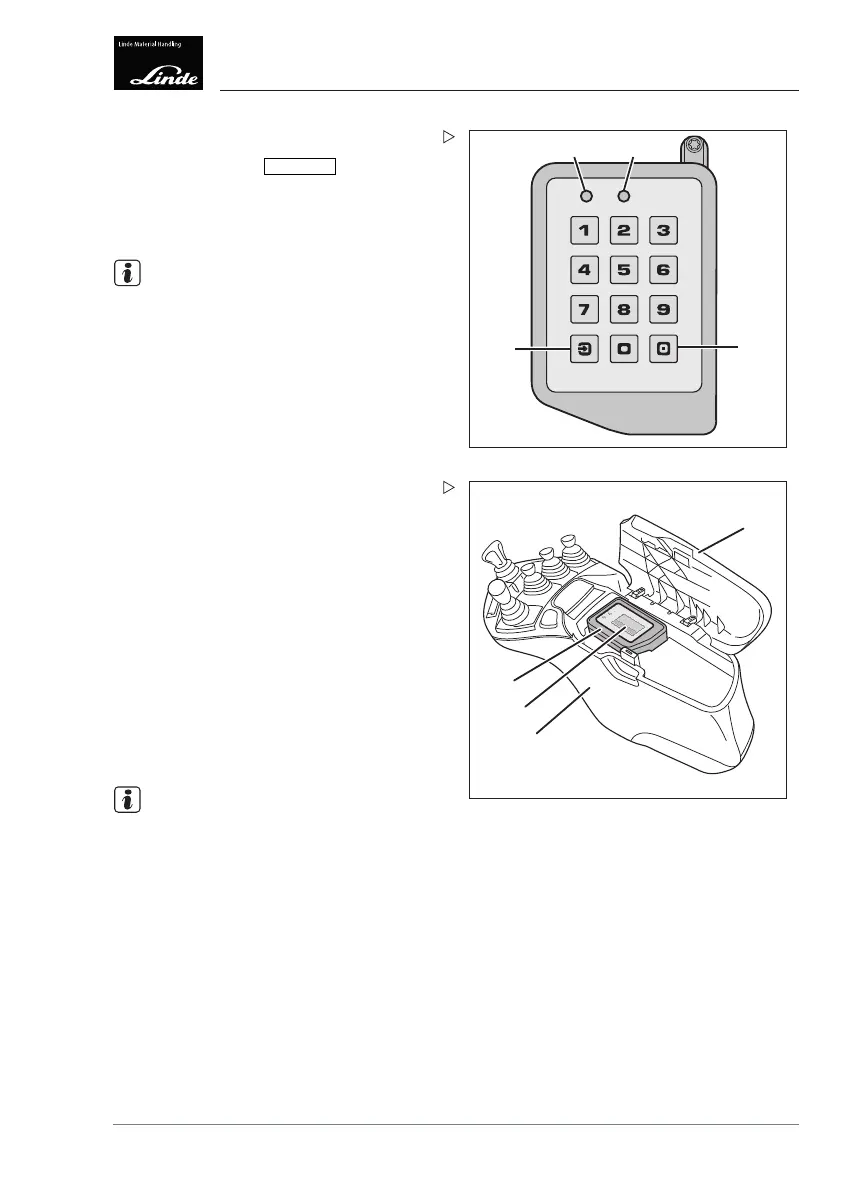
Activating the power supply:
Press and hold the
Log IN/OUT
button (7) for
longer than 2 seconds.
LED (5) lights up yellow and LE
D (6) flashes
green.
NOTE
Depending on the software version, the
colours of LEDs (5) and (6) may vary.
The power supply remains switched on for
approx. 60 seconds (e.g. for lighting).
1
3
4
e3861553
2
Input via transponder
(chip or chip card)
The input unit (1) is located in the armrest
console (3) and features a reading area (2)
onto which the corresponding transponder
(chip or chip card) must be placed.
The driver logs in
by placing a transponder on
thereadingarea(
2).
The truck can be switched on only once the
transponder has been placed onto the reading
area.
This ensures that the truck can be used only
by authorised staff.
NOTE
A status check (Pre-operational check) can
be performed using a valid transponder. The
fleet manager can activate this status check.
Operating Instructions – 3888011701 EN – 12/2017 109



 To Next Page