5.5.5 Examples for Placeholders and Variables in the Comment Field
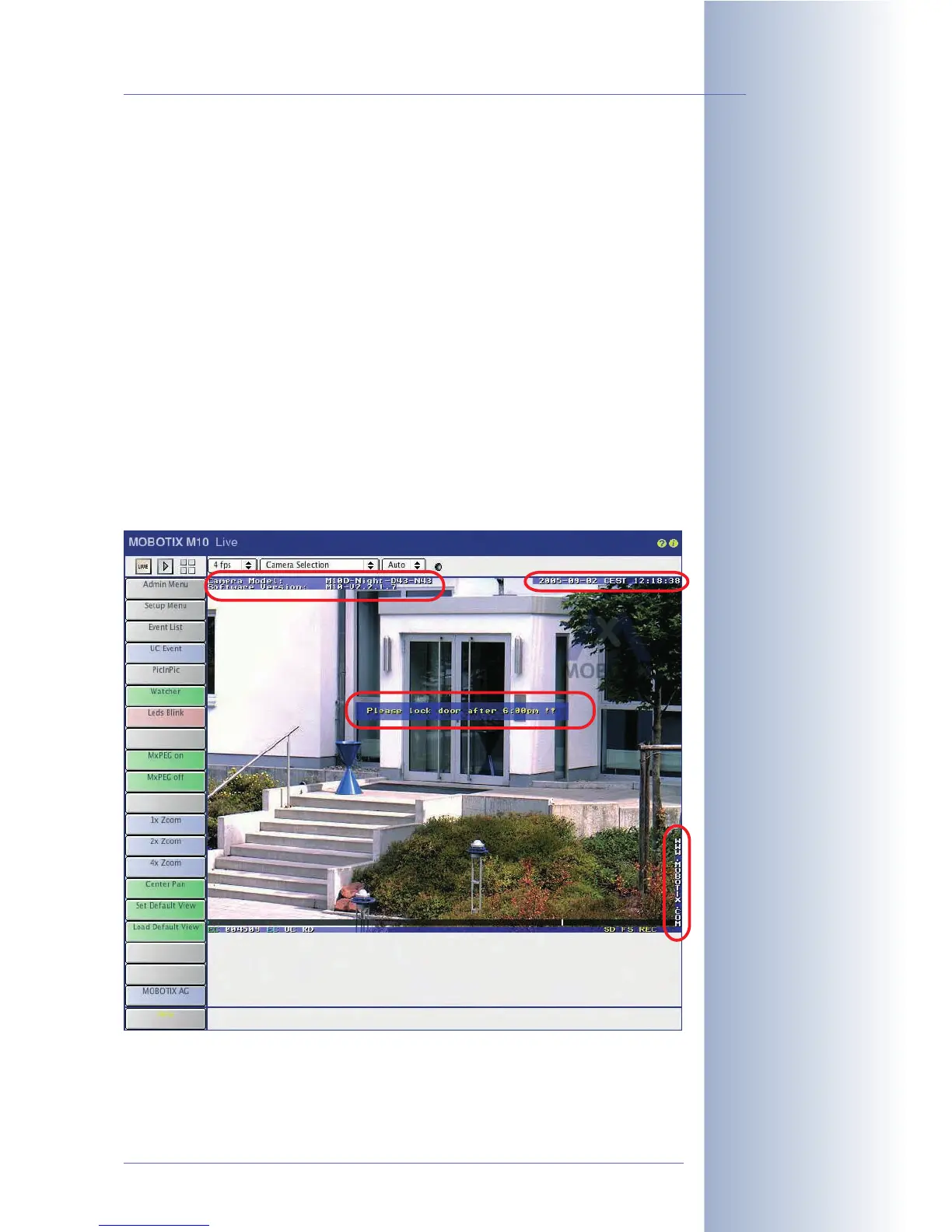
The following example creates text in the upper left corner of the image (camera
model, software version). The software version is displayed using the $(ID.SWV)
variable.
Camera Model: M12D-Night-D43N43
Software Version: $(ID.SWV)
The following example displays a yellow (^#0B) text ("Please lock ...") at a distance
of 25 characters from the left edge of the image and 20 characters from the upper
edge of the image.
^#0B^g25,20;Please lock door after 6:00pm !!
The example below displays a white (^#0F) text ("WWW.MOBOTIX.COM") at a
distance of one character from the right edge of the image (first parameter -1). An
automatic line break occurs (after one character in this case). The text is displayed
at a distance of 16 characters from the bottom edge of the image (second parame-
ter -16).
^#0F^g-1,-16;WWW.MOBOTIX.COM
The following example displays text received as network message (see section
7.6.1,
Event Selection
) at the beginning of line 5; max. length is ten lines:
^g0,5;^s10
© MOBOTIX AG • Security-Vision-Systems • Made in Germany
www.mobotix.com • sales@mobotix.com • 10.10.2006
111/288
Software Camera Manual Part 2
Text display in the live
image
Displays text in network
essages (IP Receive) in
the live image



 To Next Page