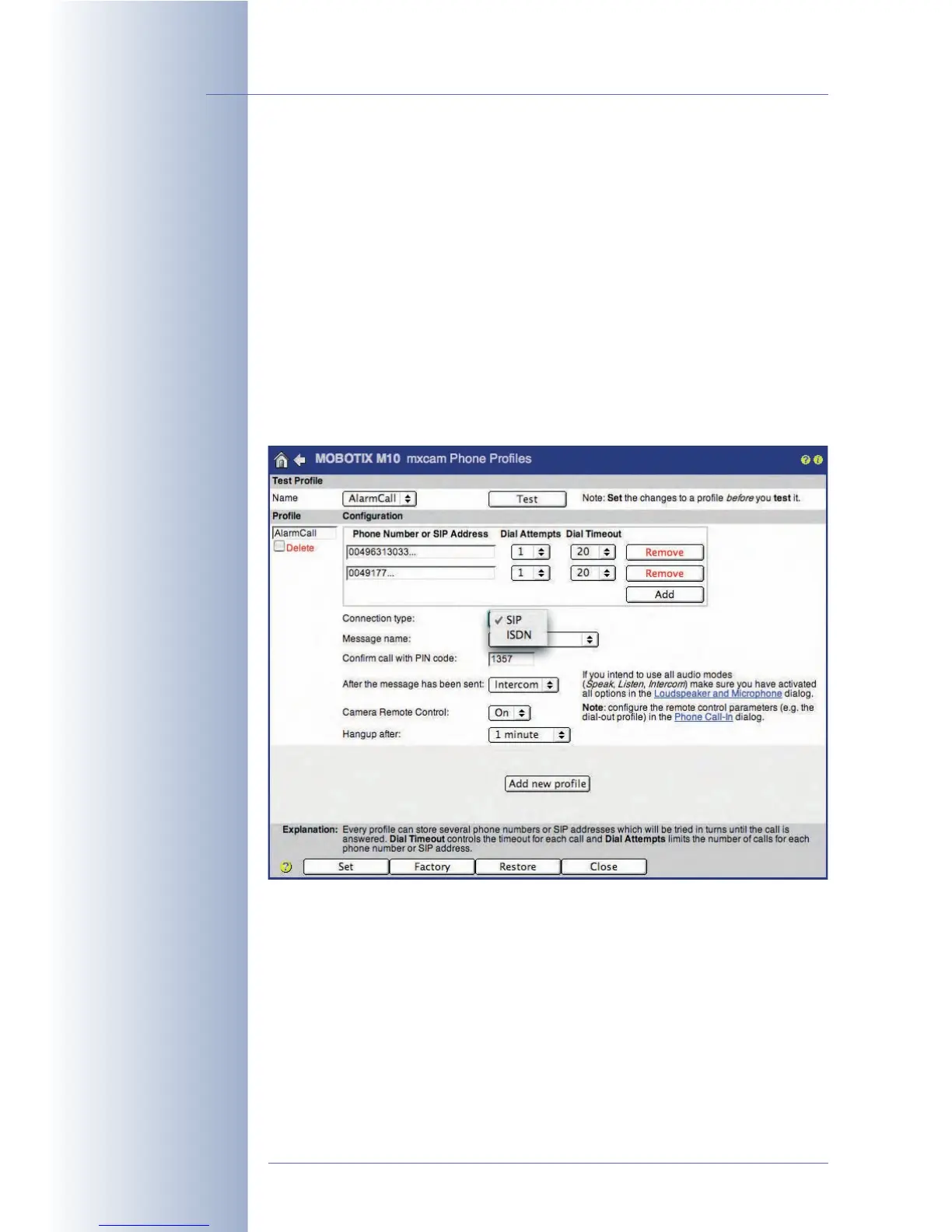
9.4 Phone Profiles: Outbound Phone Calls
The MOBOTIX camera uses the information stored in the profiles of the Admin
Menu > Phone Profiles dialog to place outbound (voice) phone calls. The phone
profiles are used in other dialogs to place automatic phone calls (CL), e.g. as a
reaction to the events selected in Setup Menu > Messaging, Setup Menu >
Messaging 2 and Admin Menu > File Server Tests.
To test a phone profile, select the desired profile in the Name list at the top of the
page and click on the Test button.
Click on the Add new profile button at the bottom of the dialog to create an
additional profile. In order to delete a profile, activate the Delete checkbox and
click on the Set button, then click on Close and store the configuration.
For additional information on this topic, see section 7.8.4,
Phone Profiles
.
© MOBOTIX AG • Security-Vision-Systems • Made in Germany
www.mobotix.com • sales@mobotix.com • 10.10.2006
242/288
Software Camera Manual Part 2
Make sure that VoIP has
been set up properly if
you would like to use a
SIP connection (Admin
Menu> VoIP Settings)
The SIP connection type
only appears in this list, if
VoIP has been activated
in Admin Menu> VoIP
Settings



 To Next Page