8.3.3 Recording on a Windows Computer
Camera Settings
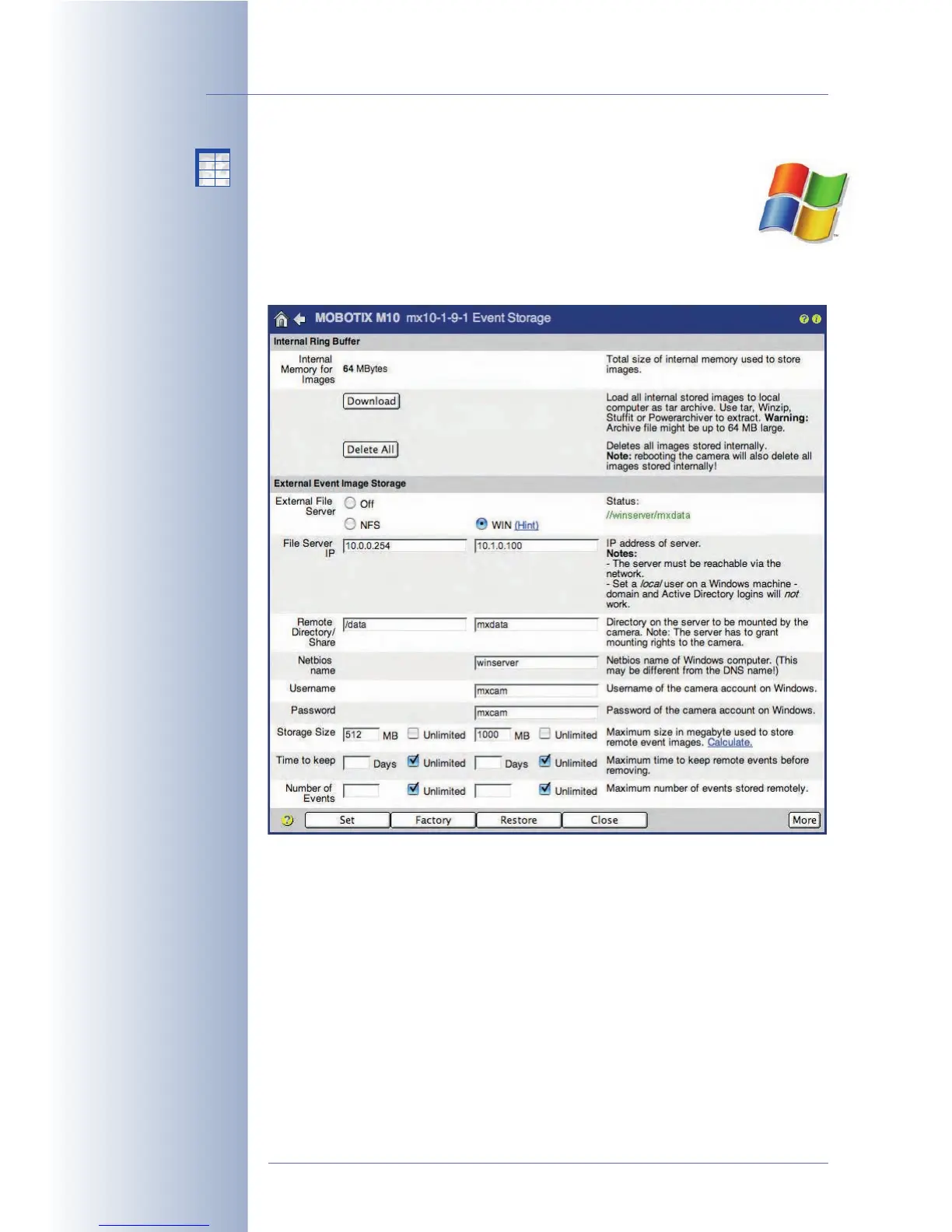
All required parameters for setting up the camera to record on a Win-
dows computer are part of the Admin Menu > Event Storage dialog.
When using Windows computers for recording, enter the appropriate set-
tings in the WIN column of the dialog.
The following parameters contain the settings required by the camera to use a
shared folder on the Windows computer (see also Settings on the Windows
Server). The essential information to enter is mostly found using the ipconfig or
ipconfig /all command at the command line (cmd) of the Windows computer
(the Netbios name can also be found on the Start > Control Panel > System >
Computer Name tab.
• External File Server: Activate the WIN option if you intend to use a Windows
computer as external ring buffer.
• File Server IP: Enter the Windows server's IP address in this field (e.g.
10.1.0.100
). You can also use the DNS name of the computer, if this name has
been registered within the local network. (Caution: The DNS name
does not
have to
match the Netbios name of the Windows computer!).
© MOBOTIX AG • Security-Vision-Systems • Made in Germany
www.mobotix.com • sales@mobotix.com • 10.10.2006
220/288
Software Camera Manual Part 2
No additional
software installation
required!
Set to Unlimited time
Set to Unlimited number
X
X
-
-
-
-
X
X
Kamerafunktionen
Kameramodell



 To Next Page