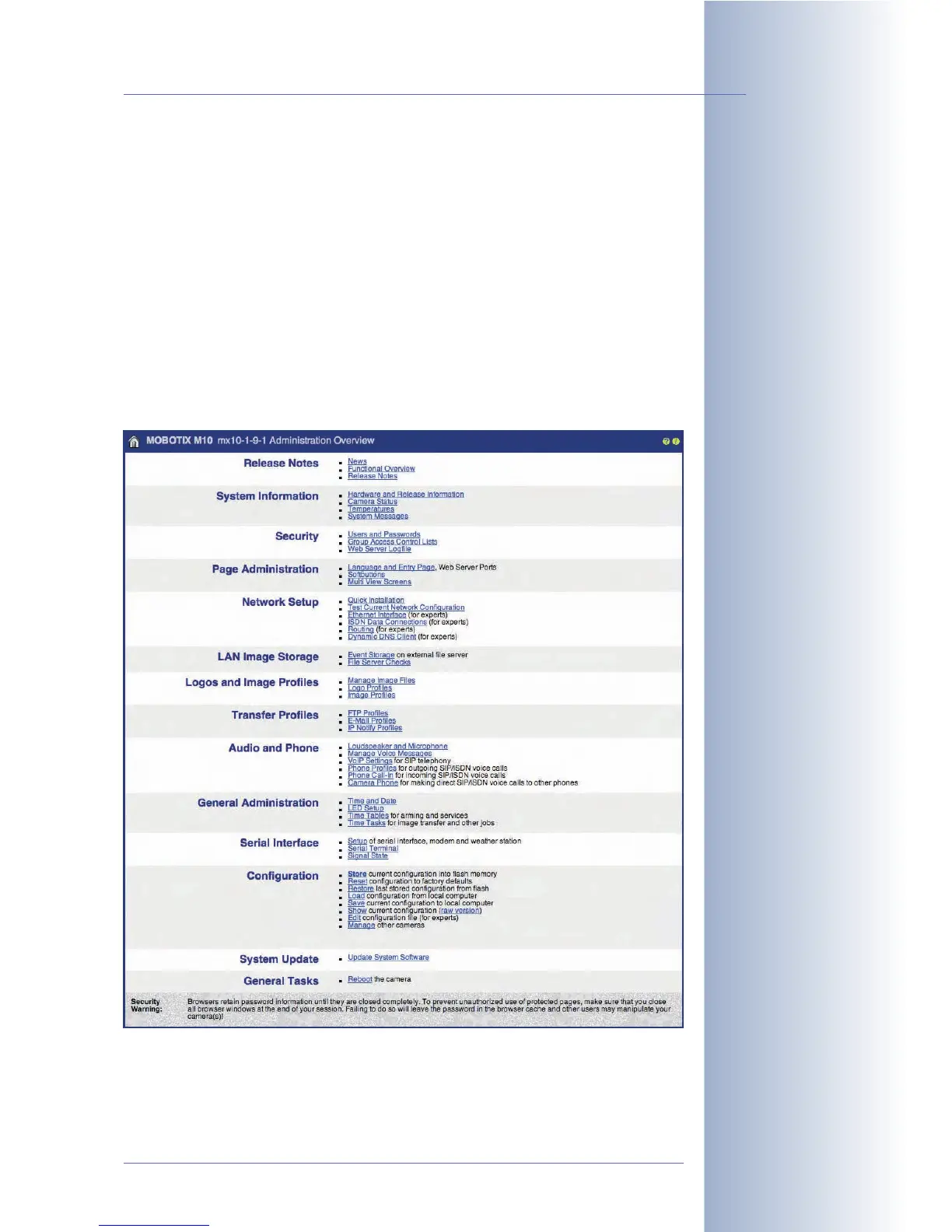
5.1.1 The Admin Menu
The Admin menu contains (among others) the dialogs for setting the Ethernet, ISDN
dial in/out (data) and ISDN phone call in/out (voice) parameters. Other dialogs
allow storing images on a file server, setting up DynDNS, routing or managing
users and passwords. You will also find dialogs for troubleshooting, information on
the camera hardware and software as well as the dialogs for configuring the
MultiView screen and individual softbuttons. Dialogs for logo and image profiles,
for time-controlled tasks, for the serial interface, configuring the camera LEDs, for
the audio features and for setting the different profiles (see section 7.8,
Working
with Profiles
) are added for setting the camera's special features. On top of this,
you can save, retrieve, reset the configuration and transfer configuration data to
other MOBOTIX cameras. Finally, the dialogs for updating the camera software and
for rebooting are also in the Admin menu.
© MOBOTIX AG • Security-Vision-Systems • Made in Germany
www.mobotix.com • sales@mobotix.com • 10.10.2006
61/288
Software Camera Manual Part 2
Administration menu:
User name: admin
Password: meinsm



 To Next Page