8.3.2 Recording on External File Servers
Using an external file server for recording requires configuring the camera and the
file server. Open Admin Menu > Event Storage on external file server to config-
ure the MOBOTIX camera.
To access the stored images or vdeo/audio data later on, either open the Player
screen of the camera (see section 4.4,
The Playback Screen in the Browser
) or use
MxViewer and directly access the images on the shared directory of the external
file server (see section 2.5.4,
MxViewer Options
, in the
MxViewer User Manual
on
www.mobotix.com).
© MOBOTIX AG • Security-Vision-Systems • Made in Germany
www.mobotix.com • sales@mobotix.com • 10.10.2006
219/288
Software Camera Manual Part 2
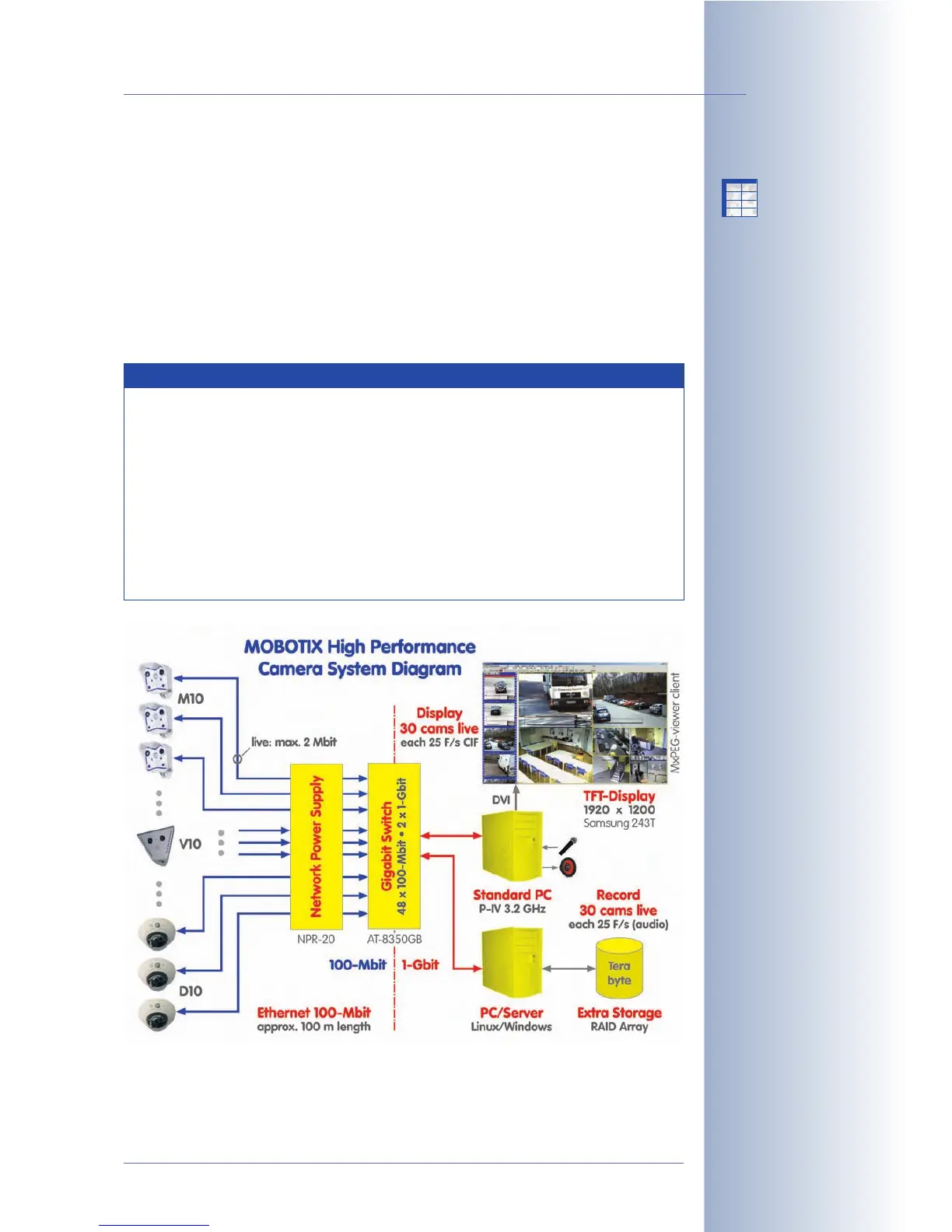
System architecture of
external recording
Notes
You can use Linux/UNIX computers, Apple Mac OS X computers (ver-
sion 10.3 or higher) and Windows computers (from Windows 2000
Professional) without installing any software on these systems.
Regarding the hardware, a standard PC is sufficient for smaller appli-
cations. For larger systems, you should consider reliable quality server
hardware.
MXNFS Server is a CD-based operating system by MOBOTIX, which
converts a standard PC into a Linux file server in a couple of minutes.
The cameras can use this server as external ring buffer storage.
X
X
-
-
-
-
X
X
Kamerafunktionen
Kameramodell



 To Next Page