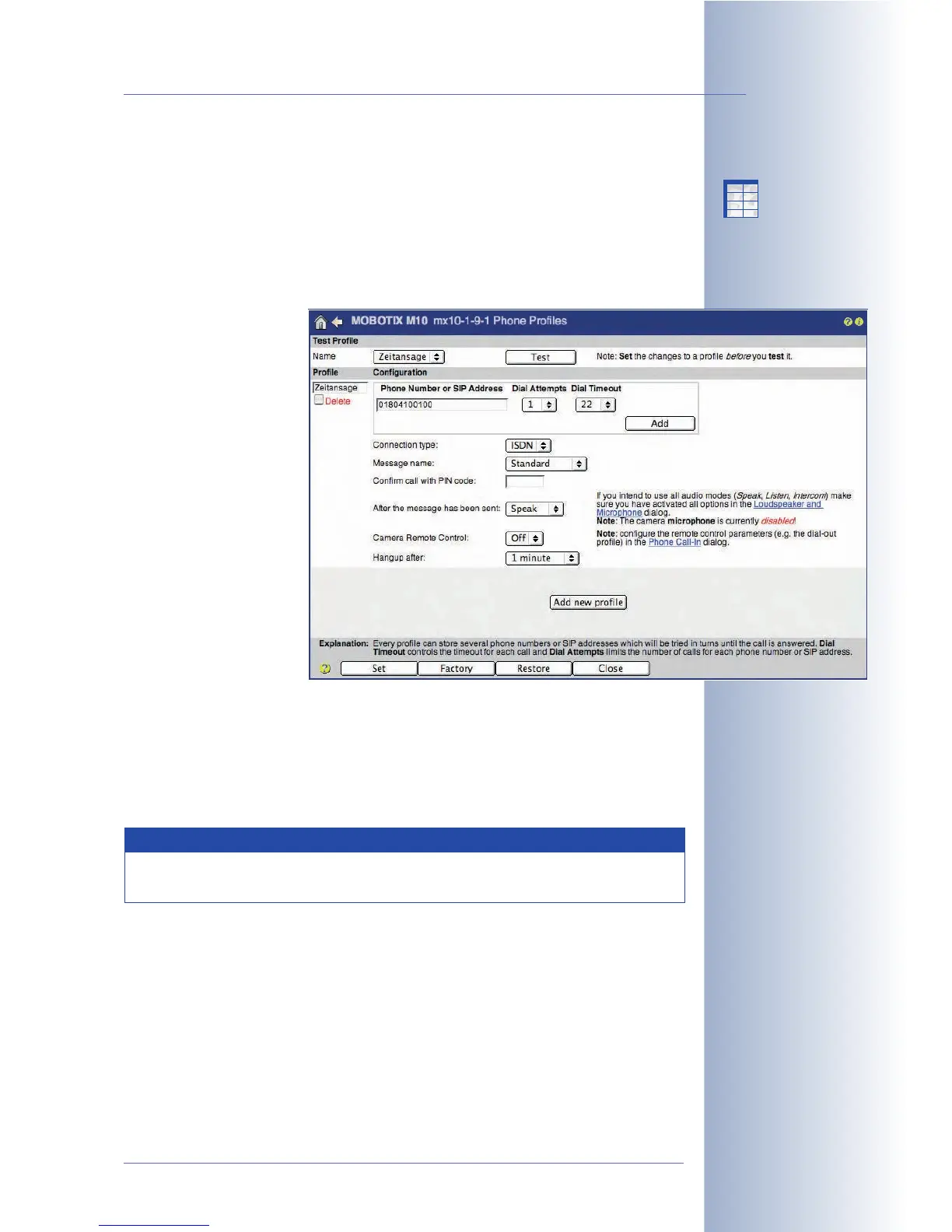
7.8.4 Phone (CL) Profiles
The Admin Menu > Phone Profiles dialog allows defining phone numbers or
phone number lists (several phone numbers). In case of an event (alert), the cam-
era can use these phone numbers or SIP addresses (IP telephony) to place auto-
mated phone calls. You can also set a PIN for each profile, which has to be entered
by the recipient of the call (using the touchtone keys of the phone) in order to
acknowledge the alert.
The camera can place
calls using ISDN or SIP
connections (using the
Ethernet interface for SIP).
Test Profile
This section allows testing the defined profiles (make sure that you click on the Set
button to save the changes to the profiles prior to testing). Clicking on the Test but-
ton will prompt the camera to call the phone number(s) of the selected profile until
the call has been completed and acknowledged (if activated).
© MOBOTIX AG • Security-Vision-Systems • Made in Germany
www.mobotix.com • sales@mobotix.com • 10.10.2006
183/288
Software Camera Manual Part 2
In case of an alarm, the
MOBOTIX camera can
call you on your mobile/
cell phone.
Note
Phone profiles created using the Quick Installation wizard are also
listed in this dialog.
X
X
-
-
-
-
X
X
Kamerafunktionen
Kameramodell



 To Next Page