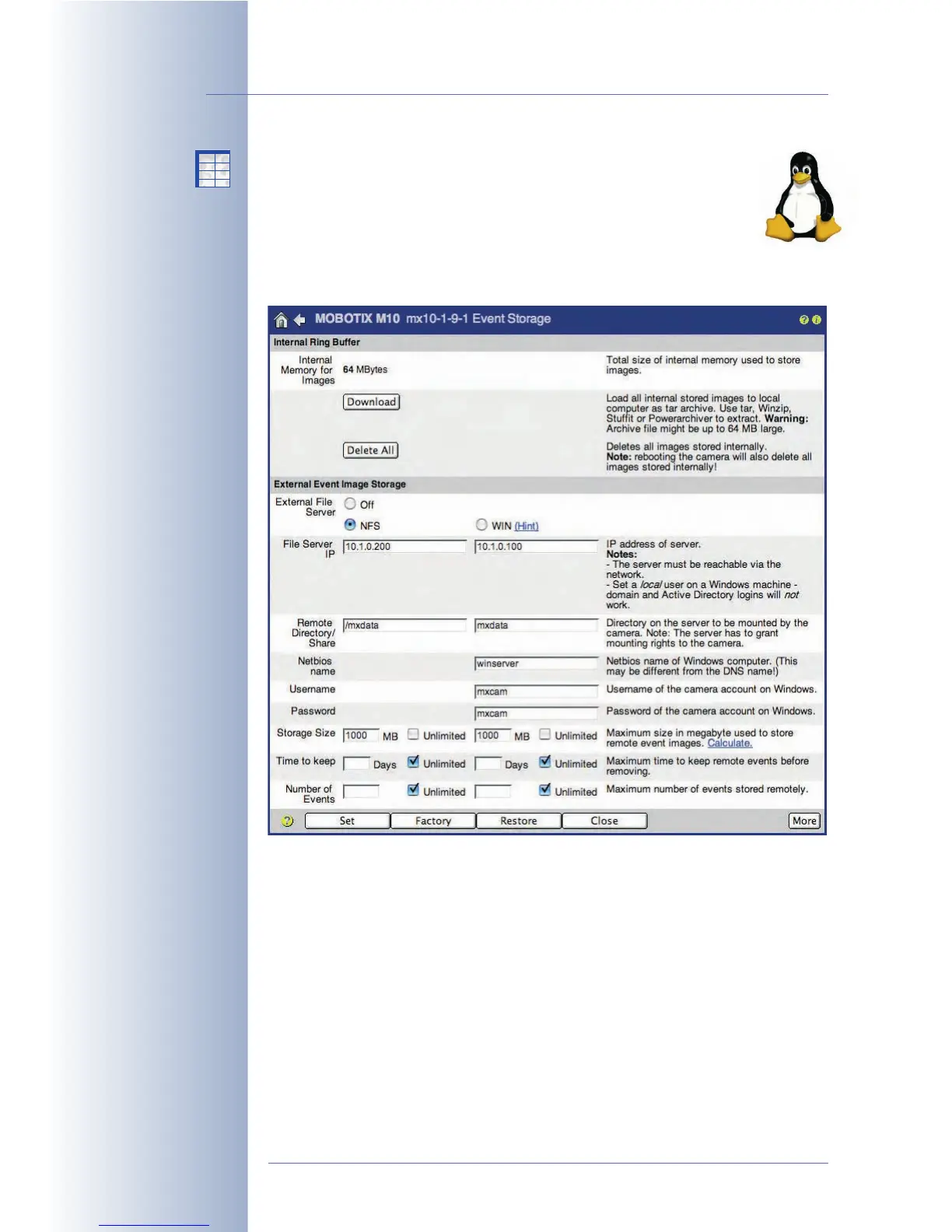
8.3.4 Recording on a Linux/UNIX Computer
Camera Settings
All required parameters for setting up the camera to record on a
Linux/UNIX computer are part of the Admin Menu > Event Storage
dialog. When using Linux/UNIX computers for recording, enter the appro-
priate settings in the NFS column of the dialog.
The camera requires the following parameters for managing its own folder on the
Linux/UNIX computer (click More at the bottom of the dialog to see all options), i.e.
user number (UID) and group number (GID); see also Settings on the Linux/UNIX
Server.
Open a terminal of the Linux/UNIX computer to obtain the required information.
Note that this procedure requires some knowledge of Linux/UNIX operating sys-
tems.
• External File Server: Activate the NFS option if you intend to use a Linux/
UNIX computer as external storage.
© MOBOTIX AG • Security-Vision-Systems • Made in Germany
www.mobotix.com • sales@mobotix.com • 10.10.2006
226/288
Software Camera Manual Part 2
No additional software
installation required!
No time limit
No number limit
X
X
-
-
-
-
X
X
Kamerafunktionen
Kameramodell



 To Next Page