4.10 Fast Video Streaming
4.10.1 Overview
Besides the possibility to display fast video images using the JPEG mode with Ser-
verPush or JScript, the MxPEG mode offers the following advantages when dis-
playing live video in a browser:
• video sequences with realtime audio
• highest frame rates with minimal delay
• drastically reduced bandwidth requirements
See also section 4.3.5,
JPEG, MxPEG and Audio
as well as section 4.3.6,
Back-
ground Information on JPEG, MxPEG and Audio
for more information.
In order to see the MxPEG video sequences and to hear the sound from the came-
ra microphone, you have the following options when using Windows:
• MxPEG ActiveX plugin for Internet Explorer
• MxViewer
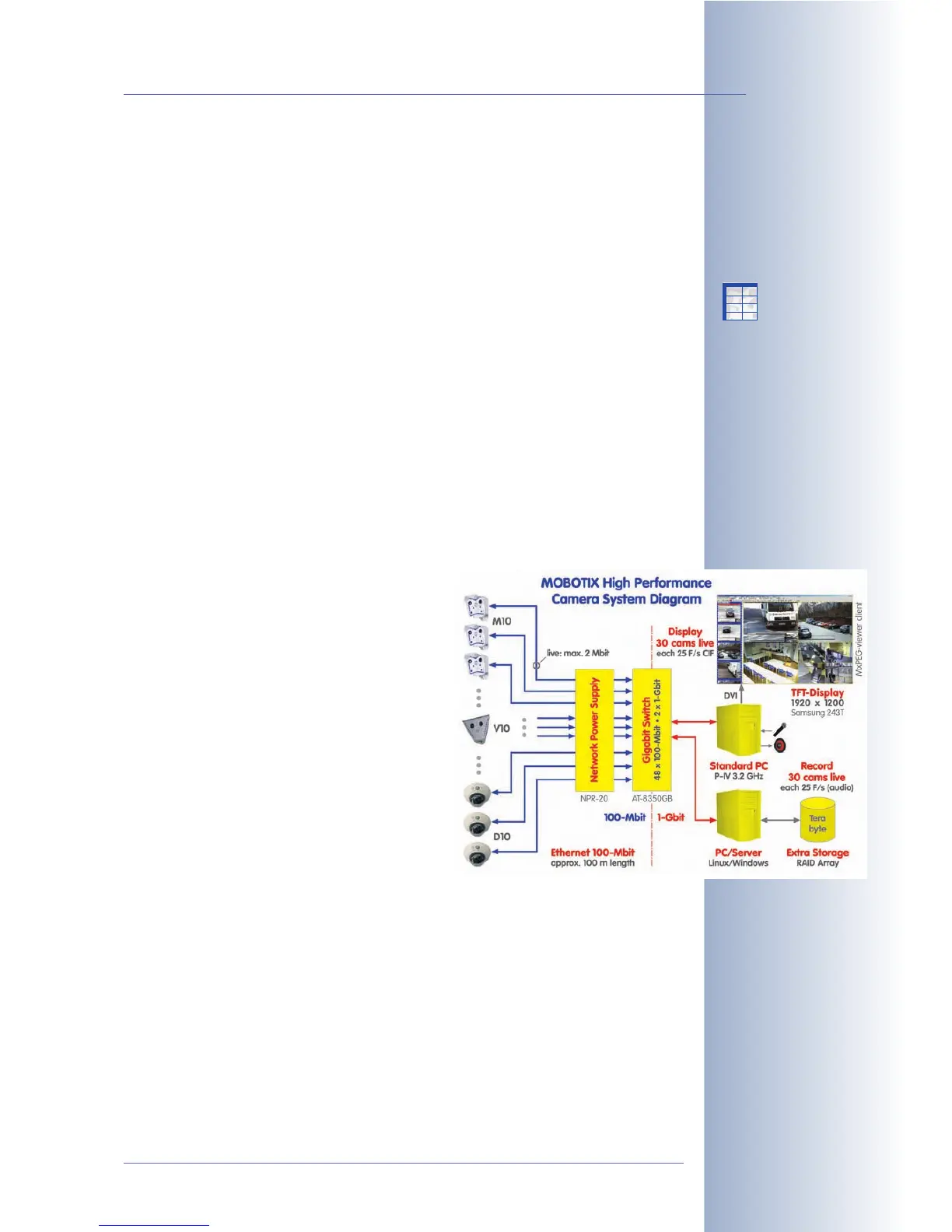
The MxPEG plug-in and the MxViewer provide the same high frame rates. On top
of this, the MxViewer can simultaneously display 30 MOBOTIX cameras with 30
frames per second each in CIF format
(320x240; on a standard PC P4 with 3.0 GHz).
Thanks to MxPEG, the performance demonst-
rated by MOBOTIX cameras is unmatched by
other systems with similar prerequisites.
4.10.2 MOBOTIX Camera
Before you start using the MOBOTIX camera for
fast video streaming (e.g. in security applicati-
ons), you should apply the following settings to
the camera (see also Camera Settings in sec-
tion 4.10.3,
Simultaneously Displaying Several
Cameras with High Image Rates
):
• Activate the MxPEG codec in the camera
• Adjust the frame rate (mega pixel resolution 1280x960 delivers lower frame
rates than VGA resolution 640x480 or CIF resolution 320x240).
• Keep exposure times short (make sure enough light is present or set the ma-
ximum exposure time to
Max 1/60
or shorter
:
Setup Menu > Exposure Set-
tings).
• Make sure the camera has no other tasks (e.g. FTP transmissions, sending e-
mails, ...).
• Avoid showing logos and displaying text as much as possible.
© MOBOTIX AG • Security-Vision-Systems • Made in Germany
www.mobotix.com • sales@mobotix.com • 10.10.2006
51/288
Software Camera Manual Part 2
MxPEG advantages:
• Realtime audio
• Highest frame rates
• Low bandwidth
requirements
Caution:
Set the frame rate to
the highest value or to
"No limitation". You can
use the Frame Rate Quick
Control to change this
setting.
X
X
-
-
-
-
X
X
Kamerafunktionen
Kameramodell



 To Next Page