9.7.2 Configuring a MOBOTIX Camera
General Procedure for Setting up the MOBOTIX Camera:
1) Configure the network parameters.
2) Configure the VoIP settings.
3) Configure the Phone Call-In parameters.
4) Create the required Phone Profiles.
5) Link the phone profile to an event (Messaging).
Configuring the Network Parameters
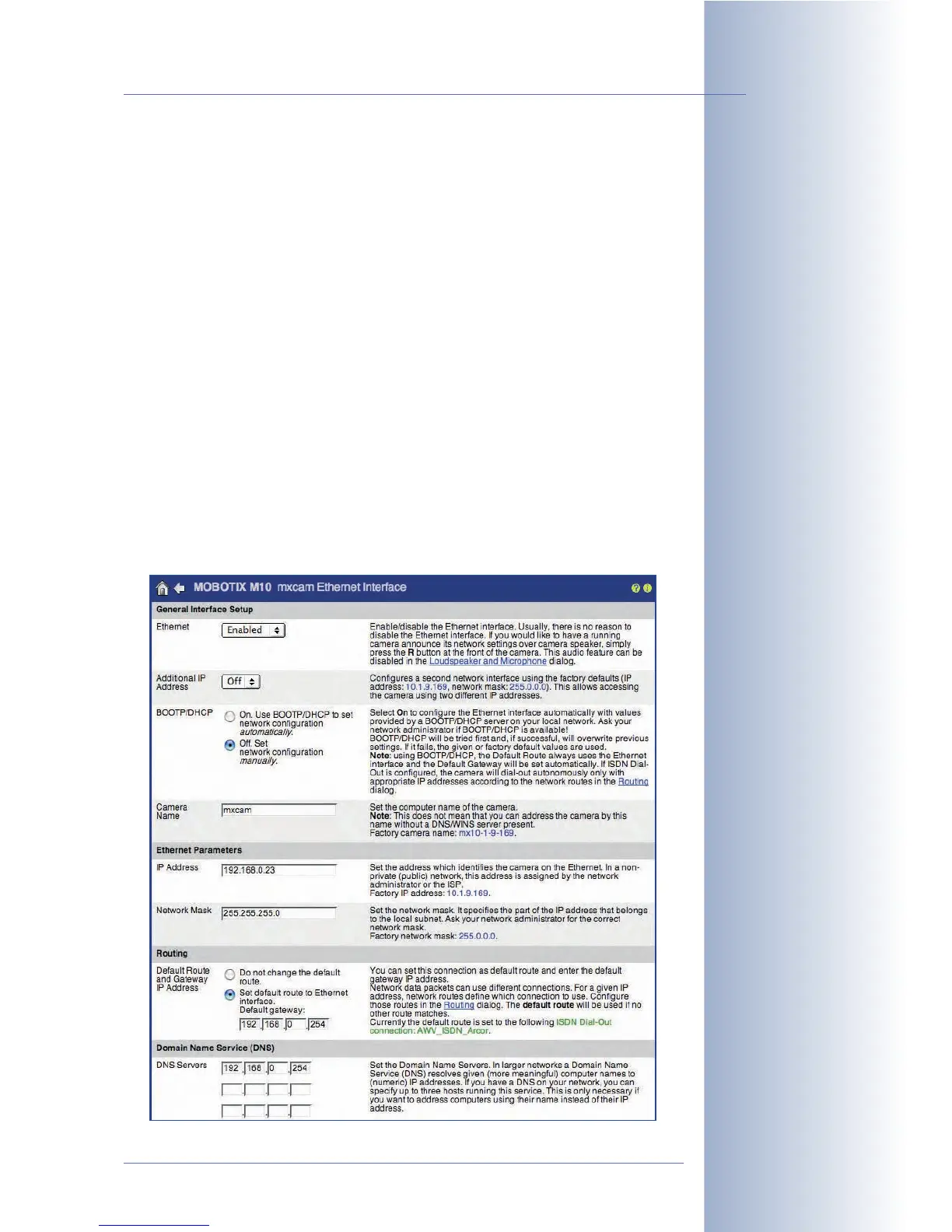
Set the network parameters (Admin Menu > Ethernet Interface).
•Network:
Activated
• BOOTP/DHCP:
Off
• Camera Name: mxcam (freely definable)
• IP Address: 192.168.0.11 (IP address of your MOBOTIX camera)
• Network Mask: 255.255.255.0 (network mask of your network)
• Gateway: 192.168.0.254 (gateway of your network)
• DNS Servers: 192.168.0.254 (DNS server of your network)
© MOBOTIX AG • Security-Vision-Systems • Made in Germany
www.mobotix.com • sales@mobotix.com • 10.10.2006
253/288
Software Camera Manual Part 2
Configure the network
interface of the
MOBOTIX camera



 To Next Page