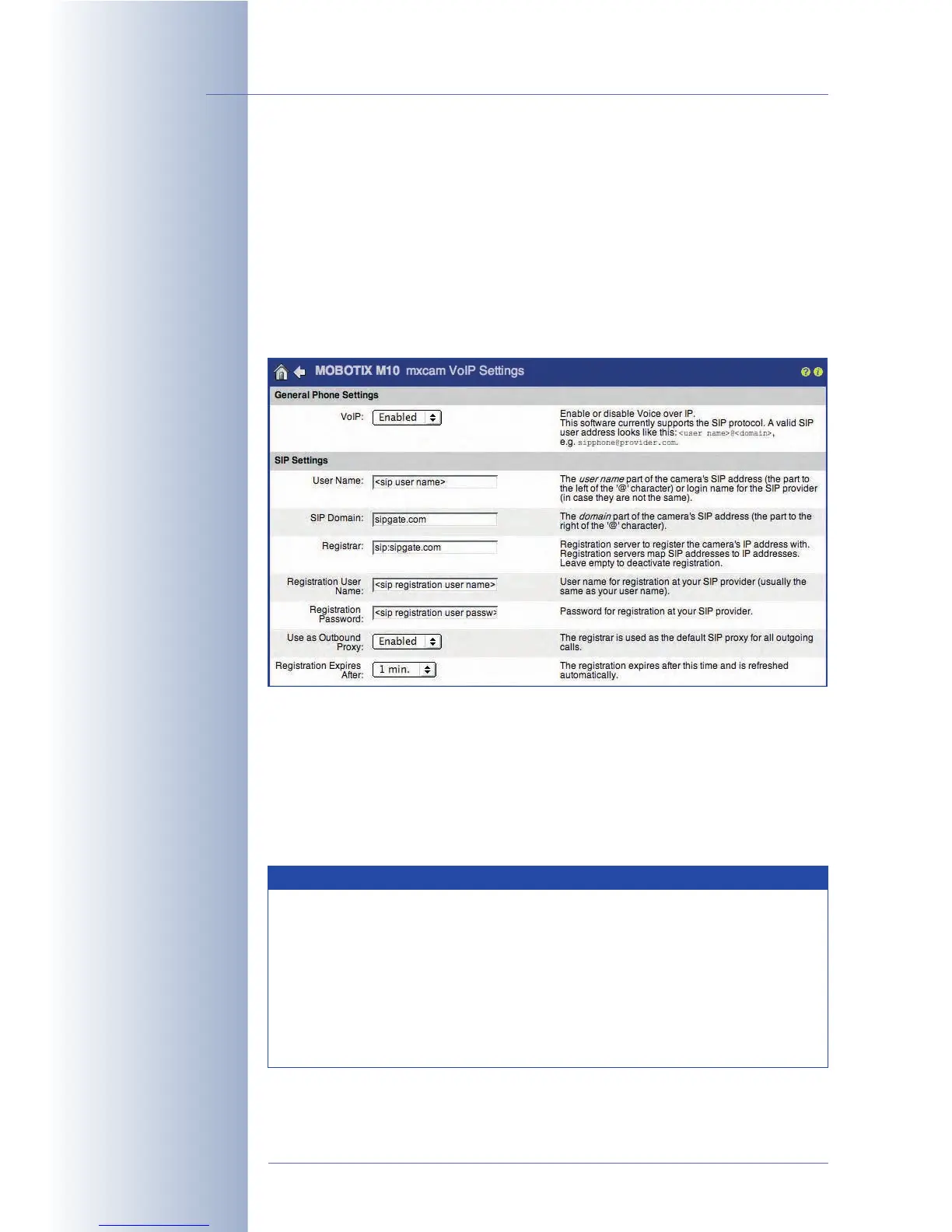
Configuring the VoIP Settings
Set the VoIP parameters (Admin Menu > VoIP Settings).
•VoIP:
Activated
• User Name: SIP user name registered with the SIP provider
• SIP Domain: sipgate.com, depends on the provider
• Registration Server:
e.g. sip:sipgate.com, …
• Registration User Name: (Login name registered with the SIP provider)
• Registration Password: (Login password registered with the SIP provider)
The MOBOTIX camera can now be reached using the phone number or SIP
address assigned by your SIP provider.
© MOBOTIX AG • Security-Vision-Systems • Made in Germany
www.mobotix.com • sales@mobotix.com • 10.10.2006
254/288
Software Camera Manual Part 2
Configure the SIP client
of the MOBOTIX camera
Note that only one SIP device should use one specific SIP account. If
you would like to use a MOBOTIX camera, an IP phone and a soft-
phone on the same network, you should register three different SIP
users, i.e. you should create three different SIP accounts. Some SIP pro-
viders actually allow using several devices with the same accounts
information in parallel (e.g. Sipgate). However, this is not necessarily so
with all providers. Contact your SIP provider, if you need more informa-
tion on this topic.
Note



 To Next Page