5.5 Image Controls
5.5.1 Overview
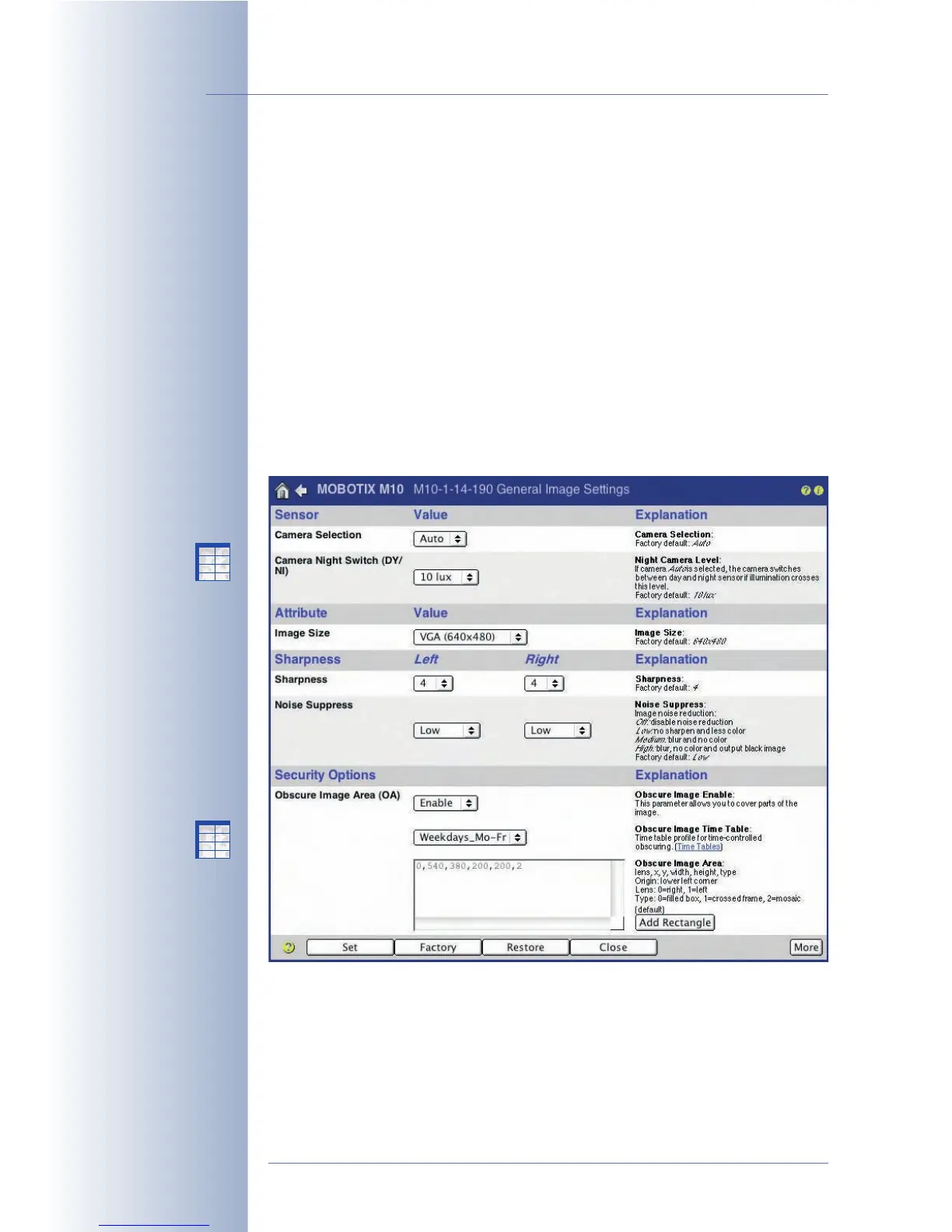
In the dialogs of the Setup Menu > Image Control page, you can set all parame-
ters related to images and exposure times. This includes color display, JPEG set-
tings as well as text and display settings, i.e. the way text and status information is
displayed within the camera image.
5.5.2 General Image Settings
In the Setup Menu > General Image Settings dialog you can set various parame-
ters that determine how the live image is displayed. These settings include (among
others) the image sensor to be displayed, the image resolution and the image
sharpness. You can modify some of the aforementioned parameters directly using
the Quick Controls (pull-down boxes above the live image) on the Live screen (see
section 4.3,
The Live Screen in the Browser
).
© MOBOTIX AG • Security-Vision-Systems • Made in Germany
www.mobotix.com • sales@mobotix.com • 10.10.2006
104/288
Software Camera Manual Part 2
Read carefully!
Night models
automatically switch
between day and night
lenses (Auto setting)
Secure (M12, D12, V12,
M22) models allow
obscuring (masking) image
areas
X
X
-
-
-
-
X
X
Kamerafunktionen
Kameramodell
X
X
-
-
-
-
X
X
Kamerafunktionen
Kameramodell



 To Next Page