9.7 Sample Configurations for IP Telephony via Internet
9.7.1 Overview
Configuring devices for IP telephony (MOBOTIX camera, IP phone, softphone)
means making only a few basic changes to the devices and in the software
(mainly entering network and user settings). Once these parameters have been
set, the devices can establish VoIP connections just like regular telephones.
The following examples are based on the assumption that you are running a
192.168.0.x C class network with a 255.255.255.0 network mask, that the
gateway is 192.168.0.254, the DNS server is 192.168.0.254 and that you
are not using a proxy server. Replace these network addresses with the addresses
that are valid on your network.
© MOBOTIX AG • Security-Vision-Systems • Made in Germany
www.mobotix.com • sales@mobotix.com • 10.10.2006
252/288
Software Camera Manual Part 2
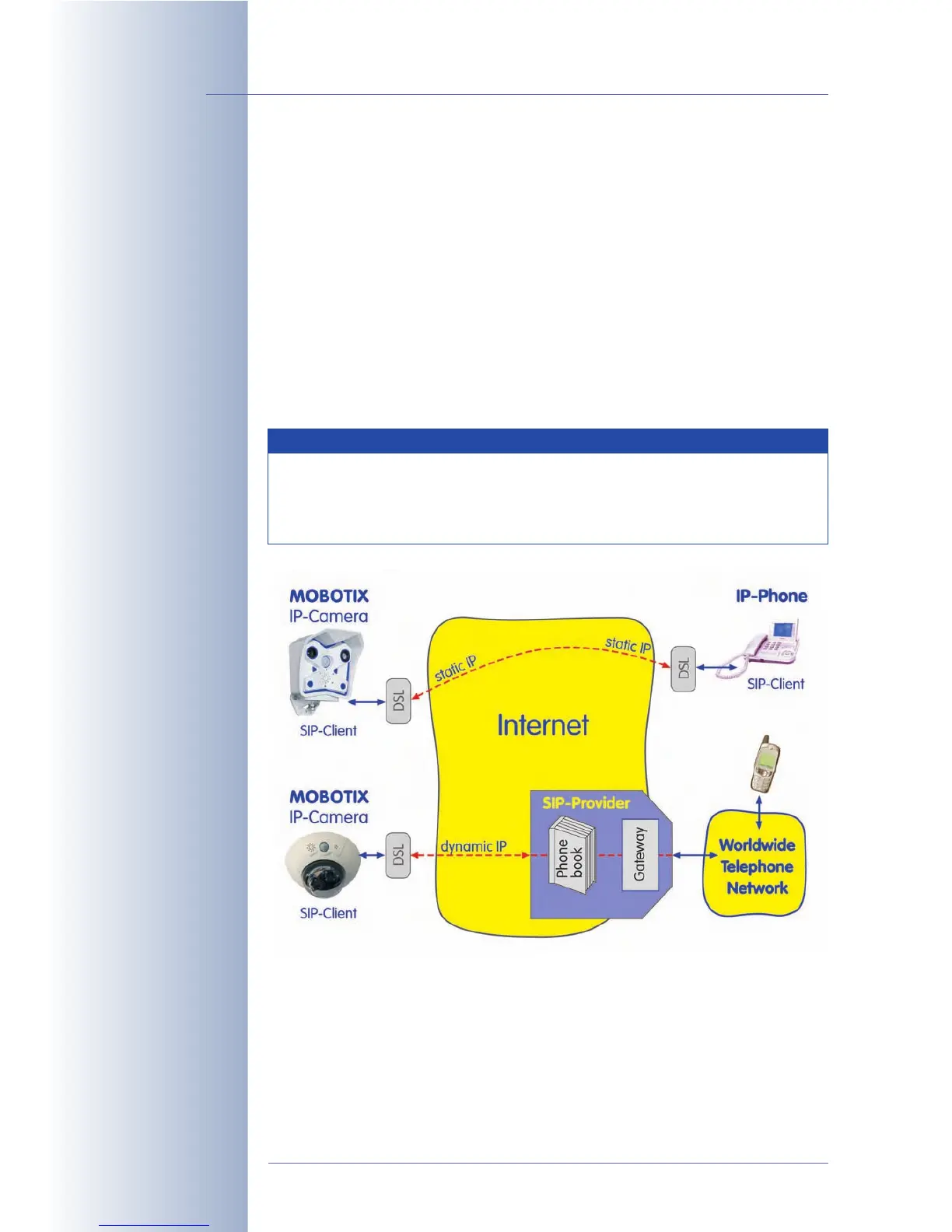
Direct SIP telephony
using static IP addresses
SIP telephony using SIP
provider
The configuration used to demonstrate IP telephony via Internet in this
example requires direct and permanent Internet access, e.g. by using
a gateway or a DSL router. On the other hand, the devices can be con-
nected to a LAN or router using WiFi/WLAN.
Note



 To Next Page