5.2.2 Quick Installation Pages in Detail
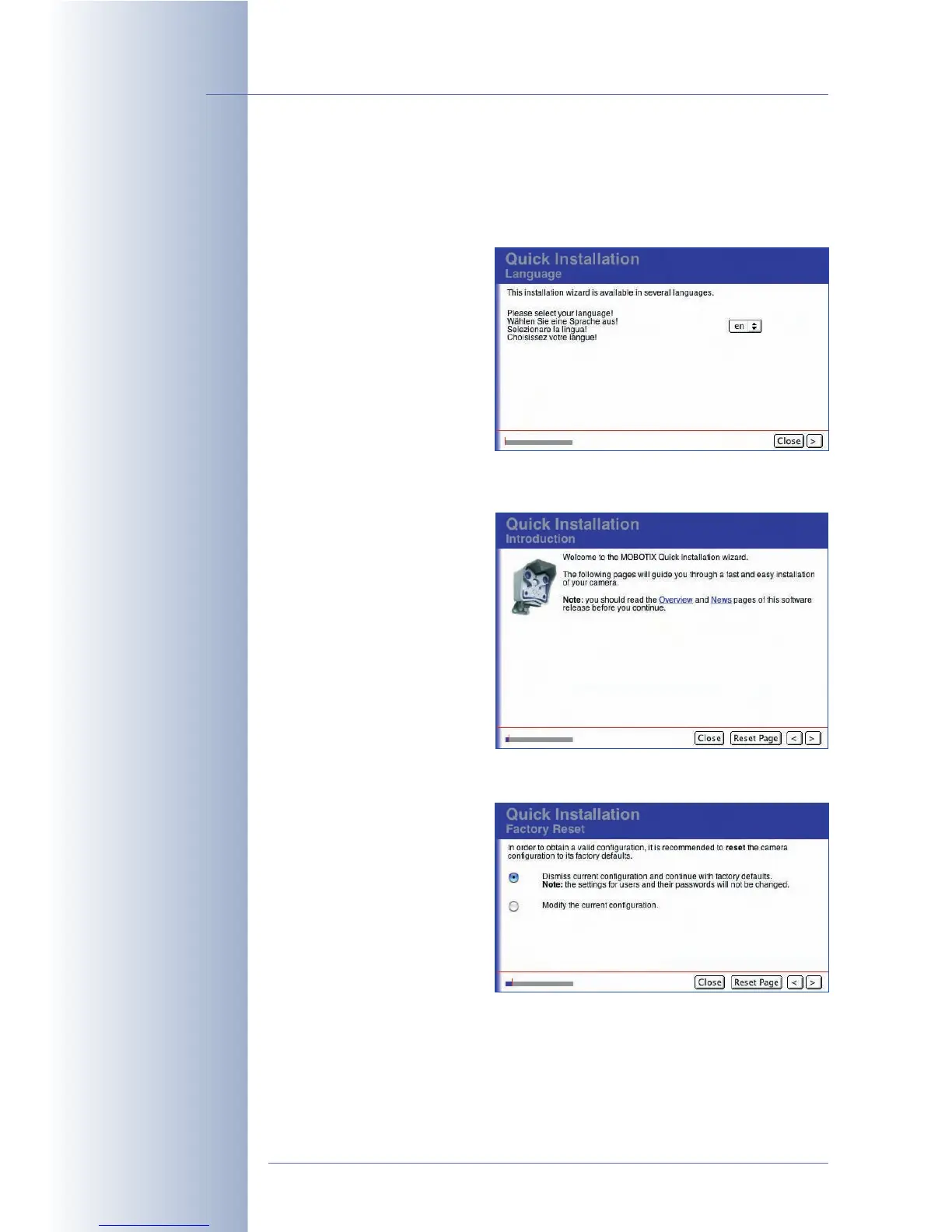
The Quick Installation wizard will display the following pages:
Language
Select the language for the user
interface of the camera.
The MOBOTIX camera software
always contains two language
versions, i.e. English plus one
additional language (German,
French, Spanish, Italian,
Japanese or Chinese; other
language versions will be
available soon). You can
download the camera software and the desired language packs free of charge
from www.mobotix.com.
Introduction
This page gives an overview of
the camera functions and of
new features included in the
current camera software
version. No entries are required
on this page.
Factory Reset / Keep Current Configuration
If you would like to use the
default configuration, select the
Dismiss current configuration
option. This means that all
previously configured settings
are reset to the factory default
values. The settings are stored
in the permanent (Flash) storage
of the MOBOTIX camera at the
end of the Quick Installation
wizard.
If you select the Modify the current configuration option, the camera will use the
previously configured settings. In the course of the Quick Installation, you are free
to keep these settings or to change them.
© MOBOTIX AG • Security-Vision-Systems • Made in Germany
www.mobotix.com • sales@mobotix.com • 10.10.2006
66/288
Software Camera Manual Part 2
Select the language for
the user interface of the
camera
Reset the camera to
factory settings
Modify the current
configuration



 To Next Page