• Min. Exposure Time: This parameter controls the minimum exposure time. It
is recommended to leave the factory default unchanged.
• Frequency of Power Supply: Set this parameter to the frequency of your
national electric system. The default value is
50 Hz
(e.g. France, Germany,
etc.), but you can also select
60 Hz
(e.g. U.S.A., Japan, etc.). This will reduce
most of the interference from artificial light sources. Note: Depending on the
selected frequency, the defined maximum exposure time may vary slightly,
e.g. 1/50 s instead of the defined 1/60 s.
5.7.6 Exposure Windows
The concept of exposure windows is one of the most use-
ful features of your MOBOTIX camera. This concept allows
determining the correct exposure not only by evaluating
the entire image area but by using special measurement
windows that can be configured individually. You can
choose to control the exposure time either by using one of
the predefined exposure windows or by distributing this
control between the exposure windows and the rest of the
image. On top of this, you can also use
Exclusion Windows
(see section 5.7.9,
Exclusion Windows
) to exempt certain
areas within the exposure windows from exposure control.
This concept also means that exposure is optimized for the
important image areas regardless of the amount of back-
light in the image area. This can be attributed to the fact
that your MOBOTIX camera' s exposure control is purely
software-driven. It also means that the dark image parts of
backlight situations can be better enhanced since there is
no auto iris reducing the amount of light on the image sen-
sor. This is a one-of-a-kind feature for handling
backlight situations.
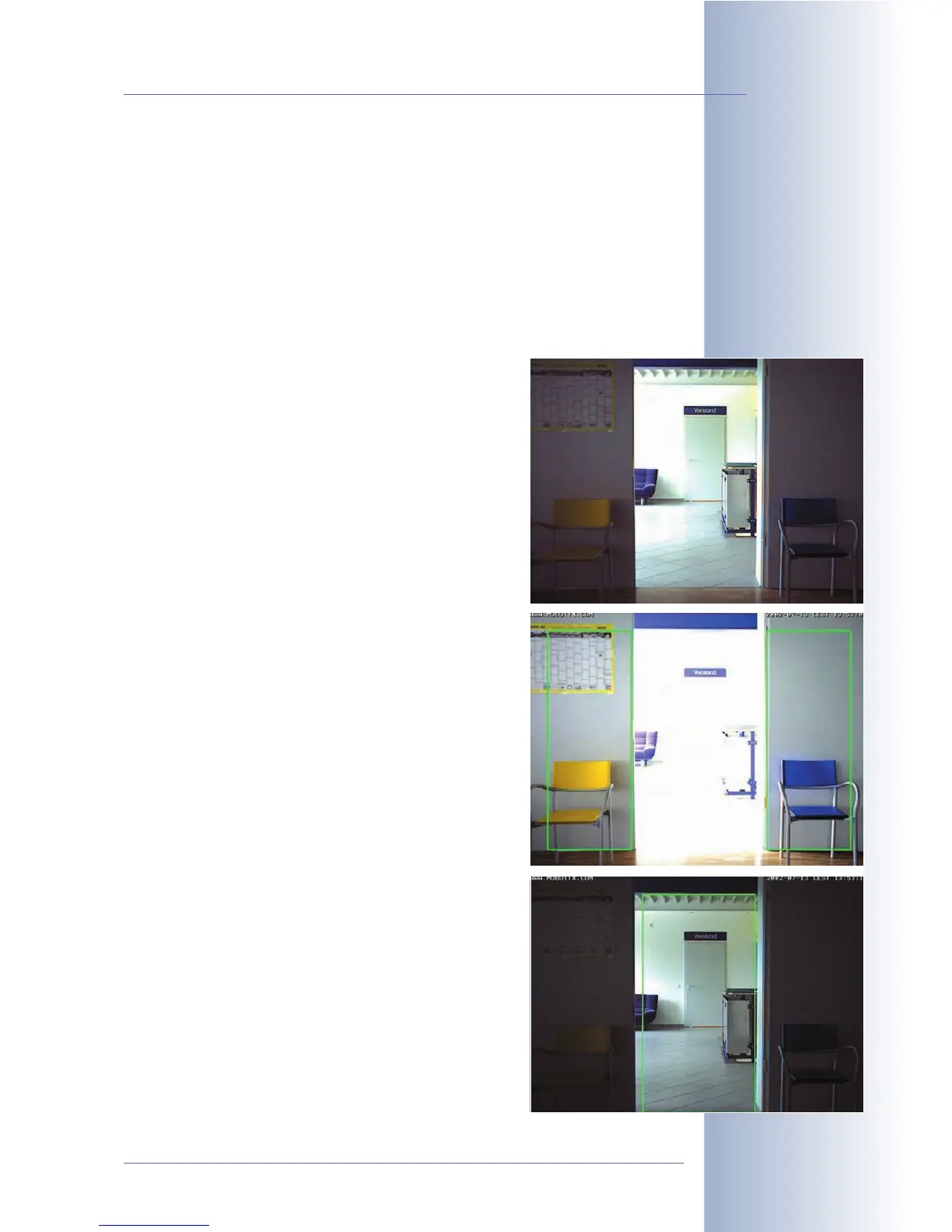
The example images show a typical situation: From a
darker room, all individuals entering that room are to be
captured. As daylight is influencing the lighting conditions
in the neighboring room, backlight will have great influ-
ence on image exposure.
The image at the top has been recorded without exposure
windows, meaning that the entire image area has been
used for exposure control. Due to the significant differ-
ences in light, the bright image areas are overexposed
and the dark walls are underexposed. Defining two expo-
sure zones on both sides of the door (displayed in green,
second image), results in proper exposure of this room's
interior. An exposure window covering the area of the door
(third image) will deliver properly exposed images of the
other room.
© MOBOTIX AG • Security-Vision-Systems • Made in Germany
www.mobotix.com • sales@mobotix.com • 10.10.2006
125/288
Software Camera Manual Part 2
Exposure Windows:



 To Next Page