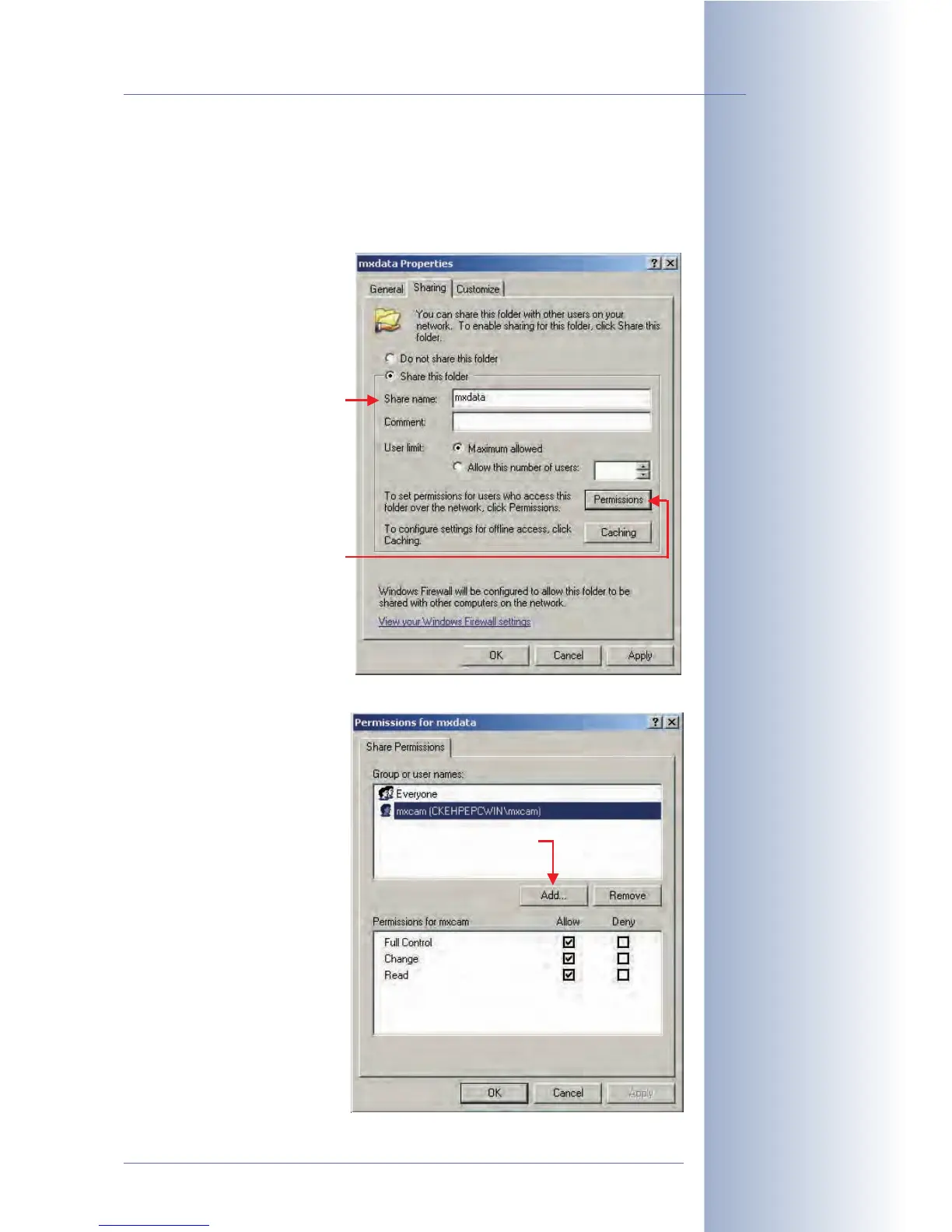
• Step 5: Right-click on the folder you just created. Select the Sharing and Se-
curity (Windows XP) or the Share (Windows 2000) option from the context
menu.
• Step 6: Activate Share this folder. Enter a share name (e.g. mxdata).
• Step 7: Click on Permis-
sions. Add the user name
of the account you just
created.
• Step 8:
Change the ac-
cess rights for this user by
activating the Full Control
option in the Allow col-
umn.
• Step 9: Close all dialogs
by clicking on OK.
© MOBOTIX AG • Security-Vision-Systems • Made in Germany
www.mobotix.com • sales@mobotix.com • 10.10.2006
225/288
Software Camera Manual Part 2
Enter this share name in
the camera dialog in the
Remote Directory/Share
field
Activate permissions (Full
control, Change, Read)
Enter exactly the
same share name
in the camera dia-
log!
Next, click on "Per-
missions"!
Click on "Add..."



 To Next Page