• File Options:
- Temporary Name: To prevent website users from seeing incomplete files
during file transfer, this option allows setting a temporary file name. Once
the transfer has been completed, the camera will rename the file, thus
overwriting the old file. The
Enable, delete before rename
option is
intended for Windows IIS servers, which do not support renaming to an
existing file.
- Event Directory: If the file transfer has been triggered by an event, the
camera can create the same event structure as in the event storage folder
on a file server. For additional information on the event structure, see
chapter 8,
Recording
.
• Server Settings: This section allows setting authentication data and connec-
tion type if they are different from those specified in the Global Options sec-
tion at the top of the dialog.
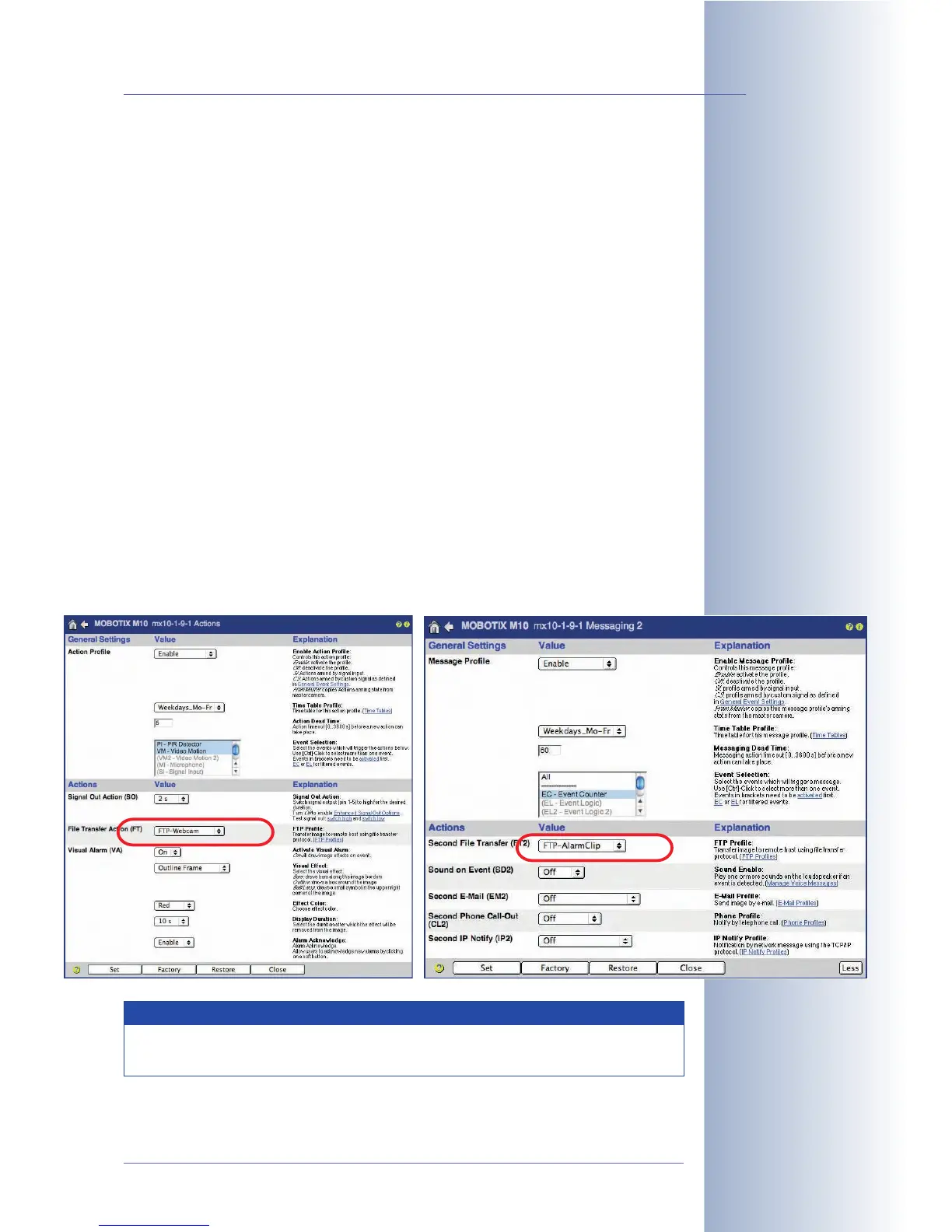
Using the profiles
The FTP profiles defined in this dialog can be used in Setup Menu > Actions and
Messaging 2 for the File Transfer Action (FT) and the Second File Transfer (FT2)
action. The FTP profiles are also used in Admin Menu > Time Tasks for transferring
images and event archives. For additional information on this topic, see section 7.9,
Time Tasks
.
© MOBOTIX AG • Security-Vision-Systems • Made in Germany
www.mobotix.com • sales@mobotix.com • 10.10.2006
179/288
Software Camera Manual Part 2
Use the Test Current
Network Configuration
dialog to test the FTP
profiles
Note
Open Admin Menu > Test Current Network Configuration to test the
FTP profiles one by one.



 To Next Page